Enter i18n: How to Build a Multilingual Website Without Touching a Config File
Enter i18n is a new extension panel in Enter Infra Stack that automates your entire internationalization workflow. Detect your framework, install i18n, manage translations visually, and rebuild — without touching a single config file.
Building a multilingual website used to be a project within your project. Before you shipped a single translated string, you had to become fluent in a different kind of engineering — i18n library internals, locale file structures, routing conventions, and the fragile ritual of keeping en.json, zh.json, and ja.json in sync across every new page you added.
Enter i18n changes that. It's a native extension panel inside Enter Project that automates the entire multilingual website workflow — from framework detection to visual translation editing to URL strategy — without requiring you to touch a single configuration file.
If you're building for global users in 2026, this is the setup that gets out of your way.
Why a Multilingual Website Is No Longer Optional
The default user base for an indie product or small-team SaaS is no longer local. App stores, Product Hunt, Twitter, and AI discovery have made distribution genuinely global from day one. A product that only speaks English is a product that actively excludes a majority of its potential users.
Research consistently shows that users are significantly more likely to purchase from, stay on, and trust a website in their native language. CSA Research found that 76% of consumers prefer buying products with information in their own language, and 40% will never buy from websites in other languages. For any product trying to convert global traffic, a multilingual website isn't a nice-to-have — it's table stakes.
The problem has never been whether to go multilingual. The problem has always been how hard it is to get there.
The Real Cost of Manual Website Internationalization
Website internationalization — the technical process of making a product ready for multiple languages — has historically demanded a dedicated skill set that most indie developers and small teams simply don't have the time to develop.
Here's what a typical manual i18n setup actually involves:
Library selection and configuration. React projects typically use react-i18next. Vue projects reach for vue-i18n. Nuxt and Next have their own conventions on top of those. Getting the library installed, configured, and wired into your routing layer alone can take half a day.
Locale file management. Every piece of text in your app needs a key in a JSON (or YAML) file for each supported language. Miss a key, and you get a silent fallback or a broken string. Add a new page, and you need to remember to update every locale file manually.
Missing translation detection. There's no built-in alarm when you forget to translate something. Teams typically discover missing keys in QA — or worse, when a user reports a half-translated page in production.
Multilingual URL design. Should you use /en/about, en.yoursite.com/about, or yoursite.com/about?lang=en? Each approach has different implications for SEO, routing, and user experience. Getting this wrong affects both discoverability and crawlability of your website multi-language pages.
Most Enter users don't want to manage an i18n system. They want their product to support multiple languages. Those are different problems, and only one of them should be your problem.
What Enter i18n Is
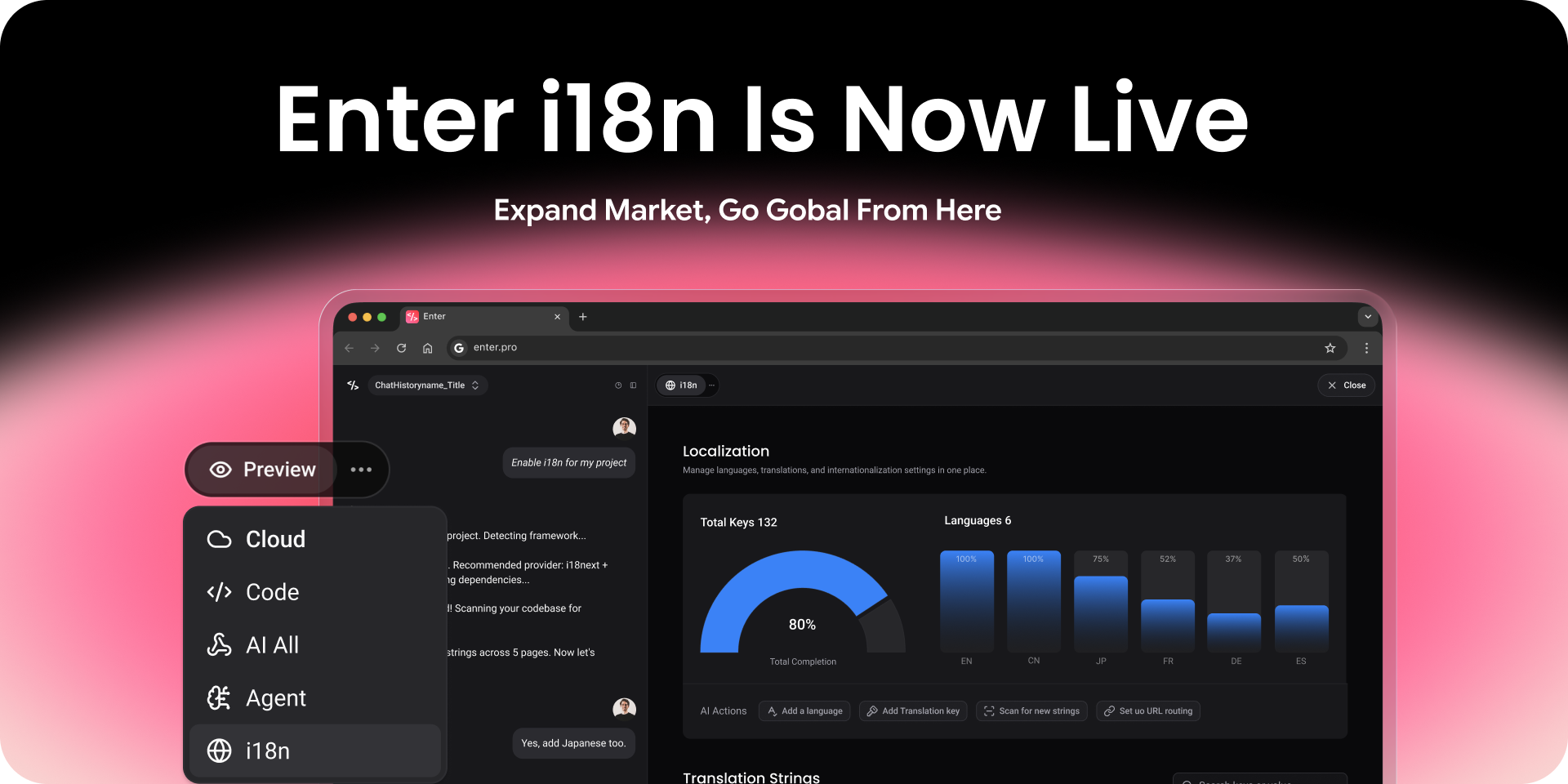
Enter i18n is a built-in extension panel inside Enter Project. It sits alongside your project the same way a linter or build tool would — as infrastructure that's just there, already integrated, waiting to be enabled.
It doesn't replace the underlying i18n libraries your framework uses. What it does is wrap the entire website internationalization workflow in a guided, visual interface so you never have to touch the underlying plumbing directly.
Enable it once. Configure your languages. Edit your translations visually. Rebuild. That's the full loop.
How Enter i18n Works: The Full Workflow
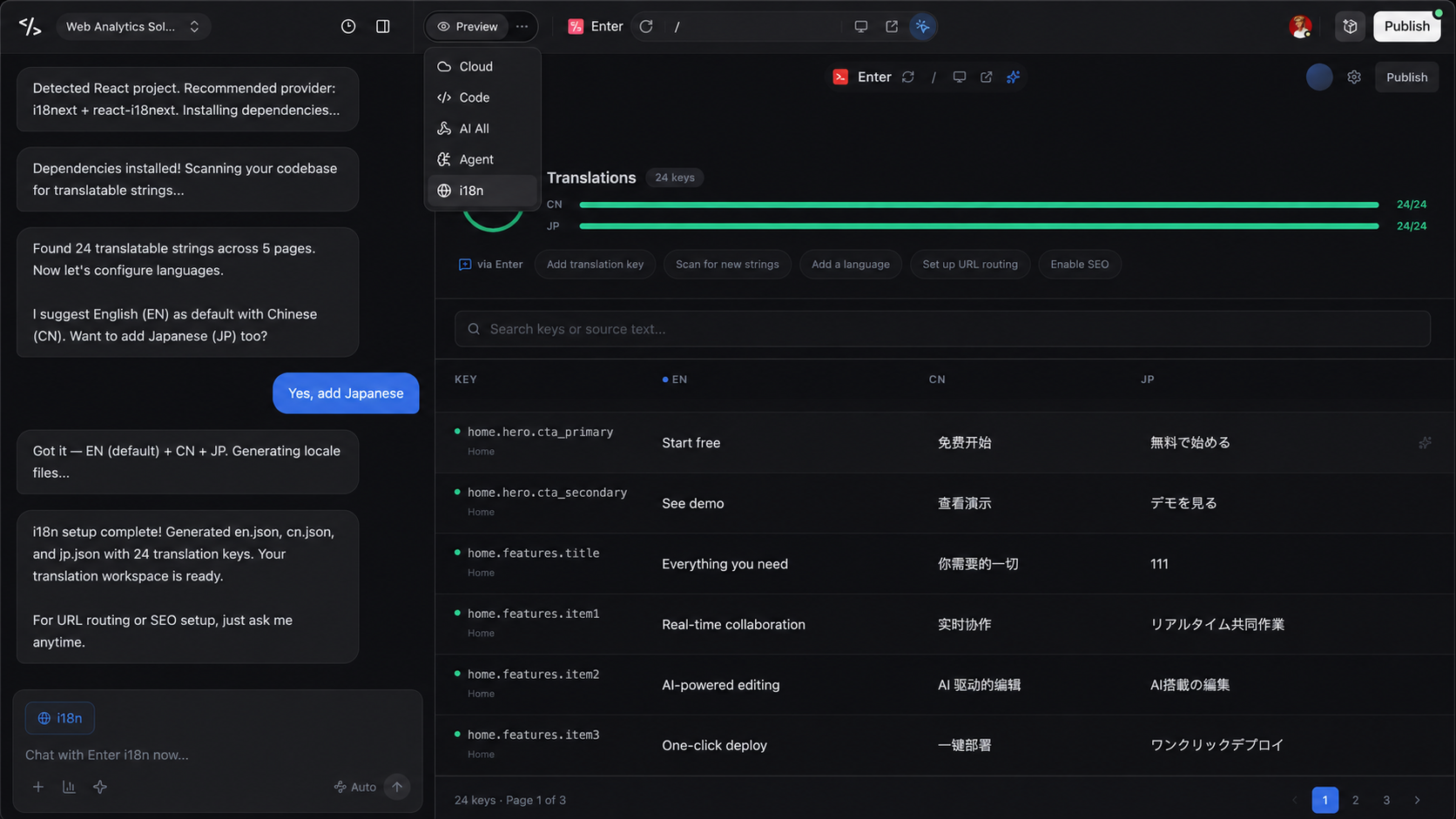
Once enabled, Enter i18n walks you through the complete multilingual website setup in a single guided flow:
Step 1: Framework Detection and Library Installation
Enter scans your project and identifies your framework — React, Vue, Nuxt, Next.js, or others. It then selects and installs the appropriate i18n library automatically. No manual npm install, no copy-pasting config snippets from documentation.
Step 2: Locale File and Directory Initialization
Enter creates the locale directory structure for your project. Your language files are scaffolded, organized, and ready — without you having to decide where they live or how they should be named.
Step 3: Language Configuration
Enter asks you two questions: what's your default language, and what other languages do you want to support? You pick from a list. Enter handles the rest of the configuration.
Step 4: Visual Translation Editing
This is where the experience fundamentally changes from manual i18n. Instead of editing raw JSON files, Enter surfaces all translatable keys in a side-by-side editor. You see every language column at once. You edit directly in the UI. You don't need to know what the underlying key is called — you just see the text.
Step 5: Missing Translation Detection and Auto-Fill
Enter automatically scans for keys that exist in one language but are missing in others. Missing keys are flagged visually. For any missing translation, a one-click auto-fill option runs the translation for you — useful for getting a draft in place before human review.
Step 6: URL Internationalization Strategy
Before rebuilding, Enter prompts you to confirm your multilingual URL strategy. Whether you prefer subdirectories (/en/), subdomains (en.), or query parameters, Enter configures the routing to match — and ensures your website multi-language pages are structured in a way that's both user-friendly and SEO-crawlable.
Step 7: Save and Rebuild
Confirm your settings. Enter saves the translation files, applies the configuration, and triggers a project rebuild. Your multilingual website is live.
What's Included in Phase 1
The current release of Enter i18n ships with the full core feature set for getting a multilingual website production-ready:
Page and component text translation
All text rendered in your pages and components is scannable and editable through the visual editor. Static strings, dynamic labels, button text — everything that shows up to a user.
Locale resource scanning and management
Enter continuously tracks the state of your locale files. Add a new page, and Enter can detect newly introduced strings that haven't been translated yet.
Default language and supported language configuration
Set your fallback language and your full list of target languages from a single configuration step.
Multilingual comparative editing
The side-by-side editor lets you see and edit all language versions of every string simultaneously — making translation review faster and reducing the chance of context errors.
Missing translation detection and auto-completion
No more hunting for gaps. Enter flags every missing key and offers to fill it automatically, so your website multi-language coverage stays complete even as your product evolves.
URL internationalization strategy selection
Choose from supported URL patterns. Enter handles the routing configuration so your multilingual website pages are structured correctly for both users and search engines.
Save and rebuild
Changes are saved to your locale files and configuration in one action. The project rebuilds automatically.
Multilingual Website URL Strategy: Why It Matters for SEO
One of the most consequential decisions in website internationalization is how you structure your multilingual URLs — and it's one of the decisions most teams get wrong because they're focused on just getting translations working.
Google treats different language versions of your content as separate pages. For them to rank independently in their target markets, each version needs:
- A unique, crawlable URL (not just a cookie or JavaScript toggle)
- Correct hreflang tags signaling which language each URL targets
- Consistent internal linking between language variants
Enter i18n's URL strategy configuration step handles the structural side of this. The three common patterns it supports:
| Pattern | Example | Best For |
| Subdirectory | yoursite.com/en/about | Most sites — consolidates domain authority |
| Subdomain | en.yoursite.com/about | Large sites treating regions as separate entities |
| Query parameter | yoursite.com/about?lang=en | Not recommended for SEO, but supported |
For most multilingual websites, subdirectories are the right default. They're the simplest to implement and keep all SEO authority under one domain.
Who Enter i18n Is Built For
Enter i18n is designed for the teams that are most likely to skip internationalization because it seems too hard — and most likely to regret it later.
- Indie developers and OPCs shipping products to global audiences without a dedicated engineering team. You don't need to learn i18n internals. Enable the extension and move on.
- Small product teams where the developer who built the app isn't an i18n specialist. Website internationalization shouldn't require a specialist.
- Existing Enter Project users who've been putting off multilingual support. If your project is already in Enter, you're one extension toggle away from getting started.
How to Get Started
- Open any project in Enter Project
- Navigate to the Extensions panel in the sidebar
- Enable Enter i18n
- Follow the guided setup — framework detection, language selection, and locale initialization happen automatically
- Use the visual editor to review and complete your translations
- Select your URL strategy
- Save and rebuild
The first time through, most projects complete the full setup in under 30 minutes — including filling in translations for an initial set of languages.
Frequently Asked Questions
What frameworks does Enter i18n support?
Phase 1 supports React (via react-i18next), Vue (via vue-i18n), and Nuxt/Next.js projects with their standard i18n conventions. Support for additional frameworks is on the roadmap.
Do I need to know JSON or i18n internals to use it?
No. Enter i18n manages locale files for you. You interact entirely through the visual translation editor — no manual JSON editing required.
What happens when I add new pages after the initial setup?
Enter i18n scans your project for new translatable strings as your codebase grows. New keys are surfaced in the editor with a "missing" flag so you can translate them before they reach production.
How does Enter handle the SEO side of a multilingual website?
Enter configures your URL structure and routing based on your chosen internationalization strategy. For hreflang tag generation and multilingual sitemap configuration, refer to the [URL internationalization documentation].
Can the auto-fill translations go straight to production?
Auto-fill is designed as a draft starting point, not a final translation. For user-facing copy, we recommend reviewing auto-filled strings with a native speaker or a dedicated localization review step before publishing.
Is Enter i18n available on all Enter Project plans?
Check the [Enter Project extensions page] for current plan availability.
The Bottom Line
A multilingual website is one of the highest-leverage investments a product can make for global reach — and historically, one of the most technically painful to set up. Website internationalization has required expertise that most small teams don't have and tooling that gets in the way of shipping.
Enter i18n removes that barrier. Framework detection, locale file management, visual translation editing, missing key detection, and URL strategy configuration — all handled inside your existing Enter Project workflow, without touching a config file.
If your product should support multiple languages and you've been putting it off, there's no better time to enable it.
Open Enter Project → Extensions → Enter i18n → Get started.