Introducing Enter Code: Your AI Super Agent, in the Terminal
Enter Code is a local AI super agent that runs in your terminal. It reads your codebase, edits files, runs commands, and connects to external tools — all through natural language. It's live now.
There's a pattern in how AI coding tools have evolved.
First came autocomplete — a cursor that guessed your next line. Then came chat panels — a conversation sidebar bolted onto the editor. Then came the in-browser builders — type a prompt, get an app, deploy it from a tab.
Each step was real progress. But each one also made the same assumption: the agent should live where the UI lives. In a browser. In a panel. In someone else's environment.
Enter Code starts from a different premise. The best place for an AI coding agent is the place where engineers already work: the terminal.
Why the Terminal?
This isn't a philosophical choice. It's a practical one.
Your terminal already has access to everything: your filesystem, your git history, your test runner, your build tools, your environment variables, your SSH keys. It's the one place where your entire development context is already assembled. An agent that lives here doesn't need to reconstruct that context through APIs — it's already standing in the middle of it.
Enter Code runs locally. Your code never leaves your machine. Only the LLM conversation is sent to the cloud for processing. That distinction matters — especially when you're working on proprietary codebases, enterprise projects, or anything you wouldn't paste into a browser tab.
Install it, navigate to your project, type enter. That's it. Sixty seconds from zero to working.
Not a Copilot. A Colleague.
Most AI coding tools assist. Enter Code acts.
Give it a feature request and it doesn't just generate a code snippet for you to place. It reads your codebase, plans the implementation across multiple files, writes the code, runs your tests, and verifies everything passes. The output isn't a suggestion — it's a working change you can review and merge.
Report a bug — a stack trace, a failing test, a vague "the login page crashes" — and Enter Code reproduces the issue, traces to the root cause, generates the fix, and writes a regression test. From error to verified fix, fully automated.
Ask it how your payment flow works, and it doesn't hallucinate an answer from training data. It greps your code, reads the actual files, traces cross-file dependencies, and gives you a precise, structural answer — with file paths and line numbers.
Any stack. Go, Python, Rust, Java, TypeScript — backend services, CLI tools, mobile apps, data pipelines, infrastructure code. If it lives in a repo, Enter Code can work with it.
The Features That Make It Compound
What makes Enter Code interesting isn't any single capability. It's the way they stack.
Plan Mode: Think Before You Write
Complex tasks deserve deliberation. In Plan Mode, Enter Code analyzes your request, breaks it into steps, and presents the plan for your approval before touching a single file. You review the architecture, adjust the approach, then let it execute. No surprises. The agent thinks the way a senior engineer does — plan first, code second.
Skills: Your Team's Coding DNA
Define your coding standards, architecture patterns, test strategies in Markdown. Enter Code reads your Skills before every task — so it always follows your team's conventions, not generic best practices. Share them across the team or install them from the community. The agent's quality improves with every Skill you add. It stops guessing what "good" means. It already knows — because you defined it.
Memory: Context That Persists
Your tech stack, architecture decisions, naming conventions, past mistakes — remembered across every session. Not chat history. Structured knowledge that compounds. Open a new session and Enter Code already knows your project. Two tiers: project-level memory for codebase-specific conventions, and global memory for your personal preferences. It learns what matters to you and carries it forward.
Rewind: Fearless Iteration
Every file change creates an automatic checkpoint. One command restores both code and conversation state together. Let Enter Code try aggressive approaches — rollback is instant. This isn't git stash. It's time travel for your entire session: files, conversation, context, all rewound to any previous point. Experiment without fear.
MCP: The Extensible Tool Ecosystem
Model Context Protocol extends the agent's reach beyond the codebase. Connect databases, issue trackers, design tools, APIs — anything with an MCP server. Your Enter agent queries them, writes to them, builds with them in real time. Configure a Feishu server and it writes documents for you. Connect GitHub and it manages your issues. Hook up Postgres and it queries your data mid-build. One configuration, and the wall between "code" and "everything else" disappears.
Sub-Agents: Parallel Intelligence
Some tasks are too complex for a single thread. Enter Code can spawn isolated sub-agents to handle subtasks in parallel — research a codebase pattern in one, refactor a module in another, run tests in a third. Each operates in its own context without polluting the parent conversation. The results flow back, clean and structured.
Worktree: Isolated Experiments
Launch Enter Code with the --worktree flag and it spins up an isolated git worktree — a separate working directory, a separate branch, zero risk to your main codebase. Try risky refactors, experimental features, or parallel explorations — all without touching your working branch.
Permissions: You Stay in Control
Every file change, every shell command — Enter Code asks before it acts. Five permission modes from fully interactive to fully autonomous, with fine-grained allow/deny rules for specific tools and paths. You decide how much autonomy to grant. The agent is powerful, but it's your power to delegate.
Built for Professional Engineering
Enter Code isn't a toy. It's built for the work that professional engineers actually do.
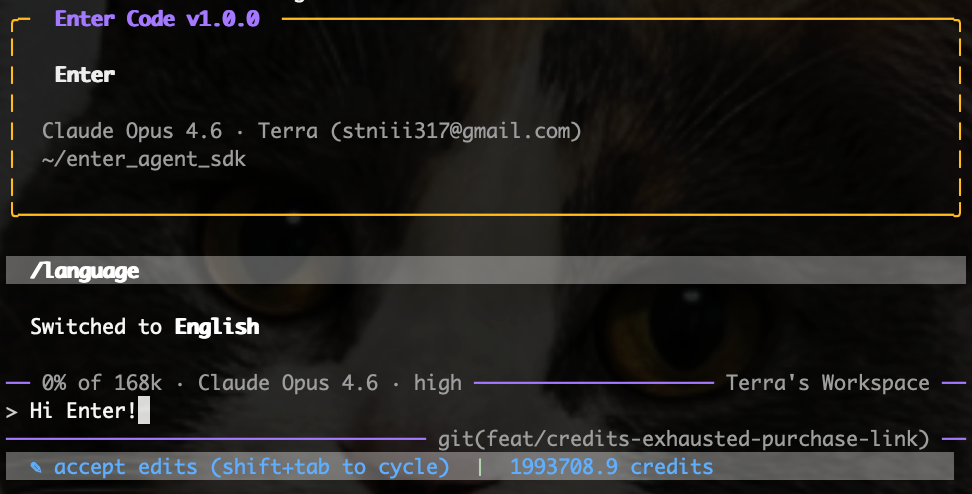
The TUI is a real terminal application — with streaming token output, real-time tool call display, and a running indicator that shows you exactly what the agent is doing and how long it's been thinking. It renders markdown, displays images, and handles Unicode properly.
Session persistence means you can close the terminal and come back. Your conversation, your context, your checkpoints — all preserved. Resume from exactly where you left off, or fork into a new direction.
Extended thinking gives the agent space to reason through complex problems. Claude's thinking budget is exposed and tunable — for hard architectural questions, the agent doesn't just generate. It thinks.
Full i18n support — English and Chinese — with more languages coming. The agent speaks your language.
Open Source, Locally Yours
Enter Code's agent SDK is open source. The core runtime, the tool system, the permission engine, the MCP integration, the checkpoint system — all transparent. You can read every line of code that runs on your machine. You can extend it. You can audit it.
The architecture is a Go workspace with two layers. The root module is a reusable agent runtime SDK with clean IO abstractions. The CLI module injects local implementations and renders the TUI. This separation means the same agent runtime can power terminal sessions, HTTP servers (via AG-UI protocol), or custom integrations.
Get Started in 60 Seconds
Install:
npm install -g @enter-pro/enter-codeLaunch:
cd your-project
enter
Your browser opens for authentication. Log in with your existing Enter account — same credits, same workspace, no extra setup. Then start talking to your codebase.
Requires Node.js 18+. Works on macOS and Linux. Windows support coming soon.
What This Means for You
If you've been using Enter to build apps in the browser, Enter Code is the same intelligence brought to where your serious engineering happens. Your terminal. Your codebase. Your rules.
If you've been using other AI coding tools and hitting walls — hallucinated answers, generic suggestions, context that disappears between sessions, no MCP, no plan mode, no real tool use — Enter Code is what happens when you build the agent from scratch with professional engineering workflow in mind.
The agent that reads your code, writes your code, runs your tests, connects to your tools, remembers your conventions, plans before it acts, and lets you rewind when it doesn't get it right — that agent lives in your terminal now.
Enter Code is live. Install it and start building.
→ Product page: https://enter.converge.ai/code
→ Documentation: https://enter.converge.ai/docs/code/overview
→ Discord: https://discord.com/invite/5FZjchgfb6