
Basic Coding Concepts Every Beginner Can Master Easily
What are the basic concepts of coding? Explore step-by-step learning with Enter Pro as you dive into variables, syntax, and logic. This guide makes coding basic concepts easy for beginners to understand and apply.
Stepping into the world of programming in 2026 is like gaining a superpower. Although code may seem like a different language at first glance, it is actually based on a handful of logical principles. Understanding the fundamentals of coding enables you to interact with machines, automate processes, and create software. This book presents the fundamentals in an easy-to-understand manner.
What are the basic concepts of coding, and why are they important
Coding concepts are the fundamental ideas that help you understand how programming works. These include basic coding concepts such as variables, data types, loops, conditionals, and functions. For beginners, learning these basic coding concepts is essential because they form the foundation of all programming languages. Without understanding basic coding concepts, it becomes difficult to write efficient and error-free programs. These concepts also improve logical thinking and problem-solving skills. By mastering basic coding concepts for beginners, you can easily learn any programming language and build real-world applications with confidence and clarity.

Basic coding concepts for beginners to understand easily
Basic coding concepts are the foundation of programming. Understanding basic coding concepts for beginners, like variables, loops, and functions, helps you write clear, efficient code and build real-world applications.
Variables
Variables are used to store data that can be reused and updated throughout a program. Instead of repeating values, you assign them to a variable name, making your code cleaner and easier to manage. Variables can hold different types of data, such as numbers, text, or boolean values. They also allow programs to become dynamic, meaning values can change during execution. Understanding variables is one of the first steps in coding because they are used in almost every program you write.
| Example:name = "John"age = 21 print("Name:", name)print("Age:", age) age = age + 1print("Next Year Age:", age)Result: Name: John Age: 21 Next Year Age: 22 |
Data Types
Data types specify the types of data that can be stored in a variable, such as numbers, strings, or Boolean values. Data types work differently, and each performs specific operations on variables. For instance, numerical operations can be performed on numbers while strings are concatenated. It is important to use appropriate data types because incorrect selection can lead to program bugs.
| Example:age = 25name = "Anu"is_student = True print(type(age))print(type(name))print(type(is_student))Result: <class 'int'> <class 'str'> <class 'bool'> |
Conditional Statements
Conditional statements make decision-making easy for your program. They test whether certain conditions are true or not, and depending on the outcome, execute one set of codes or another. This way, a program can adapt its behavior depending on what happens. Examples of conditionals are if, else, and elif statements.
| Example:marks = 75 if marks >= 90: print("Grade A")elif marks >= 60: print("Grade B")else: print("Grade C")Result: Grade B |
Loops
Loops execute a block of code multiple times. Loops decrease redundancy and save time through automation. For loops are utilized in case there is an idea of how many times a block of code needs to be executed, whereas a while loop executes until a condition becomes false. Loops are very handy when it comes to manipulating lists and repeating actions.
| Example:for i in range(1, 4): print("Number:", i) count = 1while count <= 3: print("Count:", count) count += 1Result: Number: 1 Number: 2 Number: 3 Count: 1 Count: 2 Count: 3 |
Functions
Functions are predefined blocks of programming code used for performing a certain job. The function will simplify your coding process since you do not have to repeat yourself throughout the code. Functions may receive input values called parameters and output values referred to as results.
| Example:def add_numbers(a, b): return a + b result = add_numbers(5, 4)print("Sum:", result)Result: Sum: 9 |
Lists (Arrays)
A list contains several values in a single variable. The use of lists comes in handy in cases where we have a collection of values, for instance, names, integers, and any other items. The good thing about lists is that they enable easy access, modification, and iteration of elements.
| Example:fruits = ["apple", "banana", "mango"] print(fruits[0]) fruits.append("orange") for fruit in fruits: print(fruit)Result: apple apple banana mango orange |
Syntax
Syntax is the process of writing program code using the syntax of the programming language. Every programming language has its syntax, which means that you should pay attention when writing code because one wrong character can lead to an error. Correct syntax ensures the computer understands your commands.
| Example:print("Hello World")Result: Hello World |
Comments
A comment is an annotation within the source code explaining what the code does. It is not executed by the computer but is meant for programmers who have to maintain the program. It is particularly helpful for beginners and teamwork.
| Example:#This program prints a messagemessage = "Welcome to coding"print(message)Result: Welcome to coding |
How Enter Pro simplifies basic coding concepts for beginners today
Enter Pro makes coding easy for novices with its step-by-step approach to teaching complicated subjects. The system is based on a practical study that lets users learn to code and practice it at the same time. Through tutorial-based learning, real-life examples, and exercises, individuals can develop their knowledge bit by bit. It promotes independent learning, giving both students and workers enough flexibility to fit their schedules around their responsibilities. Moreover, Enter Pro helps improve problem-solving abilities through logical thinking.
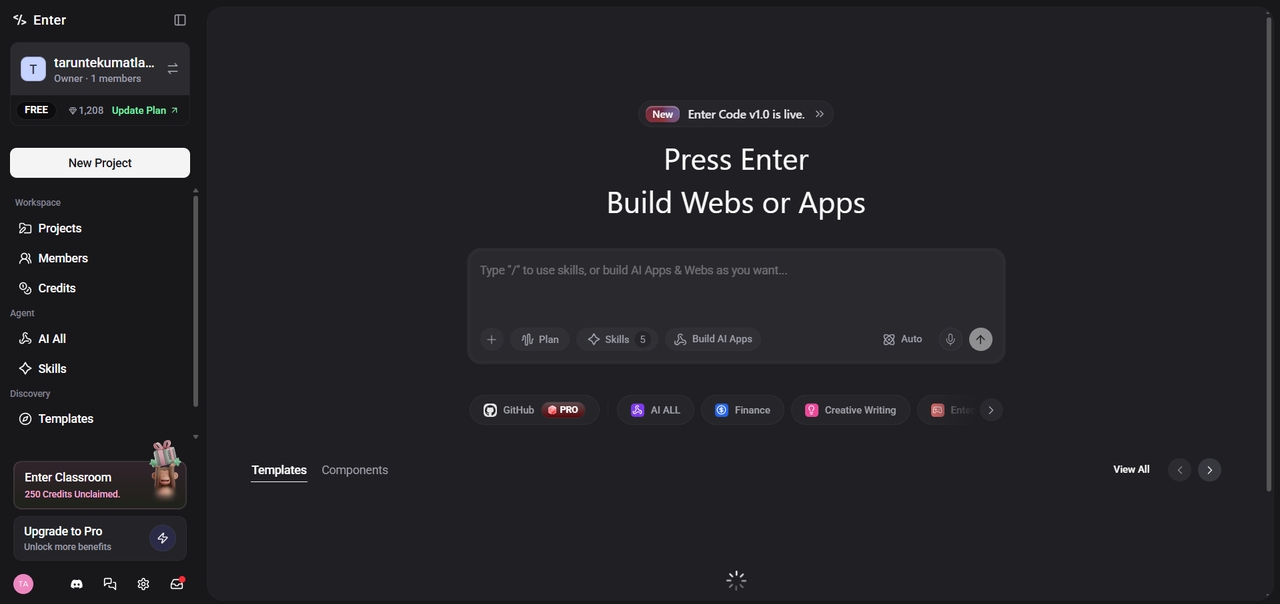
How to learn basic coding concepts step-by-step
Master the fundamentals with an interactive workflow designed for rapid skill building.
Step 1: Prompt your goal
Just type a request like "Explain data types with easy examples." Enter Pro instantly crafts a personalized path, skipping the fluff, so you focus only on the skills needed for your specific project.
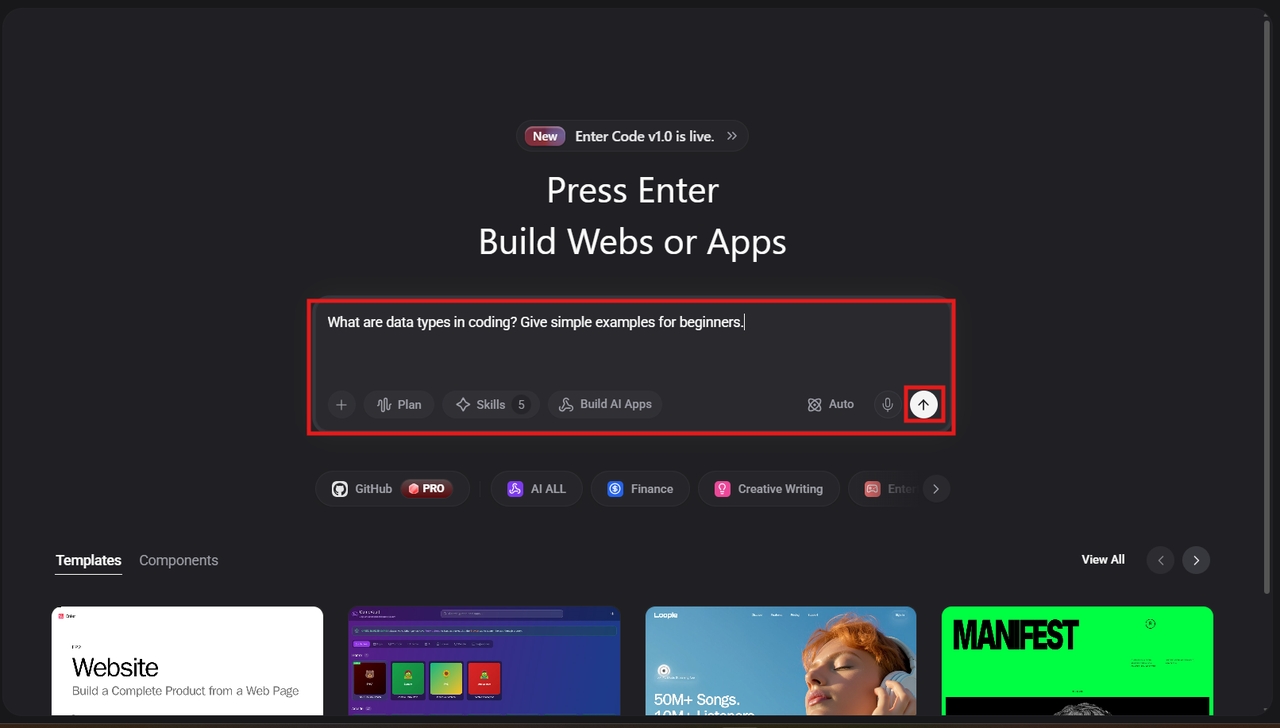
Step 2: Build live examples
Say goodbye to dull theoretical classes and write actual code in a secure coding environment. With Enter Pro, you'll learn how to create your own live example as you go through the process.
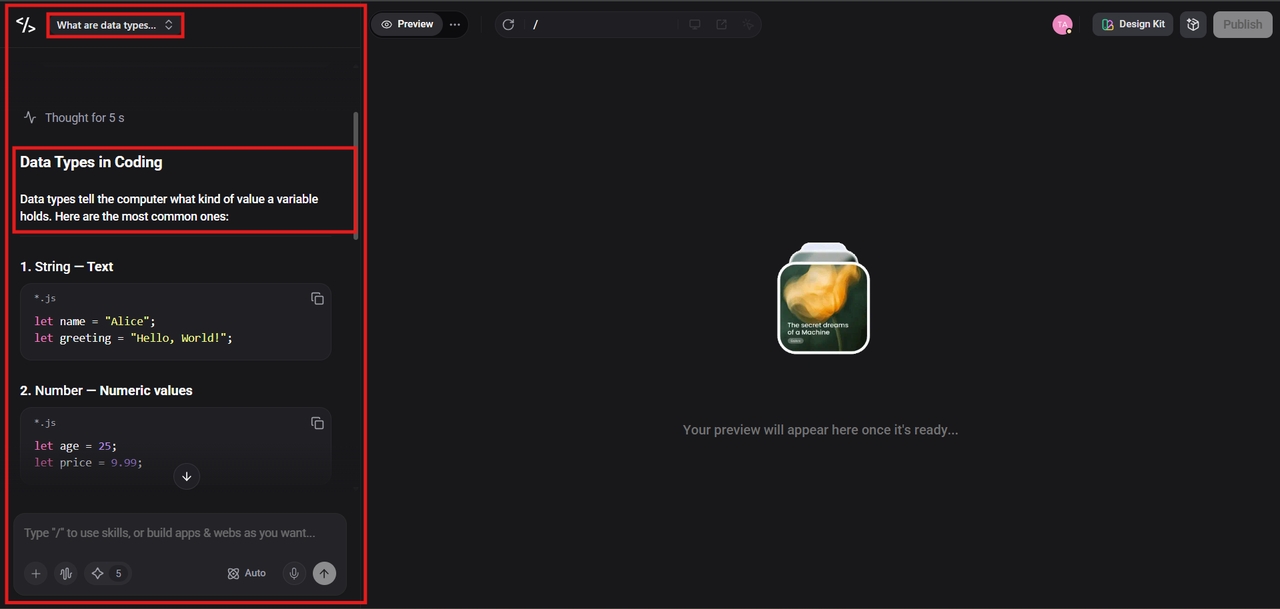
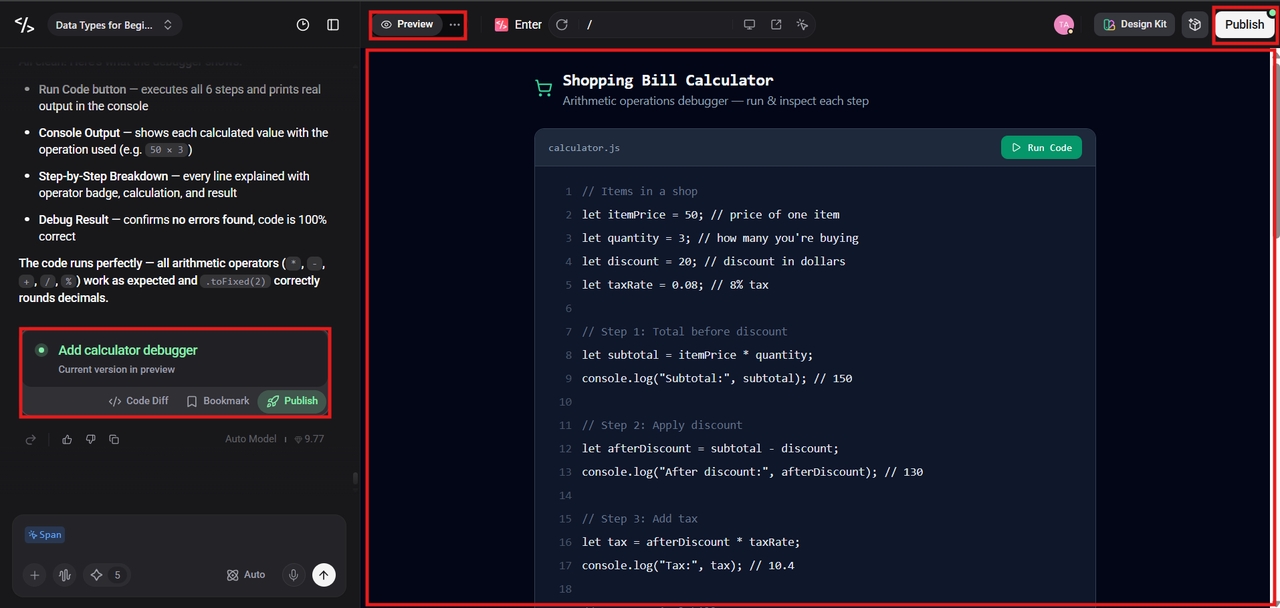
Step 3: Publish your work
Ready for the world? Simply press "publish," and Enter Pro will handle all the technicalities behind the process. What you get is an impressive item in your personal online portfolio.
Key features
- Interactive step-by-step lessons: Carefully designed modules that explain basic coding concepts with simple language and real examples, making it easy for beginners to follow and understand without feeling overwhelmed
- Hands-on coding practice: Built-in coding exercises allow learners to practice concepts instantly, helping reinforce understanding and build confidence through real-time problem-solving
- Beginner-friendly learning path: Structured curriculum that covers all essential coding topics from scratch, ensuring a smooth and progressive learning experience for new programmers
- Real-world project building: Chance to create practical projects that apply coding concepts, helping learners gain experience and prepare for real-world development tasks
- Expert support and mentorship: Access to experienced mentors and support resources to resolve doubts quickly and stay motivated throughout the learning journey
- Flexible self-paced learning: Learn anytime and anywhere with complete flexibility, allowing users to balance coding education with their personal or professional schedule
Master how to debug like a pro as a beginner
Stop guessing and start solving with a logical workflow that turns coding errors into quick learning opportunities.
- Use print statement tracing:
Trace debugging involves inserting print() commands to see how data changes in real-time. By printing variable values at different stages, you can identify exactly where your logic fails. It is the best way to see inside your running program.
- Try Rubber Duck debugging:
Explain your code line-by-line to an object. Translating logic into plain speech forces your brain to process information differently. You will often verbalize a mistake or a logical gap before you even finish explaining the function to your duck.
- Isolate bugs with Comments:
Apply "Binary Search Debugging" through commenting out portions of your code. If it works after hiding the section, the error must be within that section. With this approach, you systematically isolate the problem so you can identify a single line of code containing the error.
- Leverage AI debugging tools:
By 2026, AI assistants such as Gemini will become mentors available to you 24/7. All you have to do is copy your error message and request the AI assistant to explain the reason behind the problem. This will help you better grasp programming concepts, which you won't repeat in the future.
- Read the error stack trace:
The "Red text" on your console screen is not a failure but a roadmap for debugging. By reading Stack Trace, you will know everything necessary to solve the error. Concentrate on the line numbers and the error name, such as SyntaxError.
Conclusion
By learning the basics of coding, such as variables, loops, and debugging, you have already laid a good foundation for yourself in programming. The basics of coding make up any modern computer software or artificial intelligence tools we use today. To further develop your studies, suggest using Enter Pro's AI for education. It offers a practical course that explains the basics of coding for beginners.
FAQ's
How does "Rubber Ducking" help me understand basic coding concepts?
Rubber ducking is a psychological hack that forces you to translate abstract logic into plain speech. By explaining your code line-by-line to a toy, you perform a manual audit of your basic coding concepts. This verbalization reveals logical gaps and "magic" assumptions you didn't realize you were making.
Why is "Print Statement Tracing" a fundamental coding concept?
Print statement tracing is a vital basic coding concept because it makes the "invisible" state of your program visible. Without it, you are guessing what values reside in your variables. By issuing print commands, you create a real-time log that confirms whether your basic coding concepts match reality.
Is Python the best language to learn basic concepts of coding for web design?
Python is ideal for learning basic coding concepts because its syntax mimics standard English. While JavaScript is essential for the front-end, Python's clean layout allows you to focus on logic and basic coding concepts for beginners without getting frustrated by complex punctuation or rigid formatting rules.
Does Enter Pro cover advanced debugging or just basic coding concepts?
Enter Pro will grow with you, teaching you to code from scratch to professional-level tasks. The platform will ensure you learn the basics through sandboxes, then teach you advanced debugging techniques that even senior engineers use to address complex software issues in 2026.
What is a "Stack Trace," and why is it essential for debugging code for beginners?
A stack trace is an important debugging tool that presents a list of function calls leading to the failure of your code. It is an important basic concept in coding because it shows the exact line where a mistake occurred, helping beginners identify the problem logically and fix it professionally.