
How to Write Test Cases: A Practical Guide for QA Engineers
Understand how to write software test cases effectively with Enter Pro, covering steps, examples, and best practices to improve software quality, test coverage, and QA efficiency for both manual and web application testing.
Do you need to understand how to write a test case? This step-by-step guide will show you the essential steps to follow when preparing your test cases. This guide helps QA engineers create efficient test cases for software and web applications, following best practices and useful examples. Test cases are used to increase test coverage, accuracy, and the quality of the software being developed. By employing the Enter Pro solution, your company's QA engineers will be able to prepare test cases effectively and efficiently.
What is a test case in software testing?
A test case is a document that specifies the required preconditions, input values, procedures, and the corresponding results to be achieved to test the functionality of a particular feature in software testing. Writing test cases properly is important for quality assurance testing because it helps them identify issues related to their requirements and ensure consistent application performance.

Why it matters in software testing
- Quality assurance: Through test case development, we can be assured that all the software's functional requirements have been validated and that it works as expected. Quality assurance is improved, reducing the likelihood that bugs reach consumers.
- Test coverage: Knowledge of test case writing helps identify all aspects, including positive, negative, and edge cases, to achieve full coverage during software testing.
- Consistent execution: Properly documented test cases include instructions that any tester can understand. This will ensure accurate testing and reproducible results, and facilitate regression testing.
- Defect detection: Good test cases enable easy bug identification, reproduction, and reporting, thus saving time and effort. The discovery of defects early in the process is less expensive than later.
- Team collaboration: Test cases can act as common documentation for both testers and developers. They facilitate better cooperation among teams during all phases of software development.
Key elements that make test cases effective
Strong test cases include essential elements that ensure accurate, consistent testing.

- Test case ID: A unique identifier that helps organize, track, and manage test cases efficiently throughout the testing lifecycle, making reporting and maintenance easier.
- Test scenario: A concise description of the functionality being tested that provides context and helps testers understand the objective and scope of the test case.
- Preconditions: The required setup, system state, or prerequisites that must be satisfied before executing the test case to ensure valid and reliable results.
- Test steps: Clear, sequential instructions that guide testers through the execution process, reducing ambiguity and ensuring consistent test execution.
- Test data: Specific test input data, credentials, or datasets used in the process of testing to check how an application works under different conditions.
- Expected result: The desired result that would be obtained from the testing process after executing the test procedure in order to ascertain whether the component functions according to the design.
- Actual result: The observed outcome recorded during execution, which is compared against the expected result to identify defects or unexpected behavior.
- Pass/Fail status: This refers to the actual result after executing the tests, which can be either pass or fail depending on whether the expected results were achieved.
Types of test cases in software testing
Test cases in software testing are categorized based on their purpose, helping ensure complete validation, better coverage, and reliable software quality.
| Type of Test Case | Description |
| Functional test cases | Validate that software features work according to defined requirements and expected behavior. |
| Positive test cases | Check system behavior using valid inputs and confirm correct and expected outcomes. |
| Negative test cases | Verify system response to invalid inputs, errors, or unexpected user actions. |
| Boundary value test cases | Test edge limits like minimum, maximum, and boundary conditions to detect input-related defects. |
| Regression test cases | Ensure existing functionality still works correctly after changes, updates, or bug fixes. |
| UI test cases | Validate user interface elements like layout, design, alignment, and usability. |
| Integration test cases | Check interaction and data flow between different modules or system components. |
| Smoke test cases | Perform quick checks on critical features to confirm system stability after build deployment. |
How to write test cases effectively: A step-by-step guide
Follow a clear step-by-step approach to learn how to write test cases effectively and improve testing accuracy.
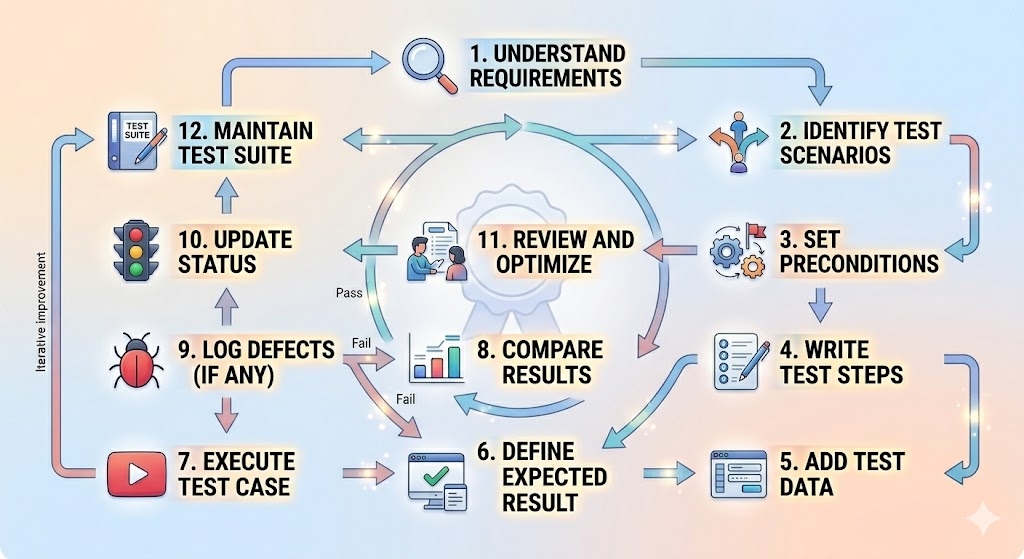
Step-by-step guide on how to write test cases effectively:
- Understand requirements: Analyze business and functional requirements before writing any test case.
- Identify test scenarios: Break requirements into clear user flows and test conditions.
- Set preconditions: Define system setup or conditions needed before test execution.
- Write test steps: Create simple, clear, and sequential actions to execute the test case.
- Add test data: Specify inputs, credentials, or data required for testing.
- Define expected result: Clearly state what the system should do after execution.
- Execute test case: Run the test and capture actual results for comparison.
- Compare results: Match actual results with expected outcomes to identify deviations.
- Log defects (if any): Report bugs with proper details if the test case fails.
- Update status: Mark the test case as pass, fail, or blocked based on execution results.
- Review and optimize: Refine test cases regularly to improve clarity, coverage, and reusability.
- Maintain test suite: Keep test cases updated with changing requirements for long-term use.
How to write good test cases for better test coverage and software quality
Simple steps to help you write good test cases for better test coverage and software quality.
- Understand requirements clearly: Analyze business and functional requirements, so each test case accurately validates expected system behavior.
- Cover all scenarios: Make sure you cover positive tests, negative tests, border tests, and edge tests to ensure comprehensive testing.
- Keep test cases focused: Write single-objective test cases to improve clarity, reduce confusion, and make debugging faster and easier.
- Use simple and clear steps: Ensure that your instructions are easy to follow for any tester to do the test correctly without making guesses.
- Prepare realistic test data: Use valid and invalid inputs that simulate real user actions to improve accuracy and uncover hidden issues effectively.
- Define expected results precisely: Provide an exact description of the results so that testers will be able to match what really happens with what is expected to happen.
- Ensure independence: Design test cases to run independently without relying on others, improving flexibility in execution and regression testing.
- Review and update regularly: Continuously refine test cases to match evolving requirements and maintain long-term software quality and relevance.
How to write manual test cases using a standard test case format
Follow a standard format to write manual test cases for clear, structured software testing.
- Understand requirements: Review business and functional requirements to ensure manual test cases align with expected system behavior and goals.
- Identify the test scenario: Define a clear, focused feature or function to be tested, so the test case has a specific, measurable objective.
- Add test case ID: Assign a unique identifier to each test case for easy tracking, reporting, and maintaining test case documentation.
- Write test description: Briefly explain the purpose of the test case, so testers clearly understand what functionality is being validated.
- Set preconditions: Mention the required system setup or conditions that must exist before executing the test case successfully.
- Define test steps: Provide clear steps that allow the tester to run the test case in a step-by-step fashion, without ambiguity.
- Include test data: Specify inputs, credentials, or values needed to perform the test and validate expected application behavior.
- State expected result: Describe what the expected results should be to facilitate comparison with actual results.
- Execute and record results: Perform the test manually and document actual outcomes for accurate comparison and defect tracking.
- Mark status: Indicate pass, fail, or blocked based on whether actual results match expected results during test execution.
How to write test cases examples for common software features
Learn how to write test case examples for common software features with clear steps.
- Login functionality: Test cases should include valid and invalid logins, empty fields, password change requests, and a lockout scenario to test successful authentication.
- Registration form: Validate all required fields, validate valid and invalid data entries, manage duplicate email cases, test password requirements, and validate successful registration.
- Search feature: Check accurate results for valid queries, no-result messages, special characters, and performance response to ensure reliable search behavior.
- Form submission: Test required field validations, error handling in case of wrong data entries, file uploading, and successful submission of the form.
- Navigation menus: Ensure all links, dropdowns, breadcrumbs, and page redirects work correctly to provide a smooth, consistent user navigation experience.
- Button actions: Validate actions such as submit, cancel, save, delete, and reset to see that the system reacts accordingly.
How to write effective test cases for web application testing
Learn how to write effective test cases for web application testing to ensure full coverage.
- Understand requirements clearly: Analyze functional and non-functional requirements to ensure complete coverage of all web application features.
- Identify user scenarios: Break down key flows like login, registration, search, and checkout into clear and testable scenarios.
- Write functional test cases: Validate core features such as forms, buttons, links, navigation, and data submission for correct system behavior.
- Include UI and usability checks: verify layout, responsiveness, design consistency, and user experience across devices and screen sizes.
- Add negative test cases: Test invalid inputs, broken links, unauthorized access, and error messages to ensure proper system handling.
- Ensure security testing: Validate authentication, authorization, session management, and input validation to prevent security vulnerabilities.
- Check performance and compatibility: Test load time, responsiveness, and browser compatibility across Chrome, Firefox, Edge, and Safari.
Benefits of popular test case management tools
Test case management tools improve efficiency, accuracy, and collaboration in software testing.

- Improved organization: Centralizes all test cases in a single location, making it easier to manage, update, and maintain test documentation.
- Better collaboration: Enables testers, developers, and QA teams to work together seamlessly with shared visibility of test cases and execution status.
- Increased test coverage: Helps structure test suites properly so teams can track requirements and ensure no critical scenarios are missed during testing.
- Faster test execution: Makes the whole test case design and execution process easier, increasing test speed and effectiveness.
- Accurate reporting: Provides detailed reports and dashboards that help track progress, identify defects, and improve decision-making in the QA process.
In addition to these advantages, a good tool may also make the test case development process more efficient. The Enter Pro tool offers a methodical approach to this process.
How Enter Pro helps in writing test cases effectively
Enter Pro facilitates efficient test case writing through a consistent approach to developing a test case workflow. The tool makes the process of creating test cases easy since all relevant factors, including steps to be tested, test data used in testing the functionality of the application, and expected results, are organized systematically within a standard layout. This improves the quality of test cases as they become more accurate, cover more ground, and minimize the effort required when performing software and web application tests.
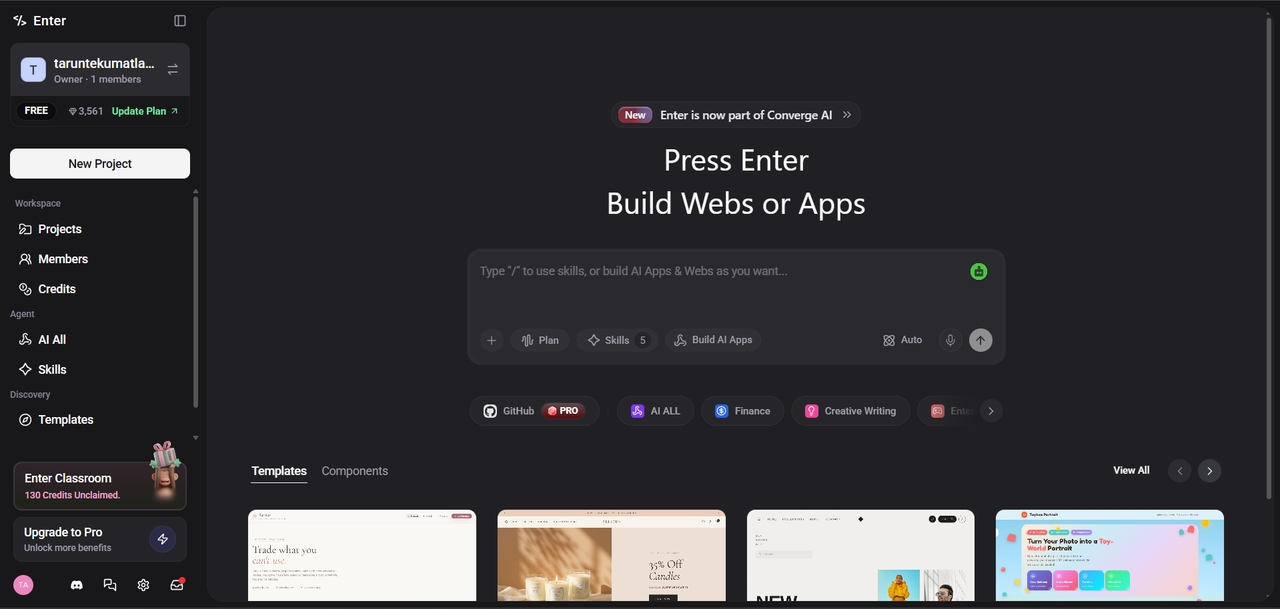
Key features:
- Custom test case templates: Build predefined formats within your own QA app so every test case follows a consistent structure with clear steps, inputs, and expected outcomes.
- Centralized test management app: Generate a single application where all test cases live in one place, making it easier to track, update, and reuse across projects.
- Built-in collaboration: Design your app so QA teams, developers, and stakeholders share visibility of test cases and status in one place.
- Faster app development: Get a working test management app up and running in minutes instead of building one from scratch, so your team can start drafting and reusing test cases sooner.
- Test coverage tracking: Add dashboards to your app that flag functional and non-functional scenarios, reducing the chances of missing critical cases.
Conclusion
In summary, knowledge of how to write test cases is vital for enhancing software quality and testing coverage, as well as improving test automation effectiveness. With an effective approach that entails systematic procedures for developing test cases, software and web applications can be tested effectively by ensuring accuracy and reducing faults during the process. Employing the Enter Pro tool simplifies test case writing by efficiently and consistently generating them across an organization.
FAQ's
How to write software test cases for functional testing scenarios?
When writing test cases for functional testing, the first step is to understand the requirements; then, create scenarios that clearly outline test steps, data, and outcomes to verify specific application functionality.
What are the best practices on how to write good test cases?
Best practices include keeping test cases simple, clear, and reusable; covering both positive and negative scenarios; using appropriate test data; ensuring independence; and regularly updating them to reflect changing requirements for better coverage and quality.
How to write effective test cases for web application performance testing?
Concentrate on performance testing criteria such as loading time, response time, and stability under pressure. Create scenarios for various users and heavy traffic to ensure the web application functions smoothly under different conditions.
What are common mistakes to avoid when learning how to write test cases?
Common mistakes include unclear steps, missing expected results, combining multiple scenarios in one case, ignoring negative testing, and not updating test cases when requirements change, which reduces accuracy and coverage.
Can Enter Pro help with writing test cases for web applications?
Enter Pro itself is an AI platform for building apps and websites rather than a dedicated test case tool. QA teams can use it to build a custom test management app tailored to their workflow, which helps organize test cases, improve consistency, and support better collaboration across a team.