Cloud Application Development: A Practical Guide for Teams Ready to Build
Still running apps on servers your team has to physically manage? Or paying a dev agency six figures to develop a cloud application that should have launched three months ago? There is a faster path.
Many teams have decided to move to the cloud. What they're less clear on is what that actually means when someone has to go build the thing.
Choosing AWS or Google Cloud is step one. It is not the hard part. The hard part is understanding how cloud application development changes how you architect, deploy, and maintain software. Get that wrong, and you end up with a cloud-hosted app that behaves exactly like the on-premise one you wanted to get away from.
This guide covers what actually matters when you go to develop a cloud application: architecture decisions, the trade-offs nobody warns you about upfront, and how tools like Enter Pro are compressing months of that work into days.
What most teams get wrong with cloud app development
The assumption that cloud development is just regular development on rented servers. That framing causes problems immediately.
Cloud-based application development requires designing for failure from the start. In a traditional environment, you try to prevent outages. In the cloud, you assume components will fail and build, so the application recovers automatically. Those are different design philosophies, and teams that bring old habits into cloud environments spend months undoing architectural decisions they made in week one.
Stateless design matters more than most blog posts admit. When an instance can be terminated at any point, and a new one spins up in its place, you cannot hold user session data locally. That seems obvious until a team is three months into a build and realizes their authentication layer is tightly coupled to a specific server.
And the release pipeline is not an afterthought. Application development in cloud computing is only valuable if you can actually ship frequently. Teams that set up CI/CD properly in week one ship ten times more often by month three. Teams that defer it ship quarterly and wonder why clouds feel complicated.
The three models of cloud-based app development, and when each actually fits
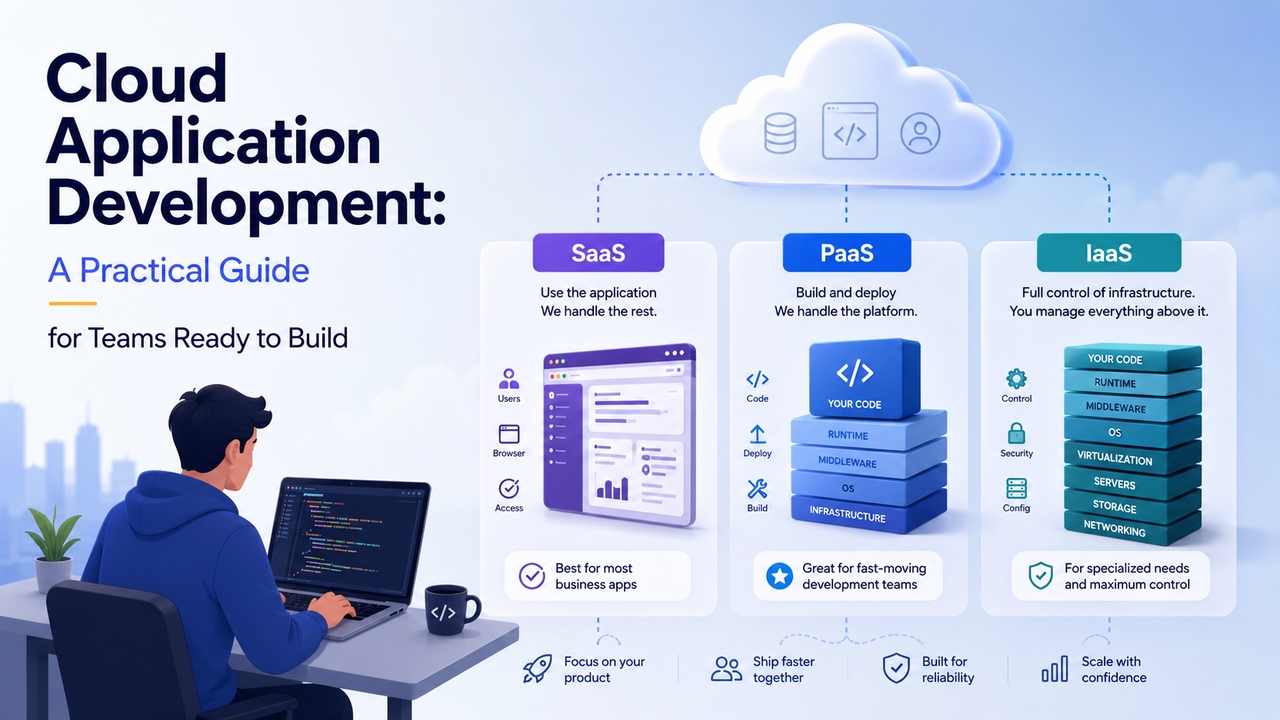
SaaS, PaaS, IaaS. Every article on this topic covers them. Most articles do not tell you when each model becomes a liability.
- SaaS is where most products end up. Fully managed, delivered over the browser. No infrastructure ownership. The trade-off is customization: you are constrained by what the platform exposes. For most B2B tools and internal platforms, that constraint does not matter.
- PaaS suits teams that want to write application code without managing servers. Heroku, Render, Railway. These platforms absorb a lot of ops complexity. But abstraction has limits. When your app hits the real scale, you sometimes find the platform has made assumptions that do not match your requirements. Then you either live with constraints or migrate, which is painful.
- IaaS gives you raw compute and storage. You manage everything above the hardware. It is the right choice when you have specific infrastructure requirements that managed platforms cannot accommodate. Most early-stage products do not need it. Teams that default to IaaS because it feels more serious end up spending engineering time on infrastructure that could have been spent on the product. That is a real cost.
Most modern cloud-based app development teams land somewhere between PaaS and cloud-native: managed databases, managed queues, managed auth, custom application code on top. Let the platform handle commodity components and build what's actually specific to your product.
What custom cloud application development actually costs
More than the license fee for the cloud provider. That part people know. The hidden costs sit in the people and the time. A senior cloud architect to design the infrastructure. A DevOps engineer or two to build and maintain the deployment pipeline. Developers who know how to write stateless, horizontally scalable application code. Someone managing cloud spending before the bill in month two becomes a problem.
For companies with that team in place, custom cloud application development delivers genuine long-term value. For companies without it, the initial project cost is often followed by a maintenance cost that nobody budgeted for.
That is not an argument against the cloud. It is an argument for being realistic about what you are getting into before you start. Teams that go in clear-eyed about cost structure make better architectural decisions than teams chasing the theoretical scalability ceiling they will probably never hit.

Honest trade-offs in cloud application development
Not the glossy version. The vendor lock-in point deserves extra attention because teams consistently underestimate it. Using RDS, DynamoDB, SQS, and Cognito feels like just picking good tools. What it actually means is that your application is deeply coupled to AWS primitives. Moving to another provider later means rewriting significant portions of your infrastructure code. Sometimes that is fine. Know that going in.
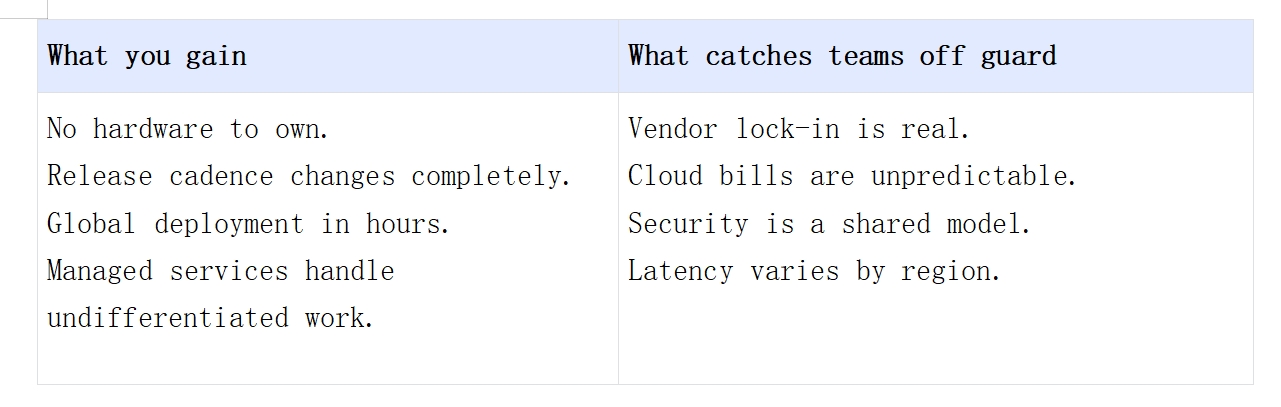
Which teams should develop a cloud application right now
Not every team. That is the honest answer.
- Startups build a product for the first time. Cloud removes the infrastructure barrier to launch. You can have a globally deployed application running within days.
- Teams with unpredictable or variable traffic. If usage spikes are part of your business model, cloud handles that more gracefully than any fixed infrastructure. An event platform, a marketplace, a tool used heavily during business hours and barely touched overnight.
- Distributed team building for global users. Deploying closer to your users matters for performance. Cloud makes multi-region deployment accessible to teams that are not Google.
- Companies in regulated industries that have done compliance homework. Most major providers have compliant offerings for healthcare and finance. The work is in understanding the shared responsibility model, not in finding a compliant provider.
Who should wait: teams without clarity on what they are building. Cloud amplifies both good and bad architecture decisions. If your requirements are still shifting week to week, the overhead of cloud infrastructure decisions on top of product decisions is real. Build something simpler first. Move it to cloud when you know what you are scaling.
Next-gen tool: Build your cloud application with Enter Pro
The practical problem with cloud app development has always been the upfront cost of getting started. Provisioning environments, writing infrastructure as code, setting up deployment pipelines: all of that happens before a single user touches the product.
Enter Pro removes that front-loaded work. You describe what you want to build. The AI generates a working application with frontend, backend logic, and production integrations already in place. Not a mockup. Something that deploys.
For teams that want to develop a cloud application without a full DevOps function sitting behind them, this changes the equation. The iteration cycle that used to take two engineering weeks now takes an afternoon. That is not a small thing when your runway has a hard end date.
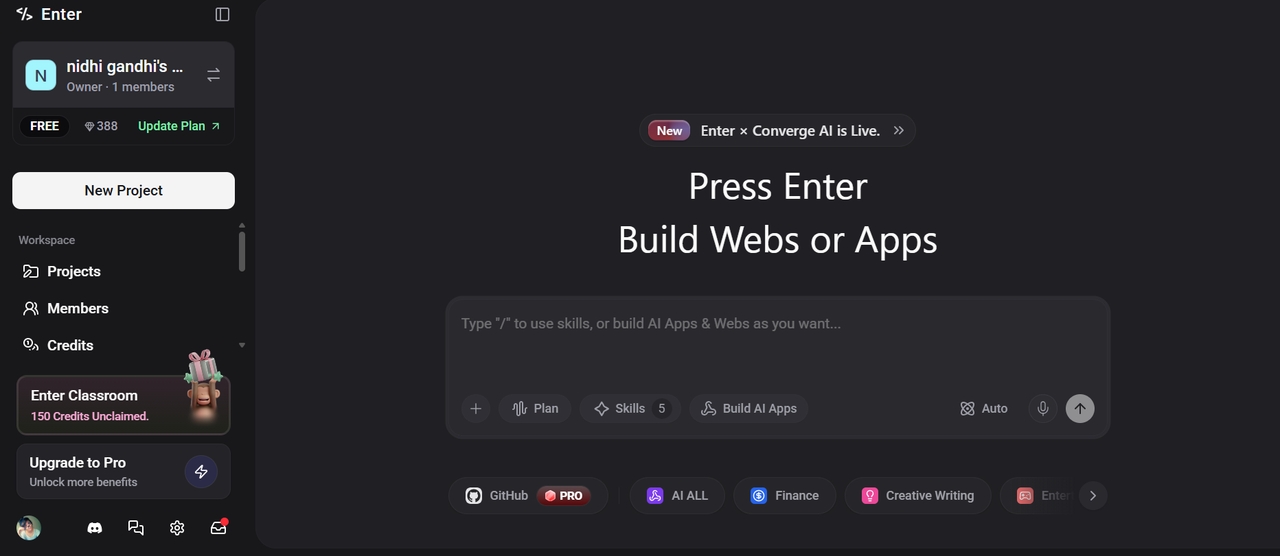
Why it works for cloud app builds specifically:
- Full stack from a prompt. Frontend and backend generated together. No stitching components from different systems.
- Built-in integrations. Stripe for payments. Supabase for the database layer. These are the integrations most cloud products need and they come configured, not requiring separate setup.
- Multiple AI models. Switch between Claude, Gemini, and GPT within the same build. Different models are better at different parts of the application. Enter Pro lets you use whichever fits the task.
- Your code, fully. Export it and run it anywhere. This matters for teams worried about platform dependency, which is ironic given the section on vendor lock-in above. Enter Pro is not that kind of lock-in.
- Visual Editor for changes that do not require going back to the AI. Adjust layouts, content, and structure directly in the interface.
Step-by-step guide:
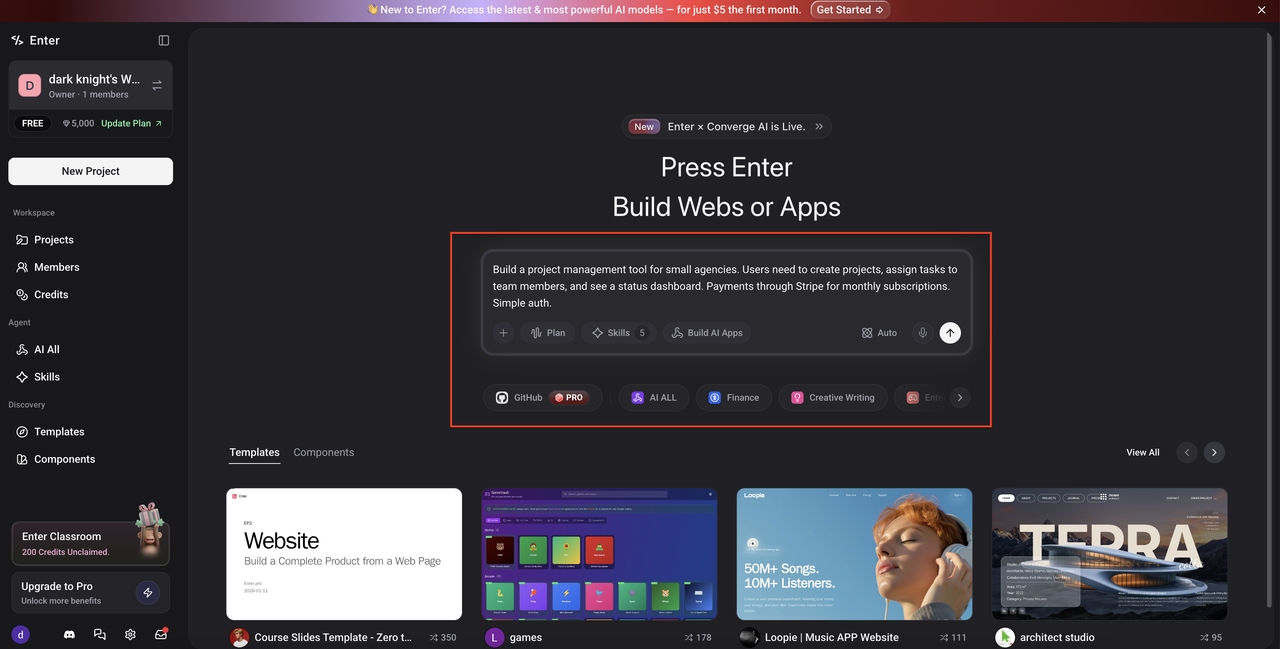
Step 1: Open Enter Pro and write a specific prompt
Go to Enter Pro and open the AI chat. Write a prompt that is specific enough to be useful. Not 'build me a cloud app.' More like: 'Build a project management tool for small agencies. Users need to create projects, assign tasks to team members, and see a status dashboard. Payments through Stripe for monthly subscriptions. Simple auth.' Pick your AI model before generating. Claude handles complex logic particularly well. Gemini is strong on frontend output. GPT is a solid general option. Hit Generate.
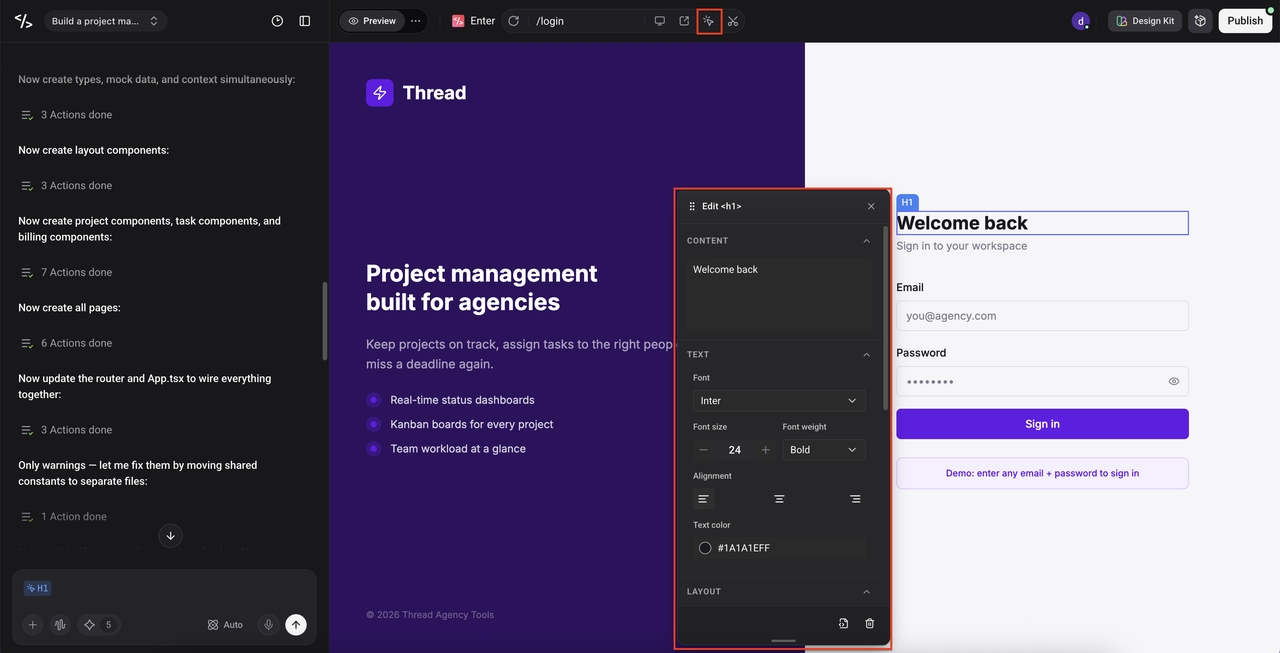
Step 2: Iterate with the Visual Editor and AI chat
When the first version appears, do not expect it to be done. Expect a solid working foundation. Open the visual editor and start reacting: move sections, update copy, and remove anything that does not fit. For bigger changes, describe them in the AI chat and let it rebuild that part. This is where you shape the product. Go as many rounds as needed. Save as you go.
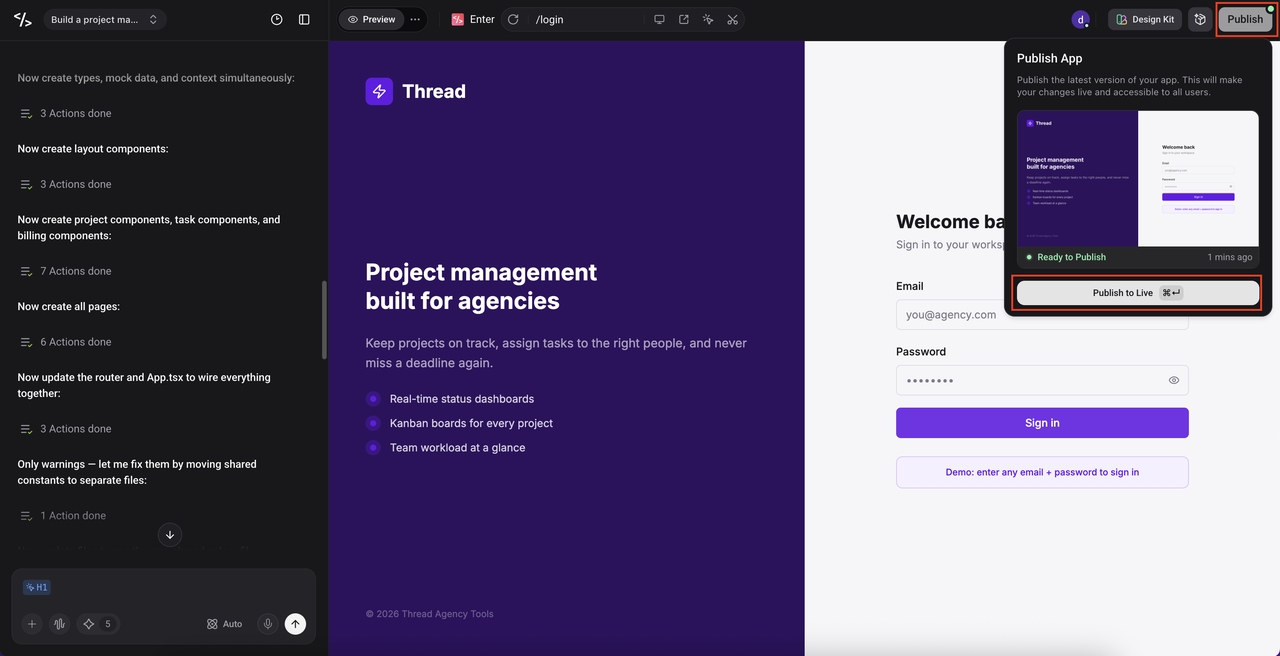
Step 3: Publish and put it in front of real users
When it is ready, click Publish. No infrastructure configuration. No deployment pipeline to set up. Enter Pro handles the hosting and the app goes live immediately. Share the link. Get real feedback. Bring that feedback back into Enter Pro for the next round. That feedback loop is the whole point. Build, publish, learn, adjust.
Conclusion
Cloud application development is not complicated in theory. The complications show up when teams underestimate what changes about how you design and maintain software once the infrastructure is no longer a fixed thing.
Get the architecture right early. Be honest about what the full cost includes. And if you want to get something in front of users before spending months on infrastructure, Enter Pro is worth trying first.
The teams that move fastest are not the ones with the biggest cloud budgets. They are the ones who built something real quickly and iterated from there. Use web app development workflows through Enter Pro to compress your first cycle, then scale when you know what you are scaling.
Frequently Asked Questions (FAQs)
Q1. What is cloud application development?
Building software that runs on remote infrastructure managed by a cloud provider rather than on servers your company owns. Cloud application development covers the full process: architecture, coding, deployment, and ongoing maintenance. The key difference from traditional development is that the environment is elastic, and you design for that from the start. Enter Pro accelerates the build side by generating full-stack AI app builder applications from a plain-language prompt.
Q2. How long does it take to develop a cloud application?
Depends entirely on complexity. A simple internal tool can be built and deployed in days. A multi-tenant SaaS product with custom billing and compliance requirements can take six to twelve months with a full team. Enter Pro significantly compresses the early phases. First working version in hours rather than weeks.
Q3. What is the difference between cloud-based app development and regular app development?
Cloud-based app development assumes the environment will change, scale, and occasionally fail. Regular app development assumes a fixed server. That difference drives architectural decisions around stateless design, distributed systems, and automated recovery that do not come up in traditional development.
Q4. Is custom cloud application development expensive?
The cloud provider costs are often lower than people expect. The expensive part is the team: cloud architects, DevOps engineers, and developers who understand distributed systems. Custom cloud application development costs have come down with managed services and AI tools, but the engineering expertise still carries a real cost. Enter Pro removes a significant chunk of the upfront build cost for teams without a full technical function.
Q5. Which cloud provider should I use to develop a cloud application?
AWS has the largest service catalog and the largest talent pool. Google Cloud has strong data and ML tooling. Azure is the default choice for companies already in the Microsoft ecosystem. For most products, the provider matters less than the architecture decisions you make on top of it. Start with the one your team already knows. And if you use AI for small businesses, tools like Enter Pro, the underlying provider is abstracted away entirely.