How I Built an AI-Powered Concept Explorer in 4 Hours with Enter
Essence is an AI-powered canvas that deconstructs any concept into fundamental elements and lets you recombine them to spark new ideas.
A designer with no backend experience used Enter.pro to build Essence — an AI-native canvas app that breaks down any concept into its fundamental building blocks. From idea to a fully working product with AI integration, bilingual support, and a gamified experience — all in just 4 hours.
The Spark
As a designer, I’ve always been fascinated by one question: where does creativity come from?
The more I studied design methods, the more I saw the same pattern: creativity often begins with deconstruction and recombination. Break something down into its essential parts, then rebuild it in a new way.
That idea led to Essence — an AI-powered concept exploration canvas. Input any concept, and AI breaks it into its core elements. Then, by recombining those elements, new ideas begin to emerge.
Why Enter
I'm a product designer, not a full-stack developer. The idea for Essence required several things that felt daunting:
- An interactive canvas with drag-and-drop, zoom, and pan — the kind of complex UI you'd see in tools like Figma or Miro
- AI integration to power the concept decomposition and recombination logic
- A serverless backend to handle AI API calls securely
- Deployment so people could actually use it
Connecting to an LLM API used to stop most non-developers — API keys, env setup, auth logic.
With Enter’s AI All, I just said: “Use Claude Sonnet 4.5,” and it wired everything up — backend Edge Functions, request formatting, error handling.
With Enter.pro, I don’t touch infrastructure at all. I describe what I want, and it handles React, Supabase, Edge Functions, and model integration. I just focus on the what and why.
The Build: 5 Phases in 4 Hours
Phase 1: Foundation
I organized the idea in my head into one comprehensive prompt and sent it to Enter. Here's the gist:
Create an AI-native canvas exploration app called "Essence." It's a lightweight thinking game. Core mechanic: users input any word, and AI decomposes it into exactly 2 more atomic concepts, displayed as emoji + short word nodes on a canvas. Decomposition rules: always return exactly 2 nodes, each with 1 emoji + 1 short word, concepts should get more essential with each level — breaking toward dimensions like emotion, motive, energy, structure, relationship, power, value, desire, conflict. Users can also select any 2 nodes to recombine into 1 new concept. Canvas supports infinite drag, zoom, double-click to decompose, multi-select to recombine. Each decomposition costs 1 point, each recombination costs 2.
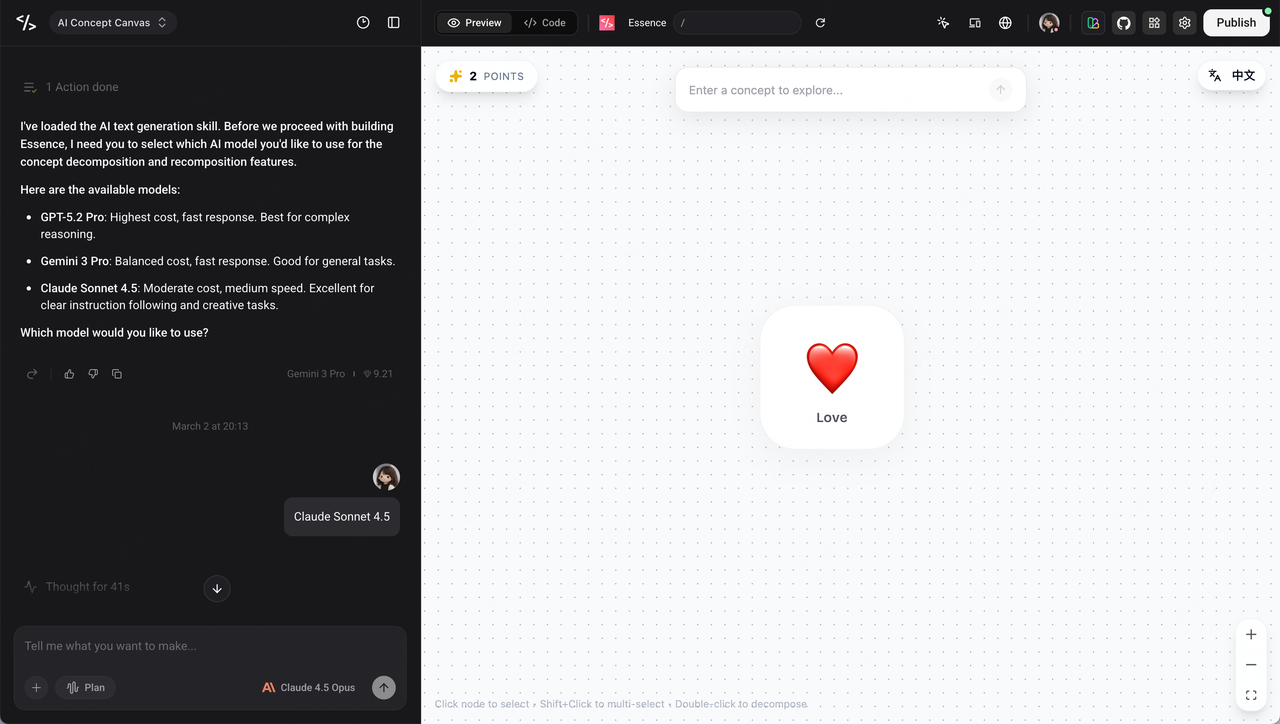
After reading this prompt, the first thing Enter did was load its AI capabilities, then asked me directly: "Which AI model would you like to use for concept decomposition and recomposition?" It listed the available options — GPT-5.2 Pro, Gemini 3 Pro, and Claude Sonnet 4.5 — each annotated with cost, speed, and strengths. I picked Claude Sonnet 4.5 (excellent for instruction-following and creative tasks), and Enter wired up the entire API connection automatically.
Minutes later, the full project structure was ready — React 18 with TypeScript, Vite as the build tool, Tailwind CSS for styling, @xyflow/react for the canvas, and a Supabase Edge Function connected to Claude's API. The core decomposition and recombination logic was working on the first try.
Phase 2: AI Logic Tuning
This was the most critical and fascinating part of the entire project. Whether Essence feels delightful or dull depends entirely on AI output quality. The final code splits the AI logic into three independent functions, each with carefully crafted prompt strategies.
The Problem: AI Was Too "Academic"
After the first version was running, the AI results were unintentionally hilarious — input "scissors" and it returned "pincer appendages" and "symmetrical evolution"; input "love" and it gave "neurotransmitters" and "quantum states." Technically not wrong, but not fun at all, and not intuitive. This wasn't the experience I wanted.
#1 Fix : Give AI a Persona
The key breakthrough was setting a clear system role for the AI — not "you are a decomposition assistant," but "You are a fun decomposition game. Turn complex things into simple building blocks! Use everyday words." That single sentence completely transformed the output style from academic paper to playful conversation.
#2 Fix : Positive Examples + Anti-Patterns
I found that positive examples alone weren't enough — the AI would occasionally still slip into academic mode. So I included both good and bad examples simultaneously:
Good examples:Scissors → 🔪 Blade + 🔗 Hinge (two blades connected by a hinge)Coffee → ☕ Hot water + 🫘 Beans (hot water + coffee beans)Friend → 👤 Person + 🤝 Trust (people who trust each other)Dream → 😴 Sleep + 💭 Imagination (imagination while sleeping)Bad examples (too academic):❌ Pincer appendages, Symmetrical evolution, Neurotransmitters, Quantum states
This "positive-negative contrast" gave the AI a very precise understanding of the tone I wanted: simple, intuitive, the kind that makes people smile or have an "aha!" moment.
#3 Fix : Three Functions, Three Strategies
The final AI logic was split into three independent functions, each with its own prompt design and parameter tuning:
① Emoji Generation (generateEmojiForConcept): When a user inputs a concept, a separate AI call first generates a semantically matching emoji. The system role is set to "You are an emoji generator. You output only JSON," with temperature at 0.7 (accuracy over creativity), guided by few-shot examples: stone → 🪨, fire → 🔥, love → ❤️. If parsing fails, it gracefully falls back to a default ✨.
② Concept Decomposition (decomposeConcept): The core function. The prompt guides the AI to "break things apart like building blocks," returning exactly 2 nodes (emoji + short word) plus a one-sentence explanation. Temperature is set to 0.8 — higher than emoji generation to allow more creative space. The crucial design decision: every request injects a random seed (randomSeed), ensuring the same concept yields different results each time — this gives the exploration real "replayability."
③ Concept Recombination (recombineConcepts): The most creative part. The prompt frames it as "think like a game," with imaginative examples: Water + Fire = Steam ♨️, Flour + Fire = Bread 🍞, Human + Wings = Angel 👼, Sadness + Joy = Life 🎭. Results should be "surprising, insightful, slightly humorous, non-obvious." Same random seed technique for variety.
#4 Fix : Hover Explanations Make the Logic Visible
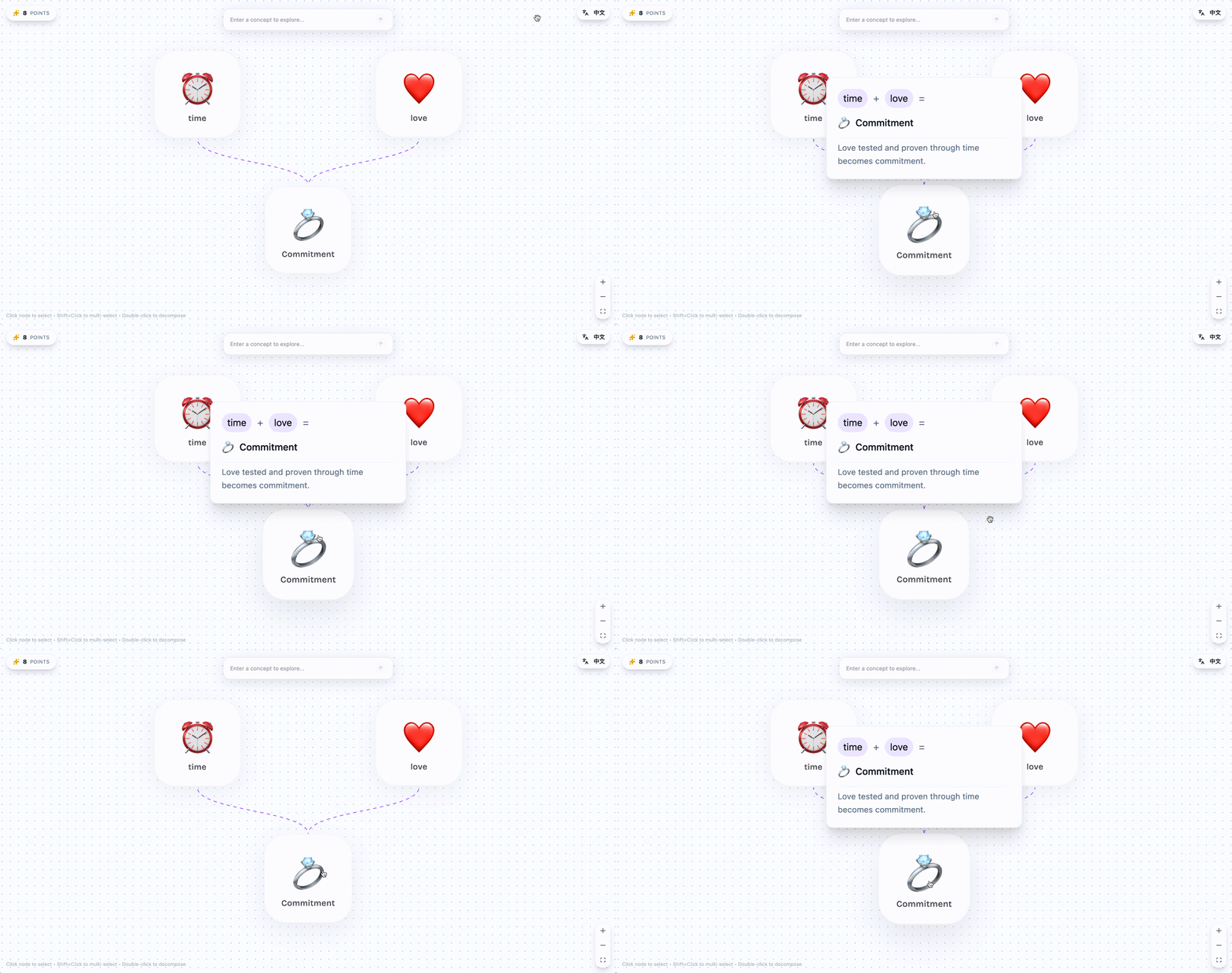
Every AI decomposition or recombination also returns a brief explanation. This text doesn't appear directly on the node (keeping the interface minimal), but is stored in the node's data. When a user hovers over a node, an elegant HoverCard appears showing the full reasoning chain:
- Decomposed nodes (emerald labels): 🎭 Drama = 😢 Conflict + 👥 Characters, with "Drama is fundamentally conflict between characters" below
- Combined nodes (violet labels): 😴 Sleep + 💭 Imagination = 💫 Dream, with "Imagination during sleep is a dream" below
This design makes information layering beautifully elegant — on the surface, minimal emoji cards; on deeper inspection, the AI's thinking process.
The Result
After all this tuning, AI output quality transformed dramatically:
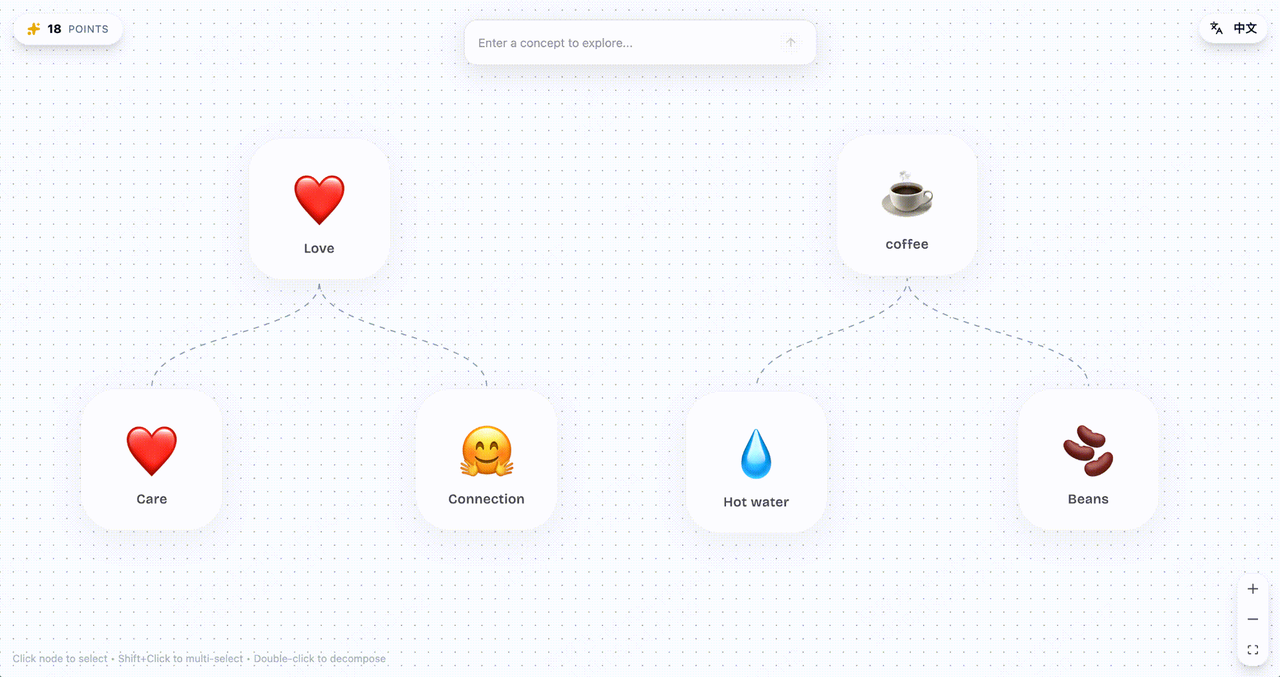
❤️ Love → 👤 Person + 🤝 Trust (people who trust each other) ☕ Coffee → 🫘 Beans + ☕ Hot water (hot water meets coffee beans) 💭 Dream → 🔮 Imagination + 🔥 Desire (a burning vision of the future) 🔥 Fire + 💧 Water = ♨️ Steam 😴 Sleep + 💭 Imagination = 💫 DreamEvery decomposition sparks an "aha!" moment; every recombination draws a smile. That's the power of prompt engineering — it's not about writing more code, but about finding the right way to talk to AI.
Phase 3: Interaction Polish
This is where the app started feeling alive:
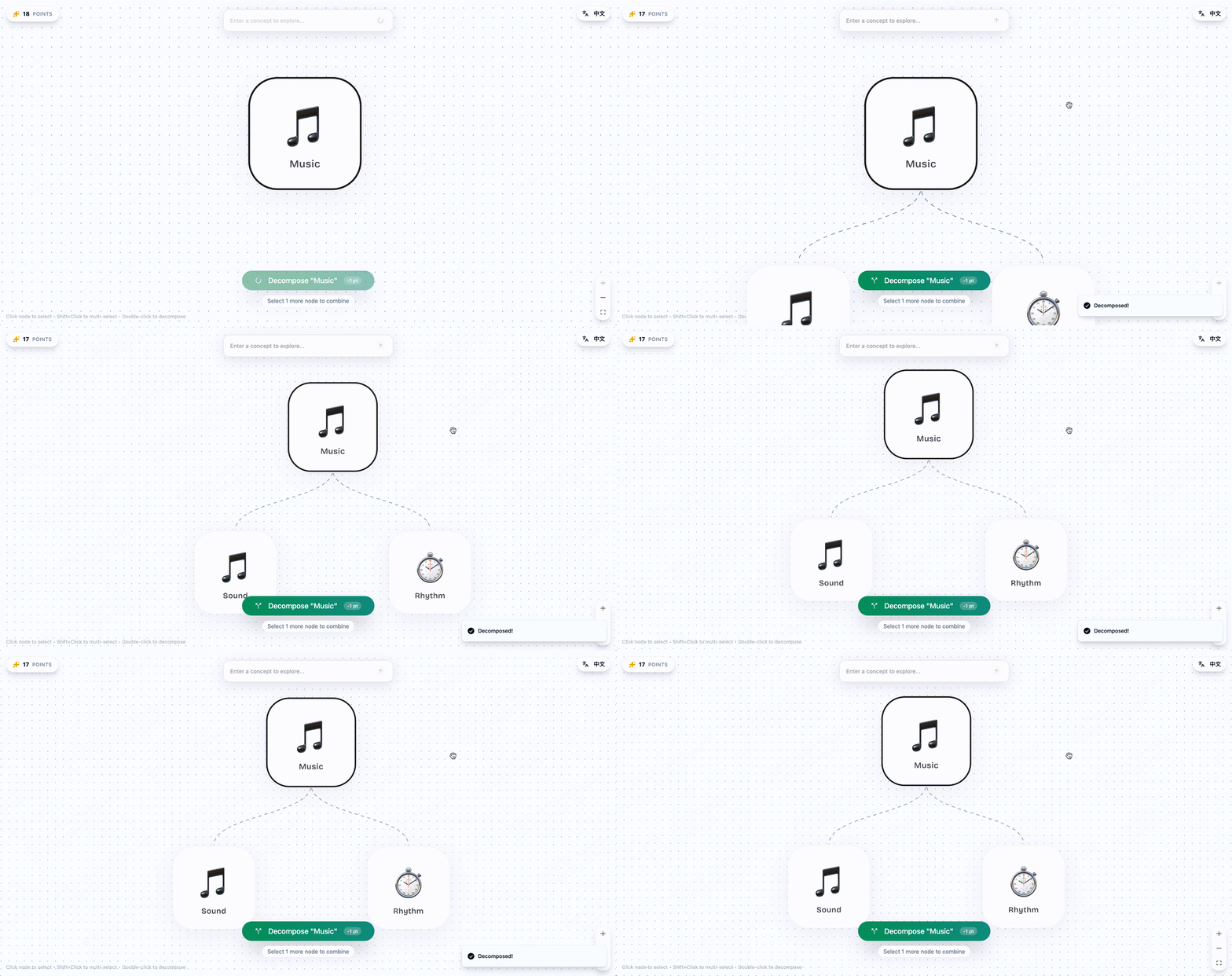
- Select 1 node → "Decompose" button appears — break it down further
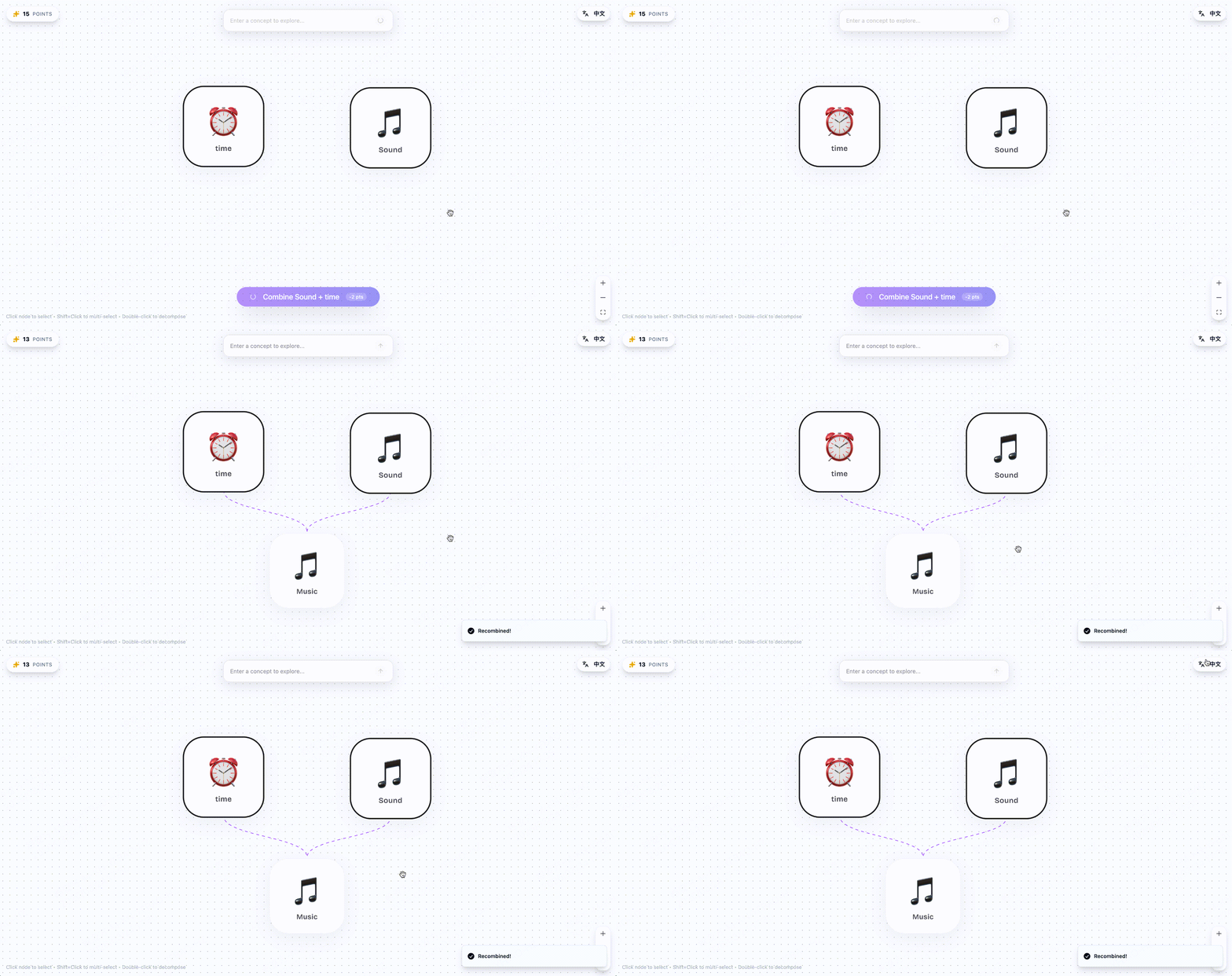
- Shift + click 2 nodes → "Recombine" button appears — mash them together
- Double-click any node → Instant decomposition — fast exploration
- Hover over any processed node → See the AI's reasoning in a HoverCard
I also added a lightweight gamification layer: you start with 20 points (decompose costs 1, recombine costs 2), creating a gentle constraint that makes you think about which paths to explore. Points persist locally, and you can always reset.
Phase 4: UI Design Polish
With the functionality working, the next focus was making Essence look as good as it felt.
The first major design decision was typography. I chose Bricolage Grotesque as the global font — a geometric, modern sans-serif that instantly lifted the app out of default system-font territory and gave it a distinctive brand identity.
The node card visuals went through several iterations. The final design landed on large rounded-rectangle cards (rounded-2xl) with soft pastel backgrounds — amber-50, emerald-50, and violet-50 randomly assigned — with a large emoji as the visual anchor and a short word label at the bottom. The canvas ended up looking like a scattering of colorful sticky notes: light, playful, and uncluttered.
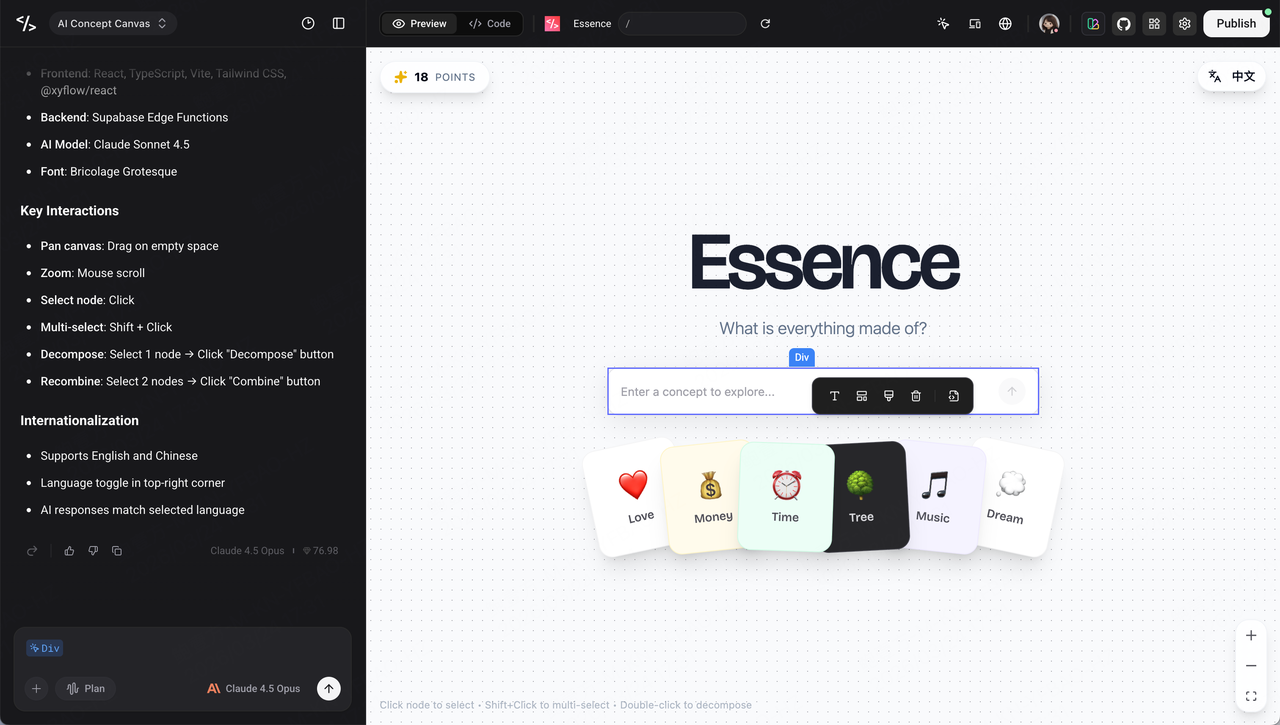
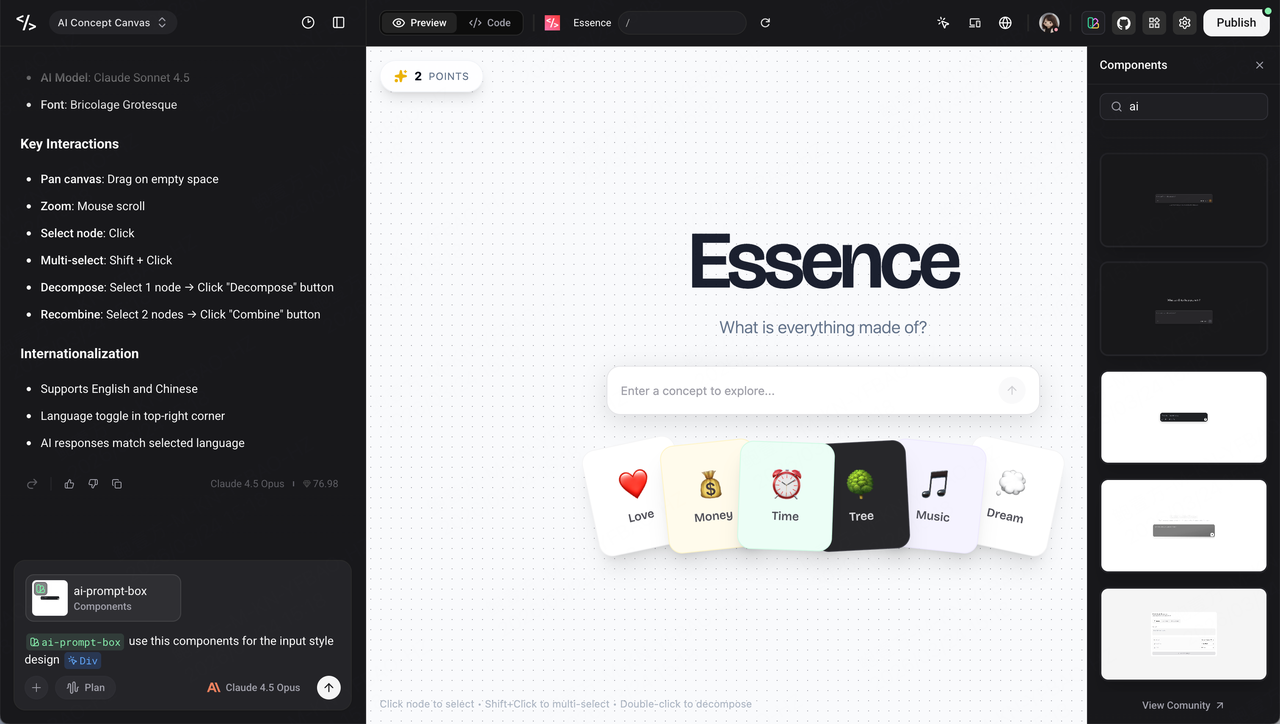
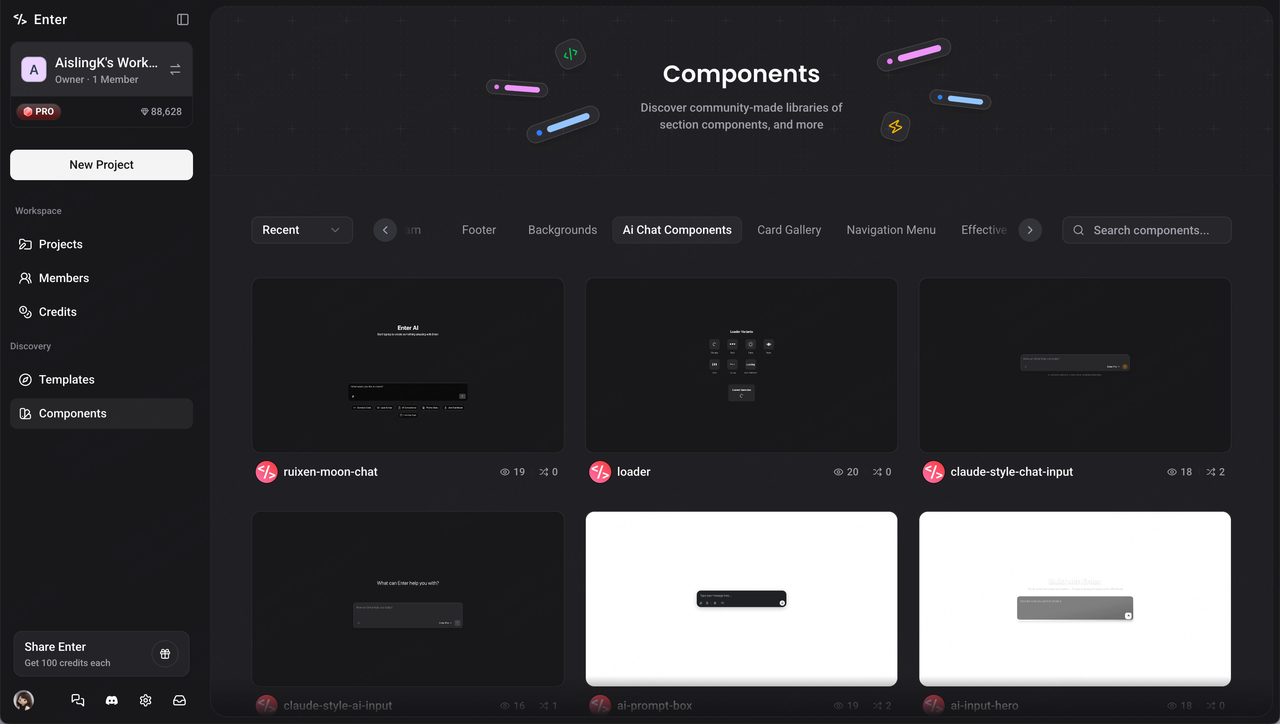
The input box is the app's "first impression," so I had the highest standards for it. This is where Enter's Enter Components feature really shone — a built-in AI component library where you can search, preview, and add components with one click. I typed "ai" in the search bar and discovered a component called claude-style-chat-input — an elegantly styled conversational input. I clicked "+ Add to Chat," and Enter automatically integrated it into my project, adapting the styling to match the existing design language. The plain HTML input instantly transformed into a polished conversational input experience — rounded borders, soft shadows, inline button layout — perfectly cohesive with the app's visual identity.
No need to write components from scratch or fiddle with CSS. Enter Components lets you assemble high-quality UI like building blocks, and Enter automatically adjusts styling to maintain visual consistency.
Finally, I added a set of quick-start concept cards — ❤️ Love, 💰 Money, ⏰ Time, 🌳 Tree, 🎵 Music, 💭 Dream — displayed as tilted, colorful mini-cards on the welcome screen, lowering the cold-start barrier so users immediately understand what they can type.
Phase 5: Internationalization
Essence is built for a global audience, so bilingual Chinese-English support wasn't a nice-to-have — it was essential.
But internationalization isn't just about translating UI text. In Essence, AI output also has to match the user's selected language — in Chinese mode, decomposing "爱" should return Chinese results like "人 + 信任"; switch to English mode and decomposing "Love" should return "Person + Trust." This means the frontend language toggle has to propagate all the way down to the AI prompt layer.
For implementation, I used Zustand for lightweight language state management. The entire i18n system works like this: user clicks the language toggle in the top-right corner → global state updates → all UI text switches instantly → AI calls receive the current language parameter → prompt templates select the Chinese or English version → AI output automatically matches the user's language. Language preference is also persisted to localStorage, restoring seamlessly on the next visit.
In Enter, achieving all of this required just one description: "Add Chinese/English toggle with a language button in the top-right corner. All UI text, AI prompts, and AI output should automatically switch based on the selected language." Enter scaffolded the entire pipeline — from state management to prompt template branching to local persistence — in one go.
This also validated an important lesson: the earlier you build in i18n, the better. If you wait until all features are complete before adding internationalization, you'll find hardcoded text scattered throughout your prompts and UI strings baked into every component — and retrofitting is painful. Build the multilingual architecture from day one, and after that you're just adding translation content.
What Makes Essence Special
Decompose: See the invisible structure of everything
Type any word. AI breaks it into exactly 2 atomic concepts — each with a semantic emoji and a one-sentence explanation. Then keep going. Break those down, too. Watch a concept tree grow before your eyes.
🎭 Drama → 😢 Conflict + 👥 Characters 😢 Conflict → ⚡ Tension + 🎯 Goals 👥 Characters → 👤 Person + 💬 StoryRecombine: Create new ideas from the atoms of old ones
Select any 2 nodes on the canvas — even from completely different branches — and combine them. AI will find the surprising connection.
🔥 Fire + 💧 Water = ♨️ Steam 😴 Sleep + 💭 Imagination = 💫 Dream 👤 Person + ✈️ Wings = 👼 AngelPlay, don't just think
The 20-point system turns abstract exploration into a playful game. Every click is a choice. Which branch do you explore? Which atoms do you combine? It's a sandbox for curiosity.
The Tech Stack — Assembled by Enter
| Layer | Technology | Role |
| Frontend | React 18 + TypeScript | Application framework |
| Canvas | @xyflow/react (React Flow) | Interactive node-based canvas |
| Styling | Tailwind CSS + shadcn/ui | Design system & components |
| Backend | Supabase Edge Functions | Serverless AI API gateway |
| AI Model | Claude Sonnet 4.5 (Anthropic) | Concept generation engine |
| Build | Vite | Fast dev server & bundler |
| State | Zustand | Lightweight i18n state |
| Deploy | Enter.pro | One-click publish |
I didn't configure any of this manually. Enter.pro assembled the full stack based on my descriptions and iterative prompts.
Lessons Learned
Two-Layer Prompting, Two Mindsets
Building AI apps with Enter is two simultaneous conversations: talking to Enter is like collaborating with a full-stack engineer — clear requirements needed; talking to the in-app Claude is like collaborating with a creative partner — emotional guidance and example-based teaching needed. Getting both layers right is the real craft.
Give AI a Personality, Not Just Rules
Changing the system role from "You are a concept decomposition assistant" to "You are a fun decomposition game" transformed the entire output style in one sentence. Rules constrain format; personality defines quality.
Positive Examples + Anti-Patterns Beat Long Descriptions
✅ Scissors → Blade + Hinge ❌ Pincer appendages, Symmetrical evolution, NeurotransmittersThese three lines convey more than 100 words ever could. Positive-negative contrast is the most underrated prompt engineering technique.
Random Seeds Give Exploration Products Replayability
The same concept yields different results every time — today "Love = Person + Trust," tomorrow "Love = Vulnerability + Courage." Random seeds + temperature 0.8 maximize variety while maintaining quality. The lifeblood of an exploration product is "something new every time."
Constraints Create Play
The 20-point system turned aimless clicking into strategic exploration. Classic game design principle: meaningful choices require limited resources.
Vibe Coding Done Right: Focus One Phase at a Time
Foundation first → then AI personality → then interaction polish → then visual design → then i18n. Each phase focuses on one dimension, keeping the conversation with Enter sharp and the output predictable.
🔗 Build your own with Enter: enter.converge.ai