
Low Code App Development: Build Apps Faster with AI
Discover how low-code app development helps businesses build web and mobile applications faster using visual tools and AI. Learn the benefits, compare low-code and no-code, and see how Enter Pro accelerates software development.
In today's hyper-competitive digital landscape, speed to market is everything. Businesses face immense pressure to modernize legacy systems, automate workflows, and launch digital products at lightning speed. However, a persistent global shortage of traditional software developers often stalls these initiatives. Low-code app development has evolved to solve this problem, transforming from a temporary trend into a strategic cornerstone for modern enterprise architecture. By abstracting complex coding behind intuitive visual interfaces, it bridges the gap between technical teams and business stakeholders.
Whether you are a startup looking to build a rapid MVP or an enterprise IT leader aiming to optimize your software delivery pipeline, this comprehensive guide will explore the ins and outs of low-code app development platforms, how they differ from no-code, and how AI is fundamentally reshaping the future of software creation.

What Is Low-Code App Development?
At its core, low-code app development is a visual approach to software development. Instead of writing thousands of lines of complex code from scratch, developers use a graphical user interface to build applications. Think of it as building with digital building blocks, where you drag and drop preconfigured components such as form fields, buttons, data tables, and integration connectors. You can then define the business logic visually and deploy the application with a single click.
While it drastically minimizes manual hand-coding, it does not eliminate it. Developers can still write custom code in languages like JavaScript, Python, or SQL to extend the application's functionality, build bespoke integrations, or optimize complex logic. This makes low-code app development tools incredibly versatile, balancing the speed of automation with the flexibility of traditional programming.
Low-Code vs. No-Code App Development
The phrases are frequently paired together as low-code/no-code app development, but they serve different audiences. Understanding the distinction is vital when choosing the right solution for your organization.
| Feature | Low-code app development | No-code app development |
| Primary audience | Professional developers, IT teams, and tech-savvy business analysts | Business users, marketers, and HR professionals (often called citizen developers) |
| Coding required | Minimal. Custom code extends functionality or handles complex logic. | None. Relies entirely on visual configuration. |
| App complexity | Enterprise-grade applications with advanced integrations and scalability | Simple internal tools, landing pages, workflow automations, and forms |
| Flexibility | High. Developers can extend applications beyond visual components. | Limited to the platform's built-in templates and features. |
If you need an application that integrates deeply with legacy databases, enforces strict enterprise-grade security protocols, or requires a highly customized user experience, low-code is the definitive choice. No-code is excellent for quickly validating an idea or automating a simple department-level workflow, but low-code scales to meet enterprise demands.
The Core Benefits and Use Cases of Low-Code
Beyond faster development, low-code delivers measurable business value by improving collaboration, reducing costs, and making innovation more accessible across teams. These benefits explain why organizations of all sizes are adopting low-code platforms.
- Accelerated Time-to-Market: Low-code can accelerate application development lifecycles by up to 10x. This allows organizations to move from ideation to production in days or weeks rather than months.
- Bridging the IT-Business Divide: Low-code's visual nature allows business stakeholders to sit alongside developers and actively participate in the design process, ensuring the final product aligns perfectly with operational needs.
- Lower Total Cost of Ownership (TCO): Fewer specialized coding resources are required to maintain applications. Because the platform handles underlying architecture updates behind the scenes, long-term technical debt drops drastically.
- Democratized Innovation: With proper IT governance, business professionals can build their own solutions to daily roadblocks, turning a development bottleneck into a distributed network of innovation.
What Can You Build with Low-Code?
Modern platforms are robust and support a vast array of application types. It is heavily utilized for low-code mobile app development to build native or progressive web applications for iOS and Android simultaneously using a single visual codebase. Additionally, enterprises use it for legacy modernization, wrapping user-friendly digital interfaces around ageing systems without a high-risk overhaul. It is also perfect for building secure enterprise-grade portals and enabling rapid MVP development for startups testing market validation.
Why Businesses Are Adopting Low-Code App Development
Businesses need to build applications faster without increasing development complexity. A low-code app development platform helps accelerate development, improve collaboration, and deliver scalable applications more efficiently.

Faster development with lower costs
One of the biggest advantages of low-code is its ability to shorten development cycles. Visual builders, reusable components, and pre-built integrations eliminate much of the repetitive coding involved in traditional development, allowing teams to deliver applications in weeks instead of months. Faster delivery also reduces development costs, helping businesses launch more projects without significantly increasing engineering resources.
Better collaboration and productivity
Low-code platforms make application development more collaborative by bringing developers and business teams into the same workflow. Stakeholders can review prototypes, provide feedback, and validate business processes before deployment, reducing misunderstandings and costly revisions. This collaborative approach ensures applications are built around real business needs rather than assumptions.
Enterprise-ready security and scalability
Modern low-code app development platforms are designed for more than simple internal tools. They include enterprise features such as role-based access, authentication, data encryption, compliance support, and API integrations. As business requirements evolve, developers can extend applications with custom code, making low-code suitable for both growing businesses and large enterprises.
Support for responsive web applications
Organizations increasingly need applications that work seamlessly across desktop, tablet, and mobile browsers. Low-code platforms simplify the creation of responsive web applications from a shared development environment, reducing maintenance while delivering a consistent experience across devices.
How AI Is Transforming Low-Code App Development
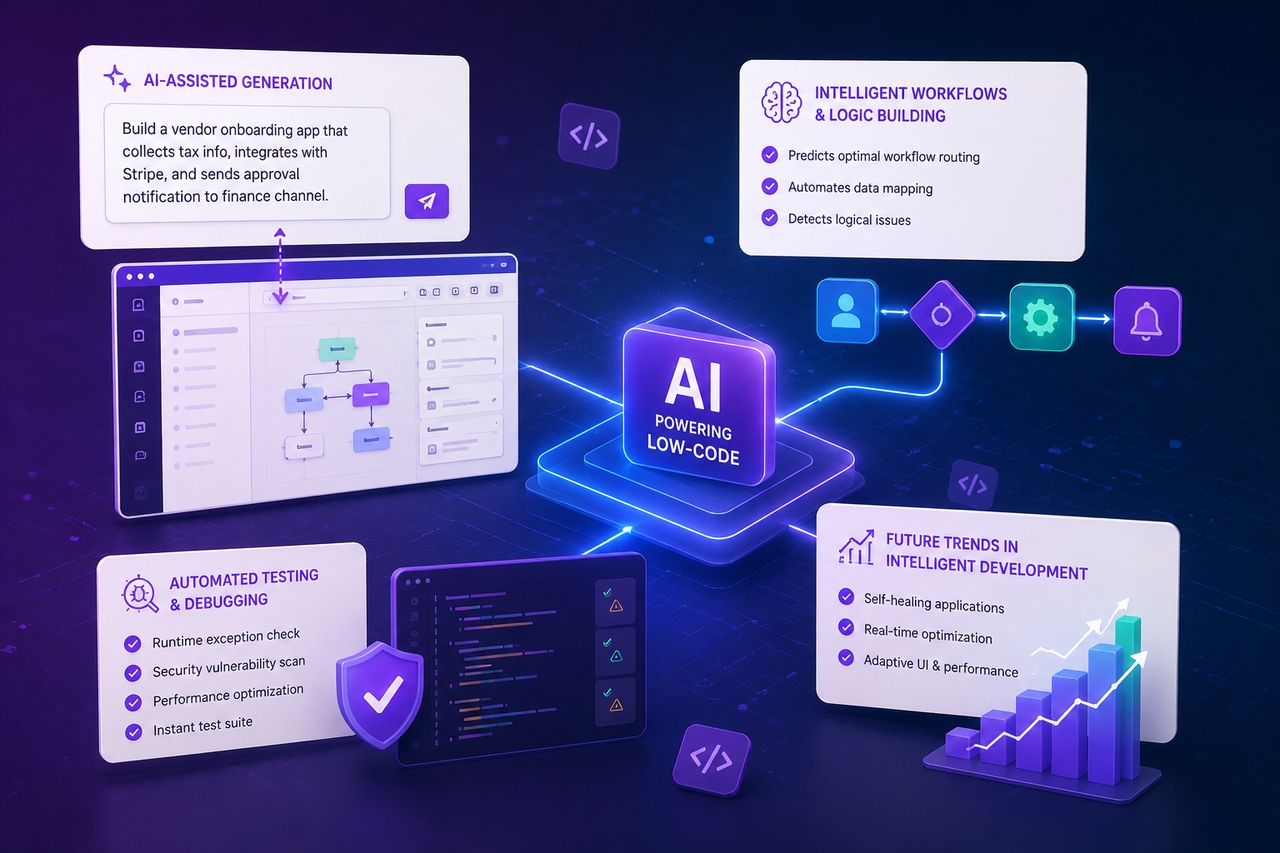
The emergence of generative artificial intelligence has permanently altered the software engineering trajectory. Today, the most powerful paradigm shift is happening at the intersection of visual programming and generative intelligence, resulting in top low-code app development with AI.
AI-Assisted Generation
Instead of manually mapping out data models or dragging fields onto a canvas, developers can simply type a conversational prompt: "Build me a vendor onboarding application that collects tax info, integrates with Stripe, and sends an approval notification to the finance channel." The AI automatically generates the relational schema, configures the UI layouts, and drafts the necessary logic flows.
Intelligent Workflows and Logic Building
AI acts as a predictive assistant inside the logic engine. It analyzes the business goals of your software and automatically suggests optimal workflow routing, automates repetitive internal data mapping, and intercepts potential logical dead ends before the application is even deployed.
Automated Testing and Debugging
When a developer steps out of the visual canvas to write custom code or specialised SQL queries, inline AI software development tools automatically optimise the scripts. AI checks for runtime exceptions, catches security vulnerabilities, runs instant automated test suites, and suggests real-time performance enhancements.
Future Trends in Intelligent Development
As we look forward, leading low-code app development tools will transition from pure code generation to autonomous optimization. Future systems will feature self-healing application layers that monitor user behavior and system loads in real time, automatically adjusting database indexes and modifying UI layouts to eliminate bottlenecks without human intervention.
Build AI-Powered Applications with Enter Pro
Building custom software often requires balancing visual development, code customization, and deployment workflows. The Enter product suite brings these capabilities together in one ecosystem. Enter Pro helps you generate and visually customize applications, Enter Code enables AI-assisted coding and project refinement directly in your terminal, and Enter CLI streamlines development with command-line automation. Together, they support everything from rapid MVPs to production-ready business applications.

Key Features
- AI-powered app generation: Describe your app in natural language, and Enter Pro generates a functional application with layouts, workflows, and business logic. This helps teams move from idea to prototype much faster.
- Visual editor: Customize your application using a drag-and-drop editor. Update layouts, content, branding, and components without rebuilding the app from scratch.
- Production-ready integrations: Connect your application with databases, APIs, authentication providers, and third-party services to fit seamlessly into your existing business workflows.
- Full code ownership: Maintain complete control over your application's source code and deployment. Extend functionality and scale your app as your business grows.
Step-by-Step App Customization Guide
Setting up a production-ready application within Enter Pro is designed to be straightforward and fast:
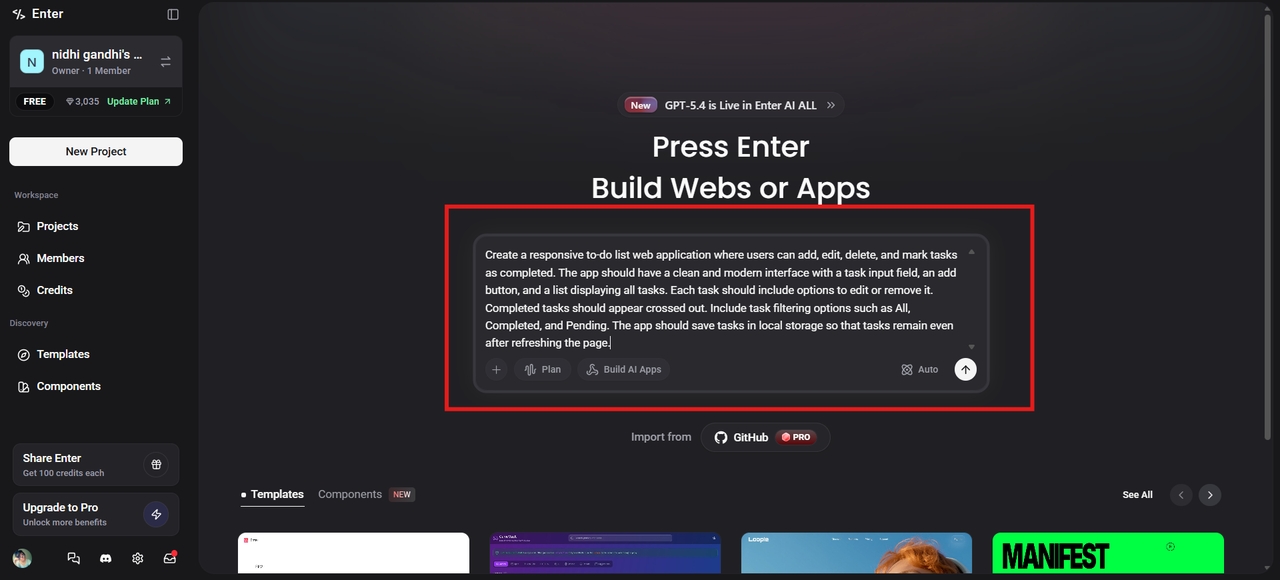
Step 1: Describe your application
Open Enter Pro and enter a prompt describing the application you want to build. Include details such as the app's purpose, features, workflows, design preferences, and branding. Select your preferred AI model and click Generate to create the first version of your application.
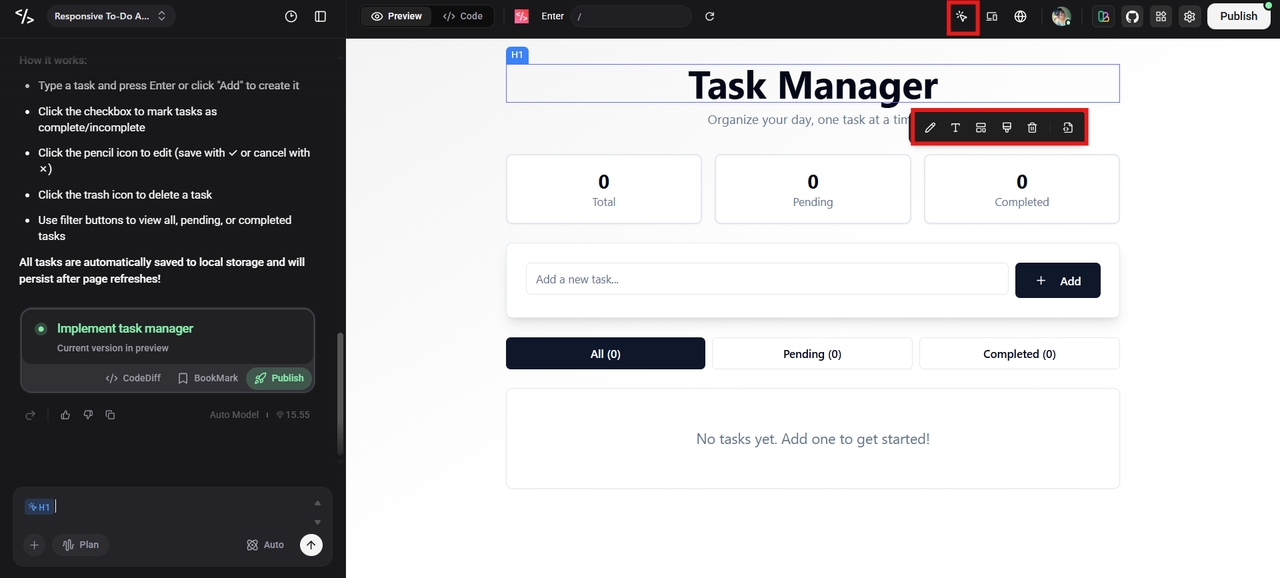
Step 2: Customize your application
Once the application is generated, use the Visual Editor to refine it. You can modify layouts, update text, adjust colors, add or remove components, and connect databases or third-party services to match your business requirements.
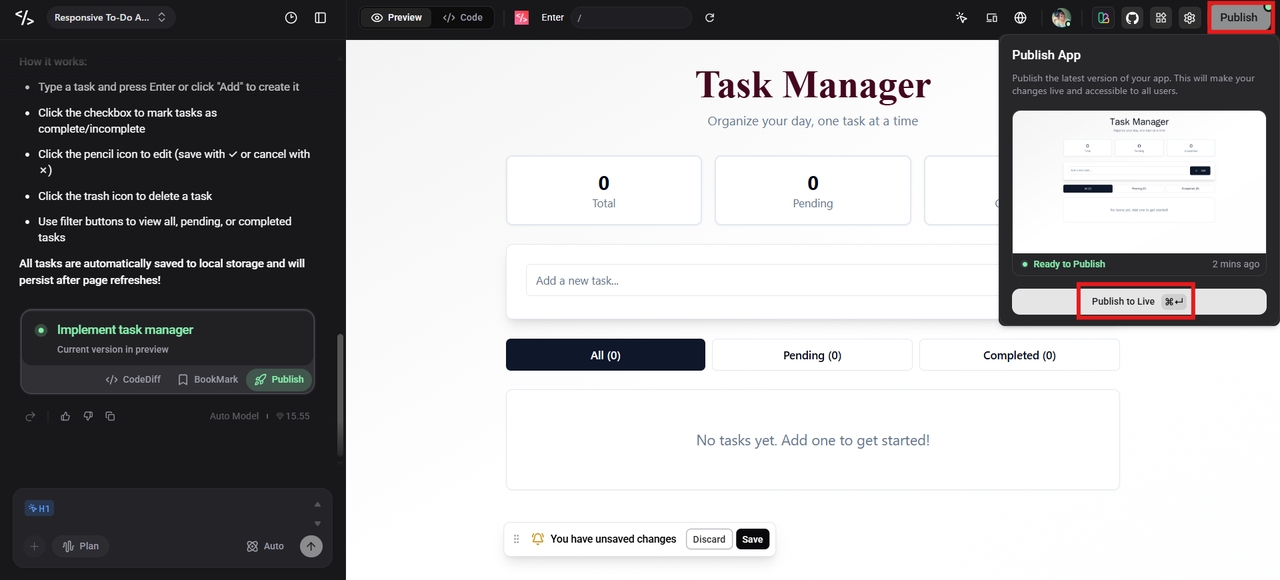
Step 3: Preview and publish
Test your application to ensure everything works as expected, then preview the final version. When you're satisfied, click Publish to deploy your application. You can continue making updates and improvements anytime as your business needs evolve.
Conclusion
Low-code app development has become an essential approach for businesses looking to build software faster without sacrificing flexibility. By combining visual abstraction, open extensibility, and the power of generative AI, low-code platforms allow organizations to build scalable, resilient software at a fraction of traditional time and cost.
As you plan your next digital product, internal tool, or enterprise system, consider your architectural needs. Aligning your engineering and business goals with the right low-code ecosystem—complemented by modern acceleration software like Enter Pro—will allow you to unlock your organization's full innovative potential, staying agile and resilient for years to come.
FAQs
What is low-code app development?
Low-code app development is a software development approach that uses visual interfaces, reusable components, and minimal coding to build applications faster. Developers can still write custom code when advanced functionality, integrations, or complex business logic are required.
Is low code better than no code?
It depends on your project requirements. No-code platforms are ideal for simple applications and workflow automation, while low-code platforms provide greater flexibility, scalability, and customization for business-critical or enterprise applications.
Can low-code platforms build mobile applications?
Many low-code platforms support responsive web applications that work well across desktop and mobile browsers. Enter Pro currently focuses on responsive web apps and internal tools, with native mobile support planned for a future release.
Are low-code applications secure?
Yes, enterprise-grade low-code platforms include features such as role-based access, authentication, data encryption, and compliance controls to help protect applications and sensitive business data. However, security also depends on following development best practices and proper governance.
How does Enter Pro simplify low-code app development?
Enter Pro combines AI-powered app generation with visual development tools to help businesses build applications more efficiently. Teams can generate applications from natural language prompts, customize them using a visual editor, and deploy production-ready solutions while retaining full control over their code and integrations.