Is Mocha AI Worth It? Complete Features and Pricing Guide
Stop struggling with code. Our Mocha AI review shows how this powerful AI app builder turns simple text descriptions into fully deployed web applications in minutes. Also, learn about Enter Pro as a better alternative to Mocha AI.
Building modern web applications traditionally required extensive coding knowledge, expensive development teams, and months of dedicated time. Mocha AI emerges as a compelling solution for non-technical founders looking to build custom digital products rapidly.
Operating as an intuitive AI application builder, Mocha transforms natural language descriptions into functional, deployed applications in minutes. Instead of grappling with complex tech stacks, users can simply describe their vision to receive a working prototype complete with frontend layouts, database management, and authentication protocols.
In this comprehensive review, we examine whether Mocha truly delivers on its bold promises of democratizing application development for everyday creators.
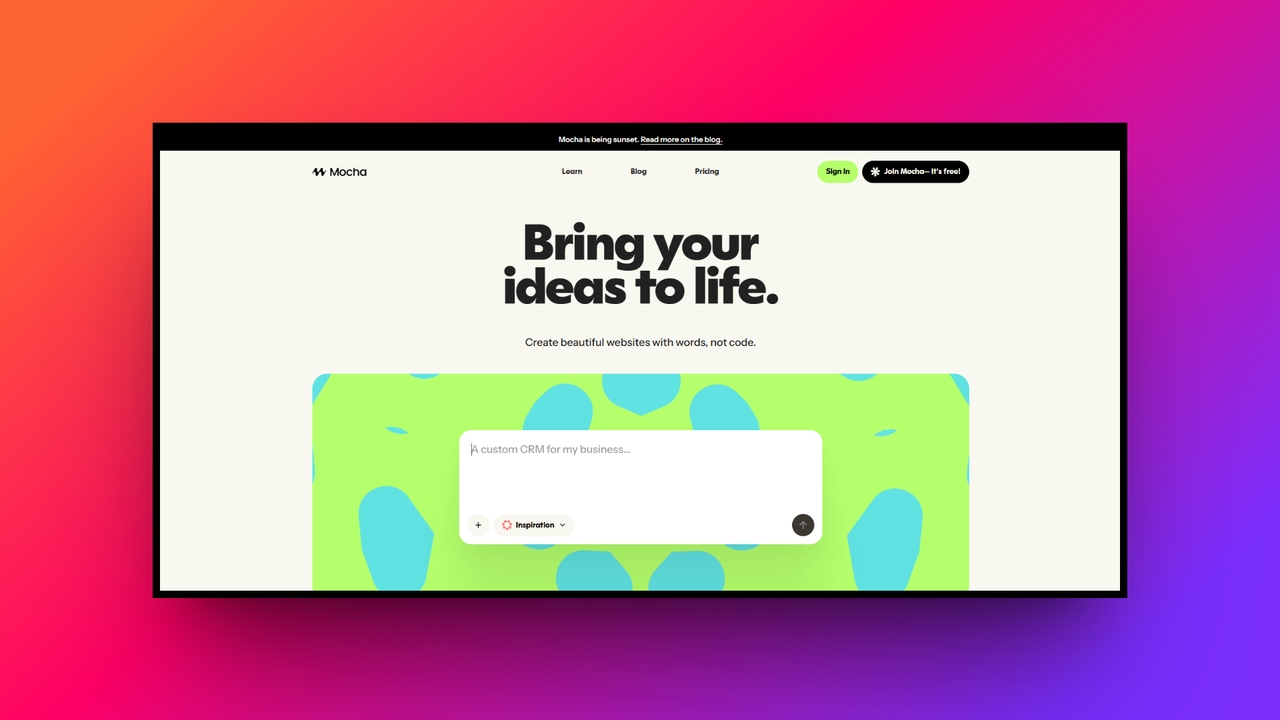
Defining features of Mocha AI
The following features of Mocha AI separate it from the crowd. Let's go through them one-by-one.
AI-powered prompt development
Mocha's standout capability is translating simple text prompts into fully functional applications. You do not need any coding background to get started. By thoroughly describing your desired pages, custom data fields, and specific user behaviors, the AI intelligently constructs working screens. This prompt-based development environment significantly accelerates initial project setup and lowers the traditional barriers to entry for aspiring creators.
Integrated backend architecture
Beyond generating static frontend interfaces, Mocha automatically provisions your essential backend infrastructure seamlessly. Whenever you request features requiring data storage or user management, the platform wires up reliable databases and secure authentication providers behind the scenes. This eliminates the headache of manually connecting disparate cloud services, allowing builders to focus entirely on their core product logic rather than server configurations.
Cohesive design generation
Instead of relying on generic, overused templates, Mocha generates visually consistent custom designs tailored to your application's unique purpose. The AI ensures that fonts, spacing, and button styles remain uniform across every generated page. While perfectionists may still need minor adjustments, this feature prevents the disjointed layouts typical of early prototypes, offering users an incredibly polished starting point immediately.
Rapid live deployment
Mocha drastically reduces the notorious time-to-first-deploy metric that frustrates many beginner developers. Within minutes of finalizing your initial prompts, the system compiles your project and provides a live, clickable prototype URL. This rapid feedback loop encourages immediate testing and validation, ensuring that you can share your working concept with stakeholders or early users without enduring prolonged development and hosting delays.
Source code exportability
A common fear with no-code builders is platform lock-in, but Mocha cleverly mitigates this risk by offering flexible code exporting capabilities. If your application eventually outgrows the visual editor or requires highly specialized custom integrations, you can seamlessly export the underlying source code. This crucial escape hatch empowers development teams to continue scaling the software externally without starting completely over.
How to use Mocha app builder?
To start using Mocha AI, be sure to follow the recommended steps below for a smooth experience.
Step 1: Define your core application idea
Start by crafting a highly specific, detailed text prompt. Describe the exact pages, required input fields, user roles, and core functionalities you envision. The more precise your initial instructions are regarding data flows and interface elements, the better Mocha can accurately generate your application’s foundational backend and frontend system architecture.
Step 2: Refine and iterate via chat
Once the initial version deploys, carefully review the live prototype. If specific business logic or design elements miss the mark, use Mocha’s conversational interface to submit additional text prompts. This iterative process allows you to swiftly adjust database filtering rules, fix validation errors, and tweak visual aesthetics without altering code.
Step 3: Deploy or export the code
After perfecting the application’s functionality, you must decide on hosting. You can easily keep the app hosted on Mocha’s fully managed infrastructure for immediate public access. Alternatively, if your project requires advanced customizations or distinct server environments, export the source code completely to manage deployment through your preferred external platforms.
Note: Mocha AI is shutting down on August 1st, 2026. All sign-ups are closed. Read the announcement.
Mocha application pricing tiers
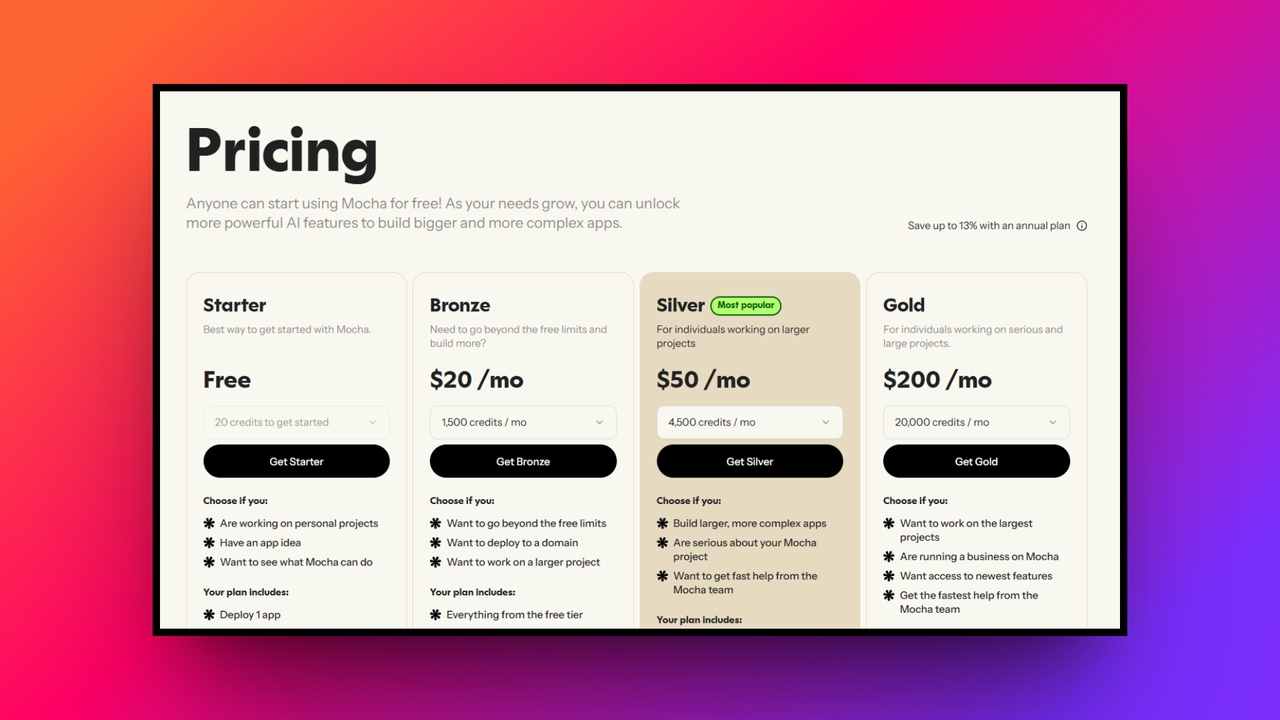
Mocha AI offers incredibly flexible pricing tiers specifically designed to perfectly accommodate everyone, from curious, casual hobbyists to serious, dedicated software entrepreneurs. While the included free tier is absolutely excellent for carefully exploring fundamental capabilities, strict credit limitations mean intensive app building requires a paid plan. Annual billing options always provide significant discounts for loyal long-term users.
| Plan Name | Monthly Price | Key Features Included |
| Free Tier | $0 | One app, limited credits, core tools |
| Bronze Plan | $20 | Five apps, custom domains, increased credits |
| Silver Plan | $50 | Higher app limits, generous AI credits |
| Gold Plan | $200 | Extensive development, massive credits, early access |
Carefully evaluate your iteration style before purchasing. Because complex logic often demands multiple AI re-prompts, heavy users should consider the Silver or Gold plans to avoid unexpectedly exhausting their monthly credit allocations, ensuring completely uninterrupted and smooth software product building experiences without suddenly hitting frustrating subscription paywalls mid-project.
Should you get Mocha AI: crucial pros and cons
Before you get into the Mocha AI ecosystem, it makes sense to learn about the platform's strengths and weaknesses.
| Advantages | Disadvantages |
| Beginner friendly setup: Anyone can quickly build applications simply by describing their desired outcomes, requiring absolutely no prior coding knowledge.Fast live prototypes: Mocha drastically reduces deployment times, allowing you to instantly generate functional web pages and test concepts immediately.Built-in app foundation: Crucial elements like secure authentication, reliable database storage, and web hosting are automatically integrated without manual configurations.Flexible code exports: If your project outgrows the platform, you can easily export the full source code for external scaling. | Complex logic limitations: Creating highly advanced database filters or intricate business logic often requires multiple tedious reprompts to achieve results.Lacks full transparency: Because Mocha abstracts backend services, seasoned developers lose strict control and visibility over their underlying running infrastructure. |
Mocha AI app builder: who should use it and who should not
Who should be using it?
Mocha AI is tailor-made for non-technical founders, solopreneurs, and product managers who need to quickly validate their startup ideas without investing heavily in traditional engineering resources. It is perfect for building Minimum Viable Products (MVPs), internal business trackers, or simple SaaS prototypes where speed-to-market matters more than intricate customization.
Who should "not" be using it?
Conversely, Mocha is not the ideal solution for enterprise development teams or software engineers who require absolute architectural sovereignty and complex backend integrations from day one. If your application relies on highly specific compliance frameworks, deeply nuanced edge cases, or heavy data processing algorithms, you will likely find Mocha’s abstracted environment too restrictive. Those needing fine-grained control over server deployment and database queries should look for more advanced development alternatives.
Exploring Enter Pro: a scalable alternative
While Mocha struggles with complex logic and lacks architectural transparency, serious builders are increasingly turning to Enter Pro.
Acting as an advanced AI project manager, Enter Pro solves these exact limitations through its unique "Plan" mode. This platform ensures engineering integrity and true full stack mastery, letting you confidently build completely scalable applications and websites, with complex backend systems and absolute control.
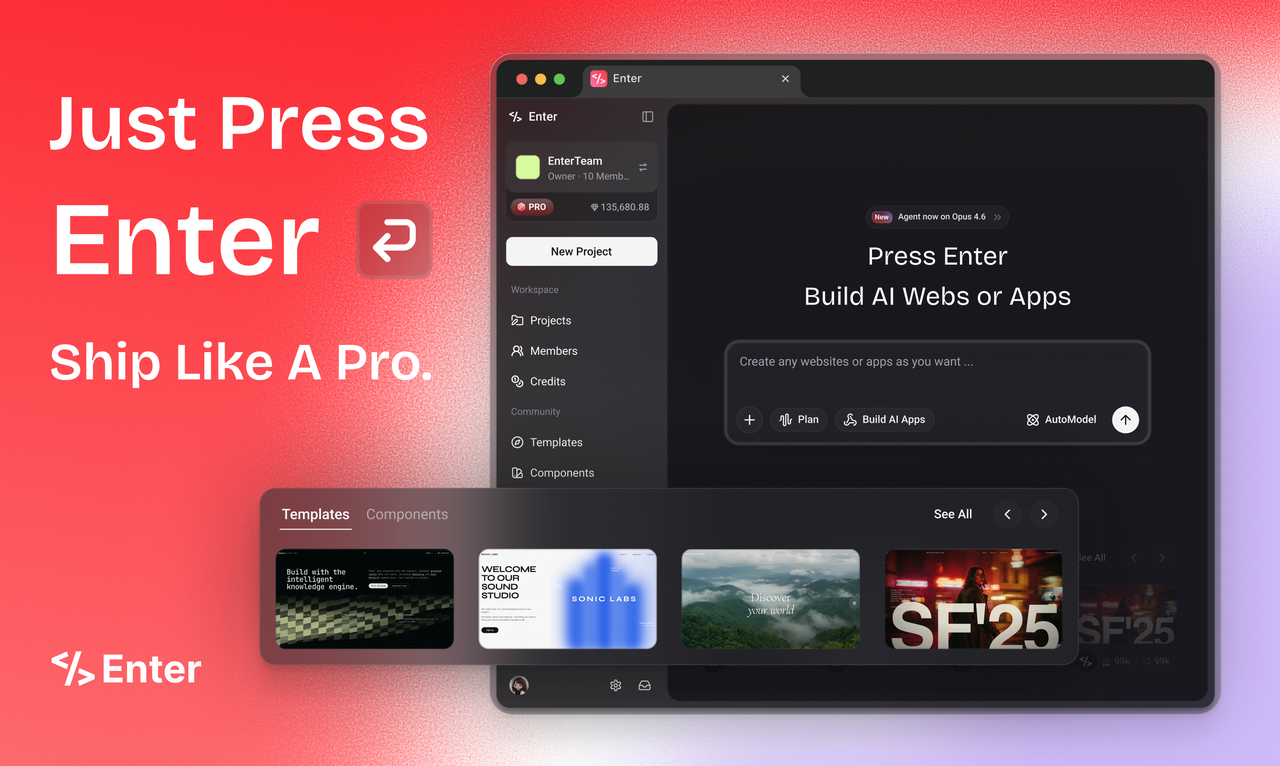
Key features of Enter Pro for building apps and websites:
- AI architectural "Plan" mode: Unlike traditional vibe-coding tools that jump straight into stacking arbitrary code, Enter Pro introduces a dedicated "Plan" mode. It acts as an AI Project Manager, structuring your database schemas, data flows, and overall system architecture before a single line of code is written, ensuring maximum engineering stability.
- True full stack mastery: Enter Pro moves beyond simplistic front-end prototypes to build fully production-grade applications. It automatically integrates complex backend logic, authentication protocols, and scalable databases. With built-in cloud integrations like Supabase and Stripe, you can launch comprehensive, monetization-ready digital products with zero manual infrastructure setup.
- The 60-minute founder experience: Through its highly streamlined "Plan-Build-Launch" workflow, Enter Pro enables creators to transform a single conceptual sentence into a live, shippable product in roughly an hour. The unified engine orchestrates top-tier AI models behind the scenes, delivering a seamless development experience without the hassle of managing API keys.
- Software sovereignty and SaaS liberation: Enter Pro champions the concept of owning rather than renting software. By allowing you to build and host custom private agents and internal tools, it replaces expensive, generic SaaS subscriptions. You gain absolute control over your customized digital workforce, securing complete data privacy and substantially reducing ongoing overhead costs.
How to use Enter Pro for building apps or websites?
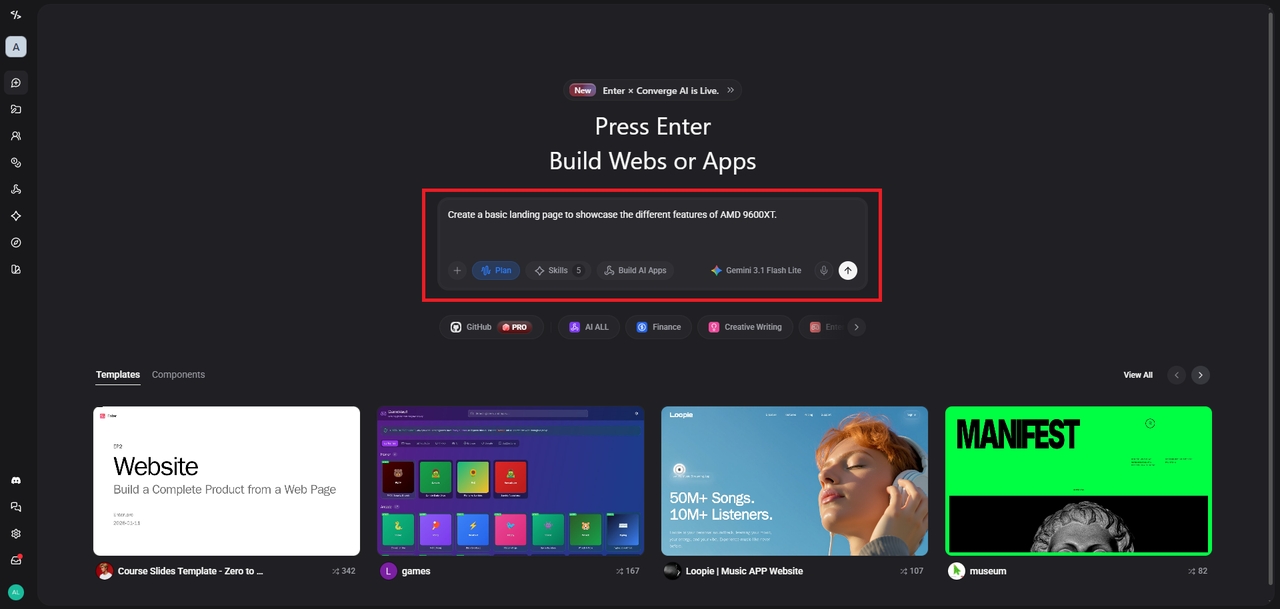
Step 1: Enter "Plan" mode
Begin by clearly describing your product vision to the AI. Enter Pro will process this input and generate a comprehensive structural roadmap. Review the proposed database architecture, user flows, and backend logic, making any necessary strategic adjustments before moving to development.
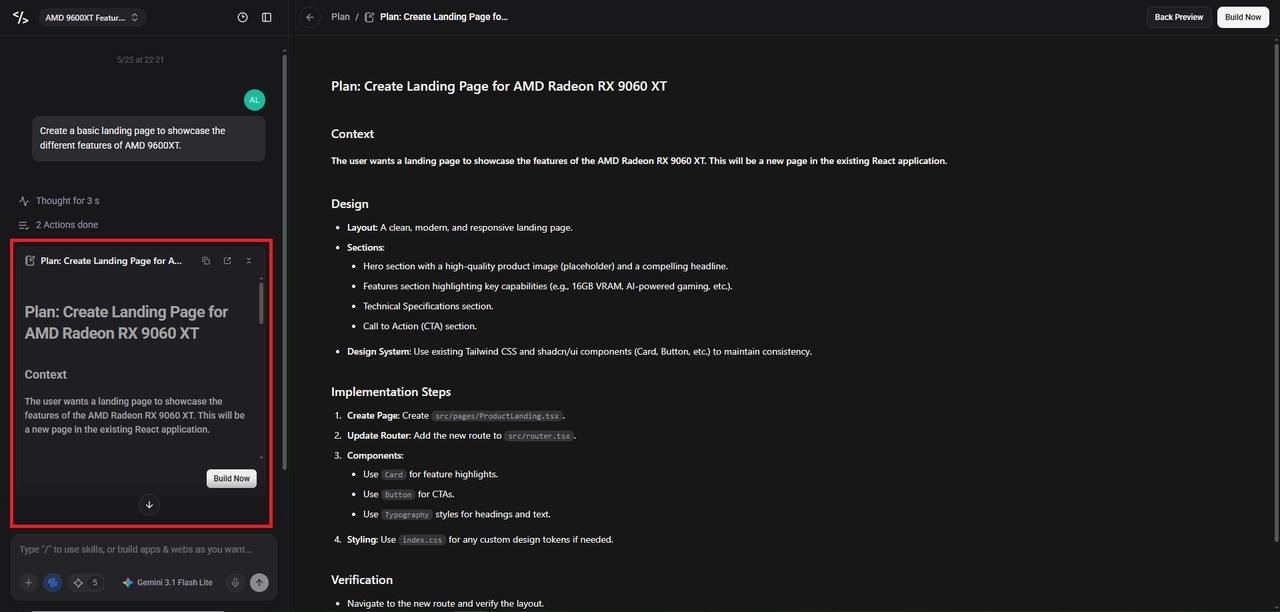
Step 2: Generate the full stack
Once the architecture is approved, the AI engine autonomously writes both the frontend interface and the underlying backend infrastructure. It seamlessly connects databases, API endpoints, and authentication modules to construct a production-ready software environment.
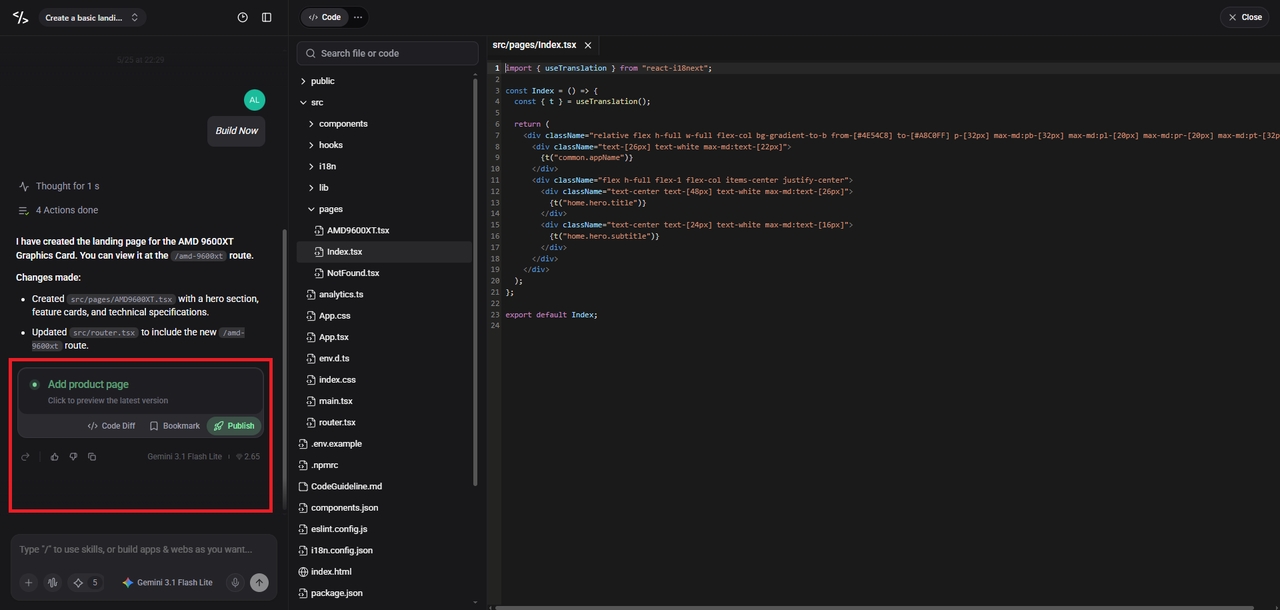
Step 3: Publish and maintain
Deploy your application instantly to a live custom domain using built-in cloud hosting. Afterward, utilize Enter Pro’s continuous AI editor to push functional tweaks, visual updates, or entirely new features with simple conversational commands, ensuring your product scales dynamically.
Wrapping up
Mocha AI offers a remarkably accessible pathway for beginners eager to launch web applications swiftly. Its text-based interface and automated deployment remove intimidating technical barriers, making it an excellent starting point for simple prototypes.
However, its struggles with sophisticated business logic inevitably limit its scalability. For creators desiring robust backend control, Enter Pro emerges as the superior choice. By prioritizing architectural planning and full stack mastery, Enter Pro guarantees production-ready reliability.
Ultimately, choose Mocha for rapid, uncomplicated ideas, but switch to Enter Pro when you are ready to build highly complex, scalable software that demands absolute engineering precision.
FAQs
Does Mocha AI require any coding experience?
No prior coding experience is necessary to utilize this platform. You can efficiently build functional applications by simply typing detailed descriptive text prompts explaining your exact desired layouts and operational software behaviors.
Can I export my source code from Mocha?
Yes, you can completely export the underlying generated source code anytime. This helpful feature ensures you never remain permanently locked into their proprietary hosting environment if your technical requirements expand significantly.
Is the Mocha AI free tier actually useful?
The generous free tier is highly useful for initially testing the interface and understanding basic prompt mechanics. However, complex projects will rapidly consume available credits, ultimately requiring an immediate paid upgrade.
How does Enter Pro handle backend system logic?
Enter Pro specifically excels at handling intricate backend operations by utilizing its dedicated architectural planning mode. It automatically generates highly structured databases, reliable authentication gateways, and incredibly secure global payment integrations.
Which platform should I choose for enterprise applications?
You should undoubtedly select Enter Pro for large enterprise applications. Its superior full stack capabilities, advanced logic handling, and comprehensive deployment infrastructure guarantee optimal performance levels without restrictive technical operational limitations.