TypeScript vs JavaScript: Which One Should You Actually Use?
Still picking sides in the TypeScript vs JavaScript debate? The choice is less about preference and more about your project's actual constraints. Here is how to think through it.
No one warns you about the real risk: pick the wrong language, and you'll spend weeks undoing months of work. The JavaScript vs. TypeScript debate has been running in circles since 2012, flooded with context-free hot takes that completely ignore your team size, deadline, and project scale. Documentation tells you how they should work; this guide tells you how they actually handle under pressure. It's opinionated, unfiltered, and practical.
The difference between TypeScript and JavaScript that changes your actual day
Runtime errors at 2 am versus compile errors at 2 pm. That is the practical gap.
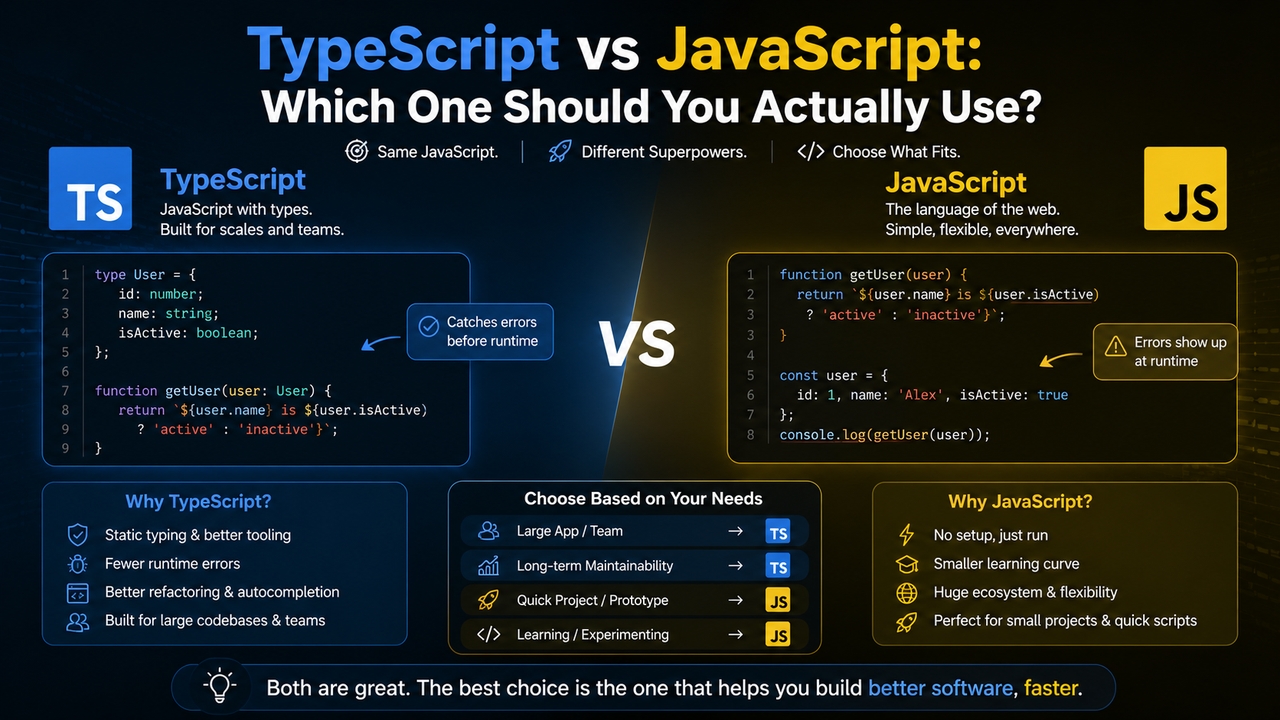
JavaScript resolves types when the code runs. Nothing complains earlier. A variable that starts as a string becomes a number, becomes undefined, and JavaScript shrugs until something actually breaks in production. On a small codebase, that flexibility is fine. On anything with more than a few contributors touching the same modules, it becomes a slow accumulation of risk that is genuinely hard to trace.
TypeScript moves that reckoning earlier. Declare a type, call a function with the wrong input, and the compiler flags it before a single line executes. The feedback loop is tighter. Bugs that would have taken an hour to reproduce in production take thirty seconds to catch in the editor.
But TypeScript does not catch everything. External data, API responses that don't match your declared types, will still blow up at runtime. Type declarations describe what you expect, not what you receive. Teams that treat TypeScript as a complete guarantee tend to find this out at the worst possible moment.
Is TypeScript the same as JavaScript? Not quite
Every .js file is valid TypeScript. Rename it .ts and the compiler accepts it. So in that sense, they share DNA.
What TypeScript adds is a layer that the compiler checks before anything runs. Explicit type declarations. Interface definitions. Generics. None of that exists in JavaScript, and none of it executes at runtime either. TypeScript compiles down to plain JavaScript. What ships to browsers or Node is JavaScript. Always.
The practical gap shows up in the tooling. IntelliSense in a TypeScript project is qualitatively different from a JavaScript one. Autocomplete knows what properties an object has. Refactoring a function name automatically updates every call site. That is not magic. That is the type of information being used at editor time.
For developers who know JavaScript well, the learning curve for TypeScript is a few weeks of friction, not months. Generics trip people up. Advanced mapped types are genuinely difficult. But for everyday usage, the extension feels incremental rather than foreign.
Is TypeScript better than JavaScript?
For early prototypes with one developer moving fast? Probably not. TypeScript adds a compilation step, a tsconfig configuration file, and types errors from third-party libraries that don't ship full definitions. That friction is real and counterproductive when the priority is validating an idea quickly.
Six months later, on a codebase with four people? The calculation looks different. Refactoring JavaScript across hundreds of files means manually tracing every call site when you change a function signature. With TypeScript, the compiler does that. Every broken reference surfaces automatically. On team shipping weekly, those are hours recovered every single week.
The honest version of whether TypeScript is better than JavaScript is this: TypeScript is better at the problems that appear later. JavaScript is faster at the problems that appear first. Picking one requires knowing which set of problems you are closer to.
Plenty of successful products are built on plain JavaScript. Plenty of unmaintainable codebases started on plain JavaScript. The language is not the deciding factor. The codebase discipline around it is.
Is TypeScript frontend or backend?
Both, have been for years. The more interesting question is whether you are using it consistently across both, because that is where the real benefit shows up.
Angular basically requires TypeScript. It was rewritten in it. React and Vue treat it as optional, though their official templates and documentation now default to TypeScript in most cases. On the backend, NestJS is TypeScript-native. Prisma generates typed query results automatically based on your schema. Express works with TypeScript without much friction.
The case for using TypeScript across the full stack is shared types. Define a data model once, use it on both client and server, and any mismatch between what the API sends and what the frontend expects becomes a compile error rather than a runtime bug. Mixed codebases, TypeScript on one side and JavaScript on the other, give up that benefit entirely. The boundary becomes a blind spot.

JavaScript vs TypeScript side-by-side
A direct comparison across factors that actually affect project decisions:
| Factor | JavaScript | TypeScript |
| Type system | Dynamic, resolved at runtime | Static, declared at compile time |
| Error detection | Runtime. You find out when it breaks | Compile time. Catches type errors before code runs |
| Learning curve | Low entry barrier, flexible by default | Steeper upfront, pays back on larger codebases |
| Compilation step | None. Runs directly in browsers and Node | Required. TS compiles to JS before execution |
| Ecosystem | Everything. JS runs anywhere | Most major libraries have type definitions now |
| Team size fit | Small teams, solo projects | Medium to large teams where module contracts matter |
| Refactoring | Manual, error-prone on complex codebases | Significantly safer. IDE finds broken references automatically |
The refactoring row is the one that teams underestimate. Every team that migrates a large JavaScript codebase to TypeScript reports finding real bugs during the migration. Not hypothetical type mismatches. Actual broken behavior that was already in production.
JS vs TS: When to actually pick each
JavaScript fits when the project is small, the team is small, and the timeline is short. A quick internal tool, a script that runs once, a prototype being shown to investors next week. The TypeScript setup cost is real overhead for anything that small.
It also fits when the existing codebase is stable JavaScript, and the team is shipping consistently. Introducing TypeScript mid-project is real work. Some teams adopt a policy of TypeScript for new modules only, leaving existing code alone. That is a reasonable middle ground, though the boundary between the two creates its own friction.
TypeScript fits when more than two people are regularly touching the same code. Type contracts between modules prevent a specific class of integration bug that shows up consistently in JavaScript codebases as teams grow. It fits for products with a roadmap longer than six months, because the compounding benefit of static typing builds over time. And it fits strongly when refactoring is coming. Changing a data model or API shape across a large JavaScript codebase without types is the kind of work that quietly eats entire sprints.
The difference between JavaScript and TypeScript in practice usually comes down to one question: when do you expect the codebase to become hard to change? If the answer is never, JavaScript is probably fine. If the answer is within a year, TypeScript is probably worth the early friction.
Build apps with Enter Pro regardless of the JS vs TS debate
Most of the typescript vs javascript differences stop being your problem when the AI is handling code generation.
Enter Pro generates production-ready applications from plain-language descriptions. The language decision, TypeScript or JavaScript, gets made based on the application type and complexity rather than team preference. For teams that have been going back and forth on the question, that is one fewer thing to debate before shipping.
The more useful question with Enter Pro is what you need to build and how quickly you need it running. The AI writes the code. You shape what the product does and how it works. That is a different relationship with the technology than most teams are used to, but it is a faster one.
Step 1: Open Enter Pro and write a specific prompt
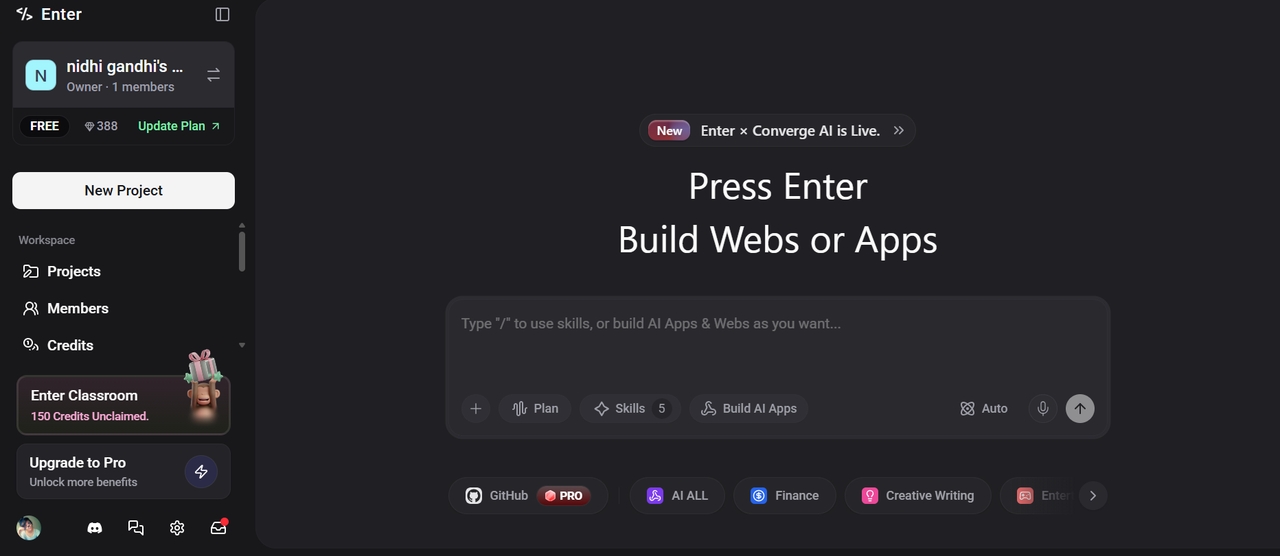
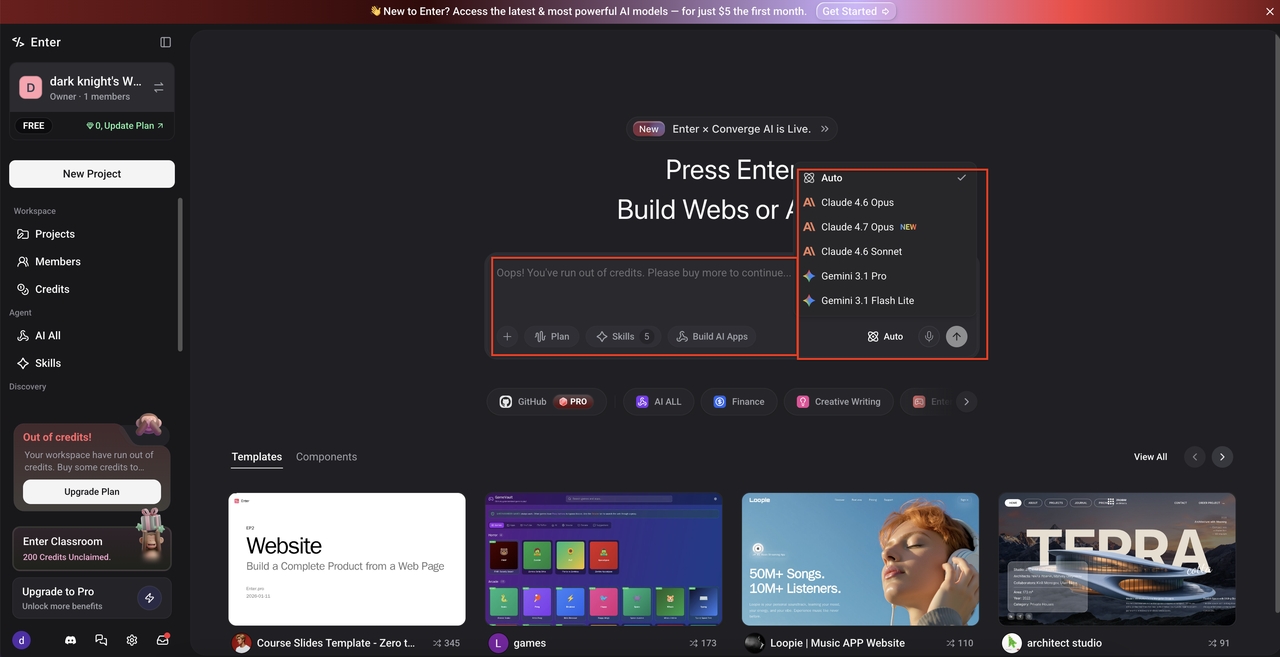
Go straight to the AI chat. Write something specific, not "build me an app" but the actual thing: what it does, who uses it, what the core workflows are, whether it needs auth or payments or a database. Pick your AI model. Claude handles complex logic well. Gemini produces clean frontend output. Hit Generate and the AI produces a full-stack application from your description.
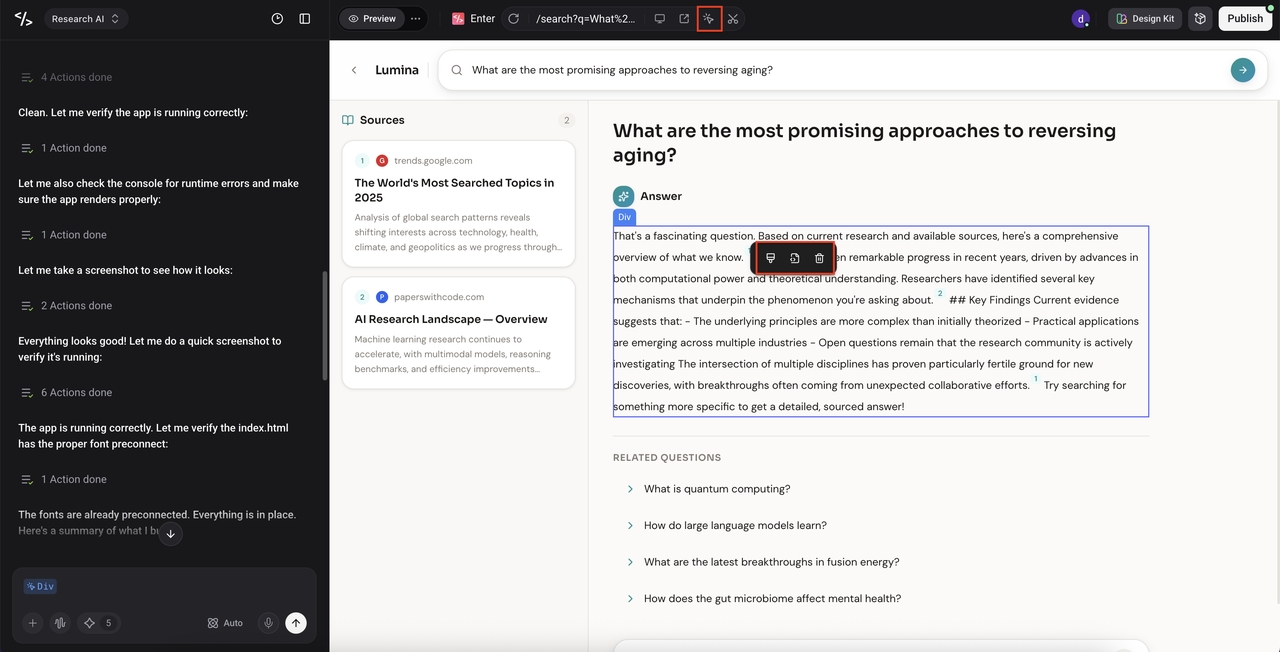
Step 2: Iterate with the visual editor and AI chat
When the first version appears, start reacting. Open the visual editor and adjust what you can directly: layouts, copy, structure. For anything structural, describe it in the AI chat. Run as many passes as needed. The product gets closer to what you need with each one.
Step 3: Publish
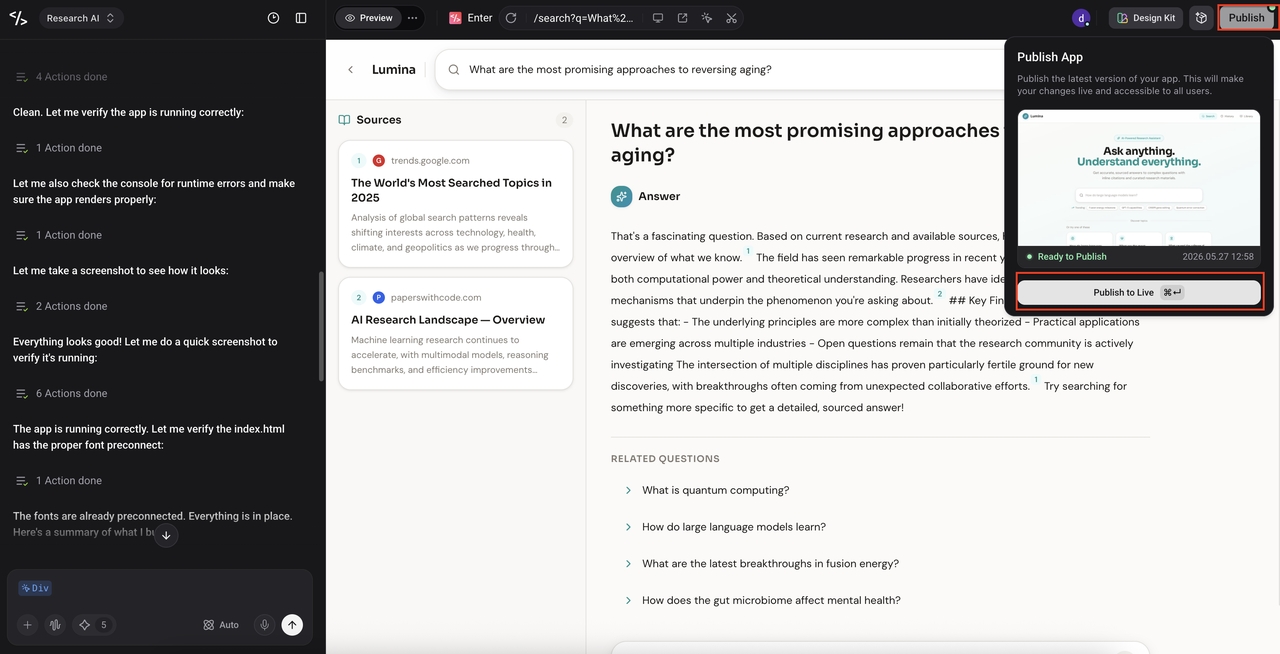
Click Publish. No infrastructure to configure, no deployment pipeline to set up. Enter Pro deploys immediately and you get a live URL. Share it with real users. What you learn from them drives the next iteration. That loop, build then learn then adjust, is how the product actually takes shape.
Enter Pro also works with AI coding assistant workflows for teams that want to extend or modify generated code directly.
Conclusion
The typescript vs javascript question does not have a permanent answer. It has an answer that depends on where your project is right now, and that answer changes as the project grows.
Start with JavaScript if speed matters more than safety. Move toward TypeScript when the codebase starts resisting change. Or use Enter Pro and let the tool decide, then focus on building something people actually want.
If you are still figuring out which direction fits, web app development resources on the Enter Pro blog cover the practical side of building modern applications without getting stuck on language-level decisions.
Frequently Asked Questions
Q1. What is the main difference between TypeScript and JavaScript?
Type errors caught before the code runs versus type errors caught when something breaks in production. TypeScript adds static typing and a compilation step. JavaScript has neither. That is the core difference between TypeScript and JavaScript that drives every other decision.
Q2. Is TypeScript better than JavaScript?
Depends on the project. Solo work, fast prototype, small scope: JavaScript is often faster. Team of four maintaining a product for two years: TypeScript is probably saving more time than it costs. Neither is universally better.
Q3. Is TypeScript a frontend or backend?
Both. Angular, React, Vue on the frontend. NestJS, Node, and Prisma on the backend. The real gain comes from using it consistently across both, because shared types between client and server turn API mismatches into compile errors rather than runtime surprises.
Q4. Can JavaScript and TypeScript be used together?
Yes. New code in TypeScript, existing files left as JavaScript. The compiler handles both. Not the cleanest setup long-term, but practical during a migration.
Q5. Which should a beginner learn first?
JavaScript. TypeScript only makes sense once you understand what JavaScript is doing under the hood. Learn JavaScript properly, then move to TypeScript when projects start feeling hard to maintain without types. Most developers end up using both depending on context and whichever best AI for coding tools they are working with.