
Website Deployment: A 2026 Guide to Going Live for Free
Ready to take your website live? Our guide on website deployment walks you through deploying a website for free, from preparation to testing. Plus, discover how Enter can build and deploy a website effortlessly.
Website deployment is often the final step that stops many people from launching their projects. You've crafted a fantastic site, but the process of getting it online can seem daunting, even technical. From selecting a hosting provider to uploading files, minor errors can easily push your launch date back. This guide shows you how to deploy a website for free while avoiding the common technical hurdles that slow you down.
What is website deployment
Website deployment is the process of publishing your website, so people can access it on the internet. It moves your website files from your computer to a server that runs online. Once deployment is complete, users can visit your site using a web address in their browser.
The website deployment process usually follows a few simple steps. First, you prepare your website files and ensure everything works locally. Next, you upload those files to a hosting platform. After that, the platform publishes your site and generates a public URL so visitors can access it online.
Hosting and deployment are two related terms, although they are not the same thing. Website hosting is the service of hosting your website files on the servers running online. Website deployment is the process of uploading and putting your website files in the hosting environment.
Why website deployment matters
- Makes your website accessible online: It moves your files, assets, and databases to a live server. This allows anyone in the world to find and visit your site at any time.
- Connects code to hosting infrastructure: It bridges the gap between your computer and the production server. This step configures vital settings like domain names and security measures like SSL certificates.
- Ensures updates reach users: A seamless update process guarantees that users receive the latest features and design enhancements without delay. This ensures your site stays modern, safe, and relevant for every visitor.
- Supports scalability and maintenance: A good deployment system makes it simple to grow. You can handle increased traffic or complex tools without breaking your current site.
How to deploy a website for free (Common process)
Want a free website deployment that actually works without headaches? Plenty of solid platforms let you go live at zero cost. Follow these six straightforward steps, and your site will be public in no time.
Step 1: Prepare your website files
Begin by organizing your project files properly. Make sure your homepage is named index.html and all images, CSS, and JavaScript files are included. Clean folders help keep links from breaking after deployment.
Step 2: Choose a free deployment platform
Select a platform that enables you to deploy your website for free. Popular options such as GitHub Pages, Netlify, and Vercel are some of the best choices.
Step 3: Upload your website files
You can upload your project files through the platform dashboard or link your Git repository. Many services let you upload files by dragging and dropping them or automatically deploying them from GitHub.
Step 4: Configure deployment settings
Some platforms require small configuration steps. You may need to choose the project folder, build command, or environment settings before publishing the site.
Step 5: Deploy the website
Once you have configured everything, you can simply click the deploy button or push your code. After that, the platform will run your code and give you the URL for the live website.
Step 6: Test your live website
You can now use the created link to visit your website and check each of its pages. You can test the website's links, images, and how it looks on various devices.
Enter Pro: The new era of zero-config website deployment
If you've ever felt "deployment dread," you are not alone. This is the fear of broken links or confusing server setups. Traditional website deployment often feels like a puzzle of hosting and environment errors. Enter Pro approaches this differently. Built around AI vibe coding, it turns your idea into a working website and handles the deployment automatically. Instead of wrestling with servers, you just describe what you want. Enter Pro acts like a technical co-founder for your project. While other platforms only focus on hosting, Enter Pro handles the full experience. It helps you move from an idea to a live URL without any of the usual friction.
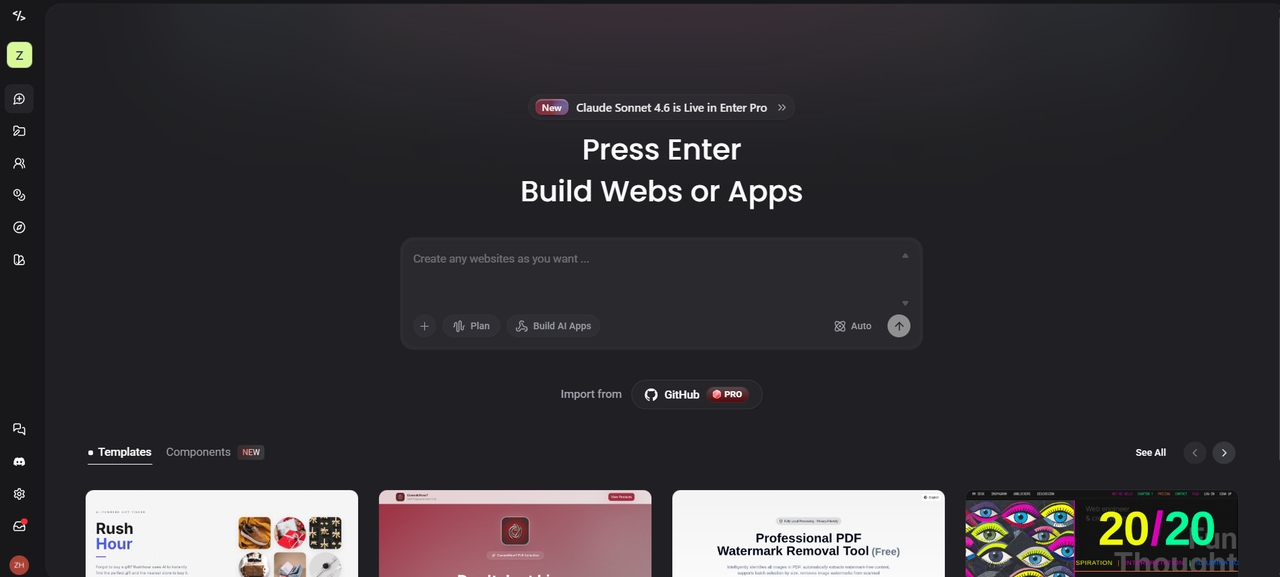
Why deploy with Enter Pro?
- One-click deployment to global edge: Skip the manual FTP uploads. Enter Pro deploys your project to a fast global network with one click. This ensures your site is blazing fast for users anywhere in the world.
- Full-stack readiness out of the box: Most free hosts only let you deploy HTML website files. Enter Pro includes built-in backend tools (databases and storage via Supabase). This means your site has the logic it needs to actually function.
- 100% ownership & zero lock-in: You own every line of code. You can deploy on Enter Pro's optimized setup today. Then, you can export your full source code to your own servers tomorrow.
- Integrated production tools: From the moment you deploy a website, Enter Pro has you covered. It includes built-in tools for Stripe payments and Google Analytics. This makes it a true business-ready environment.
How to build and deploy a website using Enter Pro
Got an idea buzzing in your head? Enter Pro turns that spark into a live site super fast—no setup stress, no boring config. Here are the three easy steps to get from blank page to online in minutes.
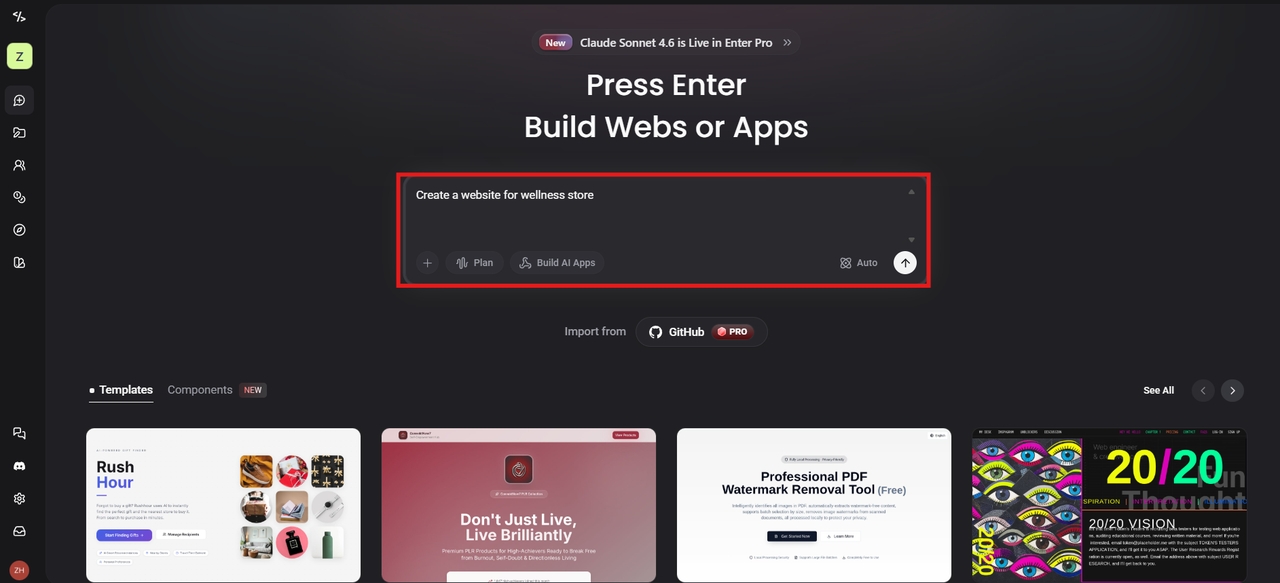
Step 1: Describe your vision
Log in to Enter Pro, and type out what you want to create—a sleek portfolio, a full SaaS tool, an online store, or whatever's on your mind. Be as detailed or loose as you like. Then hit the Generate button. The AI gets the vibe, plans the structure, and starts generating code, design, and even backend logic right away.
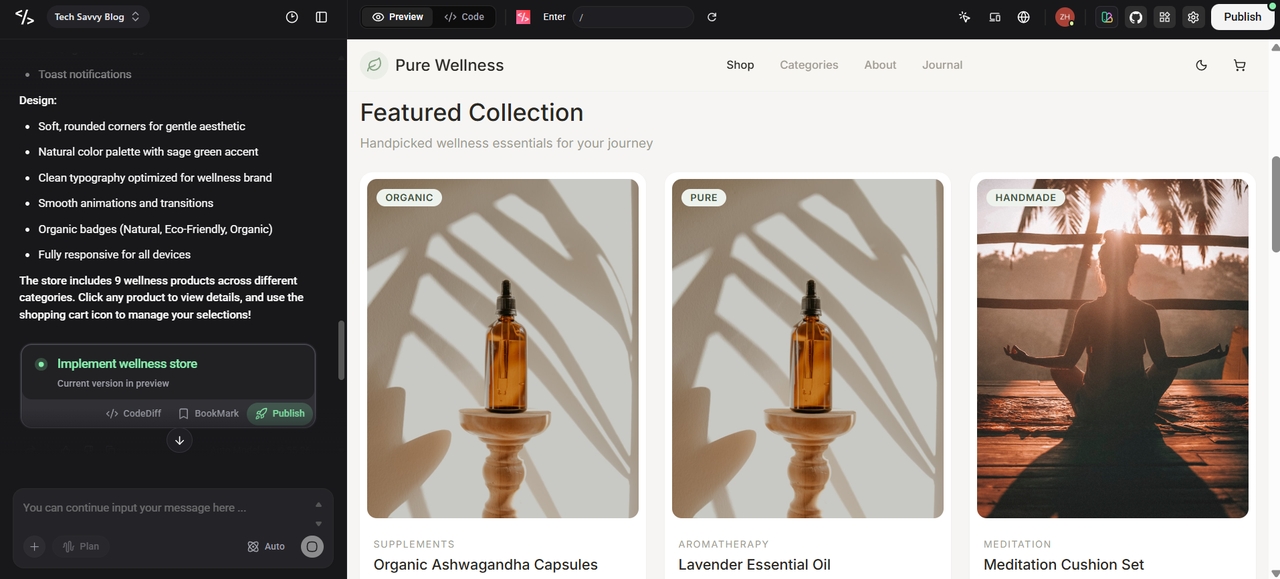
Step 2: Review and refine with the visual editor
Once the AI builds the draft, you can see it in a live preview. Use the visual editor to click on any element you want to change. You can tweak the design manually or ask the AI to refactor the code on the fly.
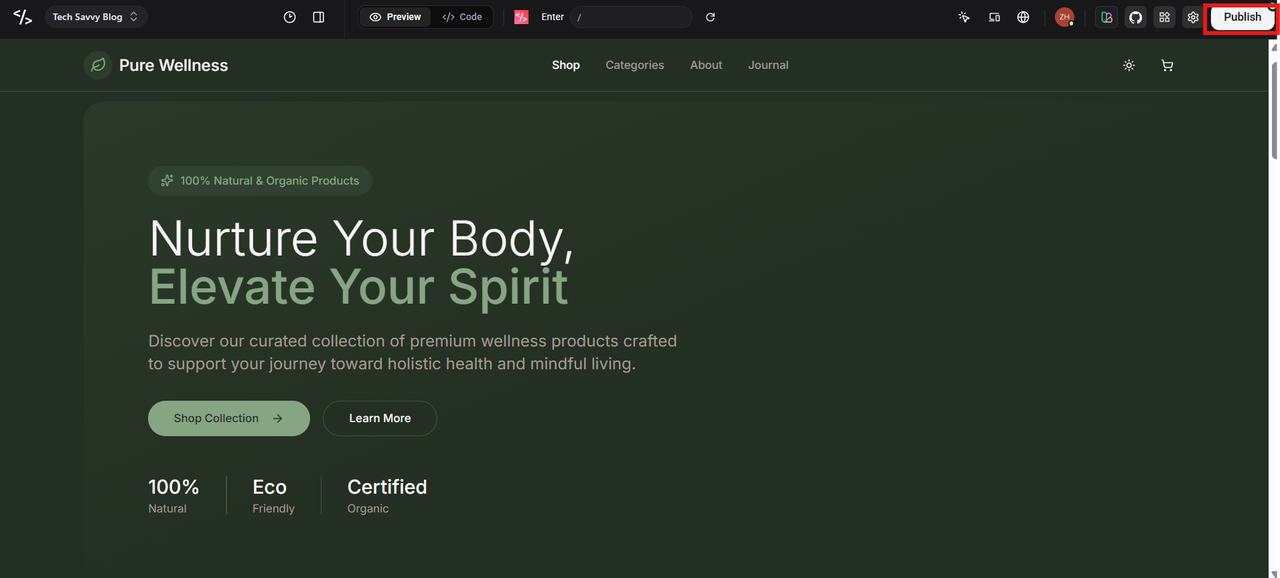
Step 3: Deploy the website
When your website is ready, you can click the Publish button. Automatically, your website will be published, and you will be given a live link to access your website online. Add your custom domain if you have one, and you’re officially live.
Common website deployment mistakes
Even if you use a great tool to deploy site projects, small errors can still break your launch. Most deployment issues come down to simple file management or missing settings. Here are the most common traps to avoid.
- Forgetting the index.html file: Most servers look specifically for a file named index.html to start your site. If you rename it or forget it, your URL will likely show a "404 Not Found" error.
- Incorrect file paths and broken links: On your computer, a link might work fine. However, once you move to a live server, case sensitivity and folder structures matter. Double-check that your images and CSS are linked correctly.
- Uploading the wrong project folder: A lot of modern frameworks create a "dist" or "build" folder. Make sure you're putting out the files that have been compiled, not the source code directory.
- Ignoring mobile responsiveness: A site that looks great on a desktop might not be readable on a phone. Before you hit "live," always test your layout on screens of different sizes.
- Not testing the website before deployment: Never assume your code is perfect. Use a local preview tool to click every button and fill out every form before you share the link.
- Missing domain configuration: If you use a custom domain, you must point your DNS settings to the right host. If these aren't matched up, your site won't load at your chosen address.
- Caching issues after deployment: Sometimes you push an update, but you don't see the changes. The reason for this is that your browser is showing an old version of the webpage, called the cached version.
- Not using version control (git): If the deployment fails, you need to go back. Git allows you to "undo" the bad update and go back to the working version immediately.
Conclusion
The website deployment process is the step that transforms your project into a product that people can use. Within this guide, we have discussed what website deployment is, its importance, and the basic steps to deploy a website for free. We have also discussed some of the common mistakes that can cause problems during the website deployment process. Today, technology has made it easy for people to deploy websites. With the use of Enter Pro, you can now build a website and launch it from the same place. The AI technology used in the workflow has made it easy to deploy a website within a few steps. If you need a better way to deploy your website, you can start creating and launching your next project with Enter Pro.
FAQs
Is it hard to deploy a website?
Not really anymore. For basic sites, free platforms like Netlify or GitHub Pages make it take just a few clicks—no coding commands needed. If you’re new, it might feel tricky at first, but follow a guide and you’re good in minutes. Enter Pro makes it even easier: chat your idea, tweak visually, and hit Publish.
Can I update my website after deployment?
Yes, you can update your website anytime. Simply edit your files and redeploy the project. Platforms like Enter Pro make updates simple because changes can be edited in the visual interface and redeployed instantly.
Is it safe to deploy a website for free?
It is safe when you deploy for free using trusted platforms. Many services even include security features like HTTPS and monitoring. Just don't put your secrets in public code. Enter Pro offers you extra safety through built-in production tools and full code ownership.
Can I use a custom domain with a free website deployment?
Some free services provide a branded subdomain (like yourname.host.com). To use a custom domain, you usually need a paid plan. Enter Pro also allows you to connect your domain, so your deployed website appears under your own brand name.
How long does website deployment take?
If your files are ready, you can deploy a website in under a minute. The actual "upload" usually takes only a few seconds to minutes. Most modern platforms process your code and generate a live URL almost instantly, letting you share your project with the world right away.
What do I need before deploying a website?
There are various things that you need before you can deploy the website. The first thing that you need is a domain name, and you also need a hosting provider. Ensure that the files are complete, including HTML, CSS, JavaScript, and images. Enable SSL for security, set up backups, and configure DNS. It’s also important to check mobile responsiveness and basic SEO before launching the site.
What is the difference between hosting and deployment of a website?
Hosting stores your website files on internet servers, while deployment publishes those files so users can access them. Platforms like Enter Pro combine building, hosting, and deployment, making it easier to launch a website from one place.