
What Is a Query Parameter? The Complete Guide to URL Query Strings template
Ever wondered what a query parameter is and why URLs change when you search or filter content online? Learn how query parameters work, where they are used, and how they power modern web experiences in this complete guide.
Every day, websites use hidden instructions inside URLs to display specific content. When you search, filter products, or browse paginated results, query parameters help browsers communicate those requests to servers. Understanding URL query parameters is important for building web applications, managing APIs, tracking campaigns, and creating smoother digital experiences.
What is a query parameter?
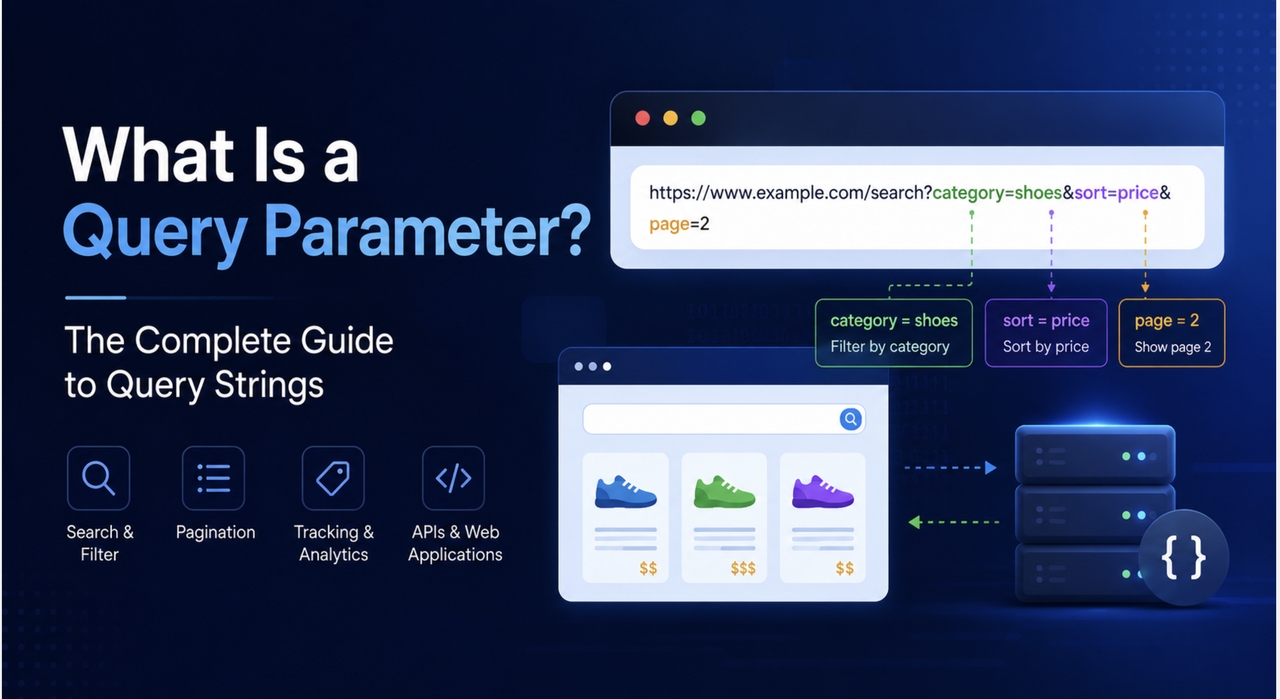
Let us establish a highly clear definition to unpack this core web technology. A query parameter is a highly specific, optional extension appended to the very end of a traditional web link to pass structured data directly into a website configuration or web application backend. You can comfortably think of them as specialized sorting tags or dynamic filters that tell the destination page exactly how to arrange, modify, or restrict the content it displays to the end user.
When you ask the fundamental question what is a query param, you are looking at one of the core building blocks of standard web communication protocols. To use a physical analogy, the main web link gets your browser to the correct digital office building. At the same time, the query params in URL strings serve as specific interior layout instructions, telling the building staff exactly which folder you want opened and how you want the data presented on your desk.
The critical characteristic to remember is that the presence of these components never alters the page's core location. Instead, using query parameters in the URL adjusts the behavior, state, or presentation layer of the destination page. This allows a single webpage to display millions of variations, custom configurations, and personalized user views, depending entirely on the specific parameters passed in the link.
The anatomy of url query parameters
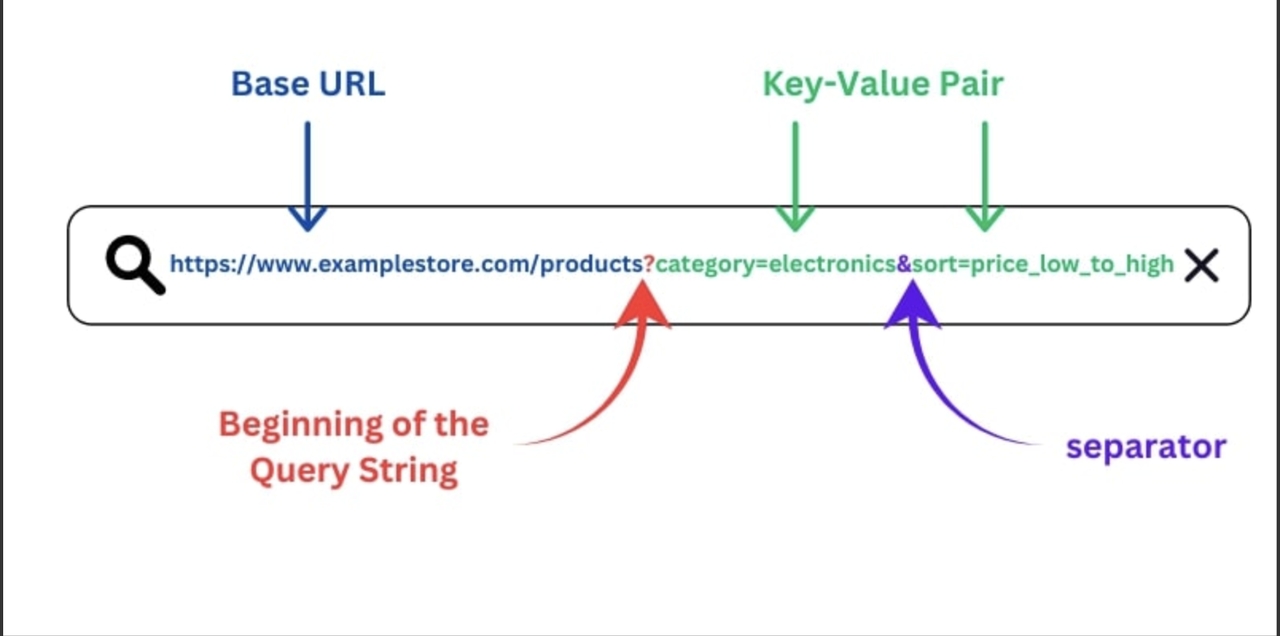
To fully comprehend how URL query params control web behavior, you must look closely at their strict structural layout. Every single query string across the entire internet follows a rigid, standardized format that web browsers and backend application servers read instantaneously.
The entire structure always starts with a single question mark, which serves as a definitive boundary marker separating the main base website link from the data payload that follows. The server recognizes anything sitting to the right of that question mark as part of the active query parameters.
Inside that specific string, data is strictly organized into highly predictable units known as key-value pairs. The key serves as the descriptive label or attribute name, while the value represents the actual data assigned to that attribute. A standard equal sign sits perfectly between the key and the value to bind them together legally within the browser logic.
When a complex web page requires multiple pieces of information at the same time, a simple ampersand is used to separate each distinct pair from the next. This modular layout allows a solitary web link to carry dozens of different custom instructions simultaneously, enabling advanced sorting, multi-level filtering, and tracking actions to execute within a single page load.
Common use cases for query parameters in url structures
Modern web applications depend heavily on URL query parameters to execute a wide variety of essential everyday tasks. You encounter these use cases constantly in your everyday internet activities, even if you never consciously notice the address bar changing.
Sorting and filtering data represent the most frequent implementation across the modern web. When you visit a large retail website and choose to sort clothing items from lowest to highest price, or filter by a specific brand name, the application generates distinct query parameters that tell the backend database exactly which products to show and which to hide.
Pagination is another massive use case that relies entirely on this technology. When you search for information on a search engine and click through to the second, third, or fourth page of results, query parameters tell the server exactly which numerical batch of records to fetch from the database and render on your screen.
Digital marketing departments also use URL query parameters extensively to measure campaign performance with precision. By appending tracking tags to advertising links, companies can accurately determine whether a website visitor arrived from an email newsletter, a paid social media advertisement, an organic search result, or a specific influencer partnership.
URL query params vs path variables
Application developers frequently mistake query parameters for path variables because both techniques involve sending data bits directly through a standard web link. However, these two methods serve completely different architectural purposes in modern software systems.
Path variables are completely mandatory components that define the literal identity of a specific digital resource. They point directly to a unique, permanent location or to an individual item within a database, such as a user profile page or a specific standalone blog article identification number.
In direct contrast, query parameters are entirely optional add-ons to the link. If you completely strip every query parameter from a website link, the page will still load successfully for the user. However, it will simply display the default view rather than your specific filtered preferences.

To put it in the simplest structural terms possible, path variables determine the exact resource you are currently viewing, while query parameters determine the specific arrangement, filter settings, or current state of that identical resource.
Best practices for managing URL query parameters
Implementing query parameters effectively within your web systems requires careful attention to data security, clean engineering standards, and search engine optimization. Poorly structured query strings can quickly cause massive technical headaches and compromise performance.
First and foremost, you must never pass highly sensitive personal information like account passwords, credit card numbers, or private user details through a public query parameter. Because web links are routinely saved in browser histories, recorded in server network logs, and shared with third-party analytics platforms, placing confidential data here creates extreme security vulnerabilities.
Second, developers must remain highly mindful of search engine crawl budgets and indexing patterns. If your website allows identical content to be accessible through multiple varying query links, search engine bots will struggle to understand which version is the primary page, leading to duplicate content penalties that can severely damage your organic search visibility.
Finally, you should always strive to keep your parameter keys clear, concise, and highly predictable. Sticking to strict lowercase naming conventions and avoiding overly complex nested keys ensures that your data structures remain easy for your development team to manage and scale as your application grows larger.
Handle URL query parameters effortlessly with Enter Pro
Building custom web applications that constantly parse, read, validate, and respond to complex query strings typically involves a massive amount of repetitive boilerplate code. Developers often spend hours writing custom handlers just to manage how a page changes when a user clicks a simple filter layout.
Enter Pro completely revolutionizes this entire development workflow by automating your backend data routing and parameter management. When you sit down to design a new application or system inside Enter Pro, the platform utilizes advanced generation tools to automatically structure your database connections to accept, interpret, and validate incoming query parameters.
You no longer have to spend time writing tedious manual parsing scripts or setting up URL logic. Whether you're building a landing page builder, an e-commerce website builder, or a full application powered by AI software development, Enter Pro automates the backend structure while keeping everything flexible and scalable.

Step-by-step query parameter integration in Enter Pro
Setting up dynamic data filtering using query params inside Enter Pro takes only a few simple steps.
Step 1: Launch Enter Pro and add a text prompt
Open Enter Pro in your web browser and enter a text prompt regarding the custom software application you want to make. Mention all important elements, like the type of custom software, the color theme, and other needs. Select the AI model, and click the "Generate" button to get started.

Step 2: Let Enter Pro generate routing and query parameter logic
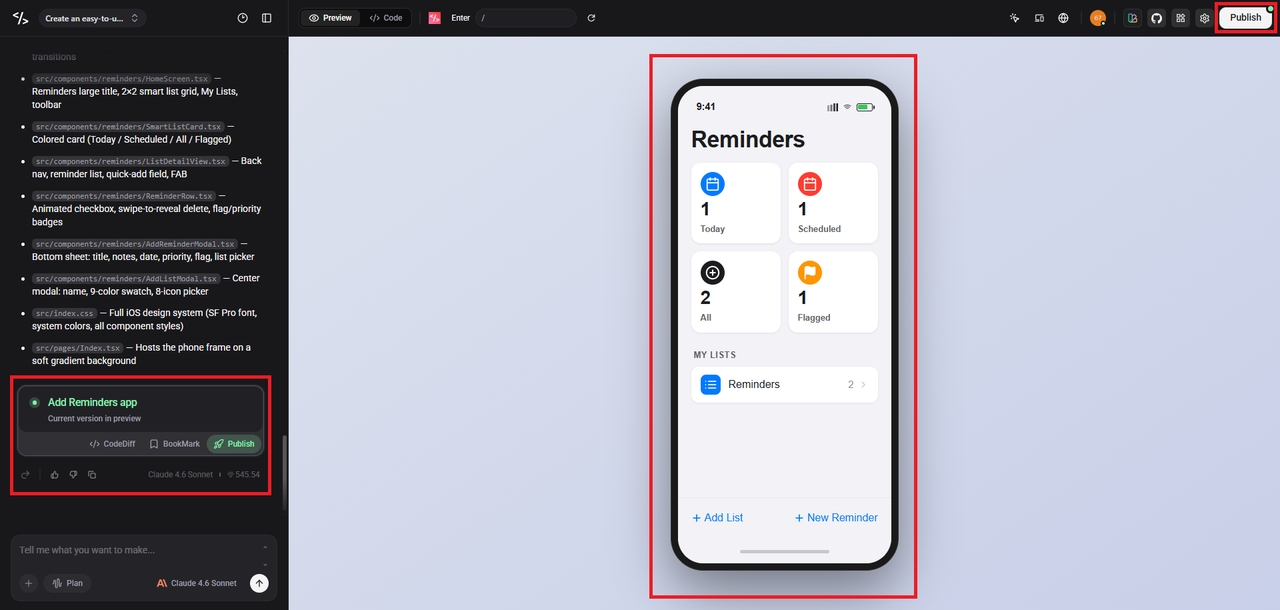
The platform converts your input into a working application and automatically sets up routing. It also configures URL query parameters such as ?category=shoes&sort=price to manage filters, sorting, and page states dynamically.
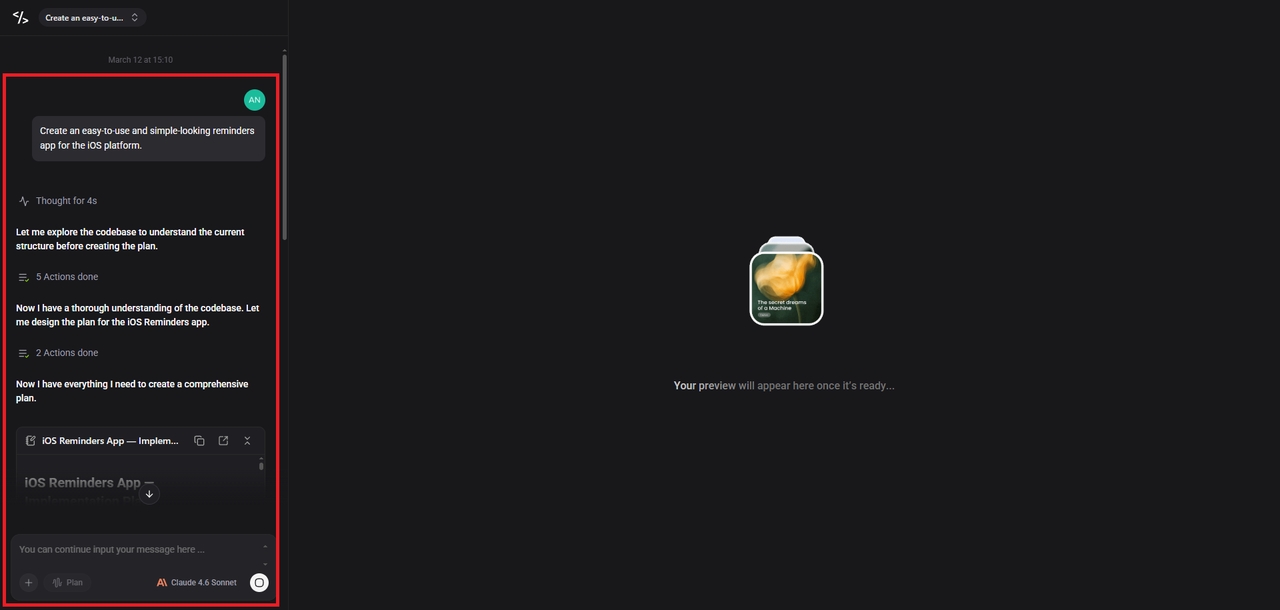
Step 3: Test and refine using the visual editor
Preview how user actions update the URL with query parameters in real time. The built-in visual editor helps you refine UI components, making it easier to design responsive layouts using a responsive web builder approach.
Conclusion
Query parameters are a simple yet incredibly powerful component of modern web infrastructure. They bridge the gap between static web links and dynamic user experiences, driving everything from basic search forms to advanced analytics tracking.
With modern creation tools like Enter Pro, implementing and managing these data structures no longer requires deep architectural knowledge. The platform handles the technical heavy lifting, allowing you to focus on building features that your users love.
FAQs
- What is a query parameter in simple terms?
A query parameter is a piece of text added to the end of a web link that provides specific instructions to a website. It usually follows a question mark and helps filter, sort, or track information on the page.
- What separates multiple query parameters in a url?
While a question mark introduces the very first query parameter, every subsequent parameter is separated by an ampersand. This allows the system to recognize where one instruction ends and the next begins.
- Can query parameters affect search engine optimization?
Yes, query parameters can harm SEO when they create multiple URLs that show the same content, which confuses search engines and leads to duplicate content issues. Enter Pro avoids this by generating clean, SEO friendly routing by default, helping your app follow best practices automatically.
- Is it safe to send passwords through a query param?
No, it is highly unsafe. Query parameters remain visible in browser histories, network logs, and analytics reports, meaning any sensitive data placed there can be easily intercepted or exposed.
- How does Enter Pro help with query parameters?
Enter Pro automatically writes the code required to read, parse, and process query strings. You describe how you want your application to filter data in natural language, and the system sets up the web infrastructure automatically.