What Is a Webhook vs API? Differences, Examples & Uses
Understand what is a webhook vs API and how each powers software integrations. Explore webhook vs REST API basics, examples, and when to use APIs or webhooks. See how EnterPro supports smarter automation and connected workflows.
Modern apps live and die by how well they talk to each other. Yet, many teams still struggle to choose between webhooks and APIs. While both exchange data, they do it in completely opposite ways: APIs pull data via request-and-response, while webhooks push data automatically the moment an event happens.
Choosing the wrong one leads to laggy automation or massive over-engineering. In this guide, we'll break down how each system works, weigh the pros and cons, and look at real-world use cases so you can choose the right tool for the job. Let's dive in.
What is an API?
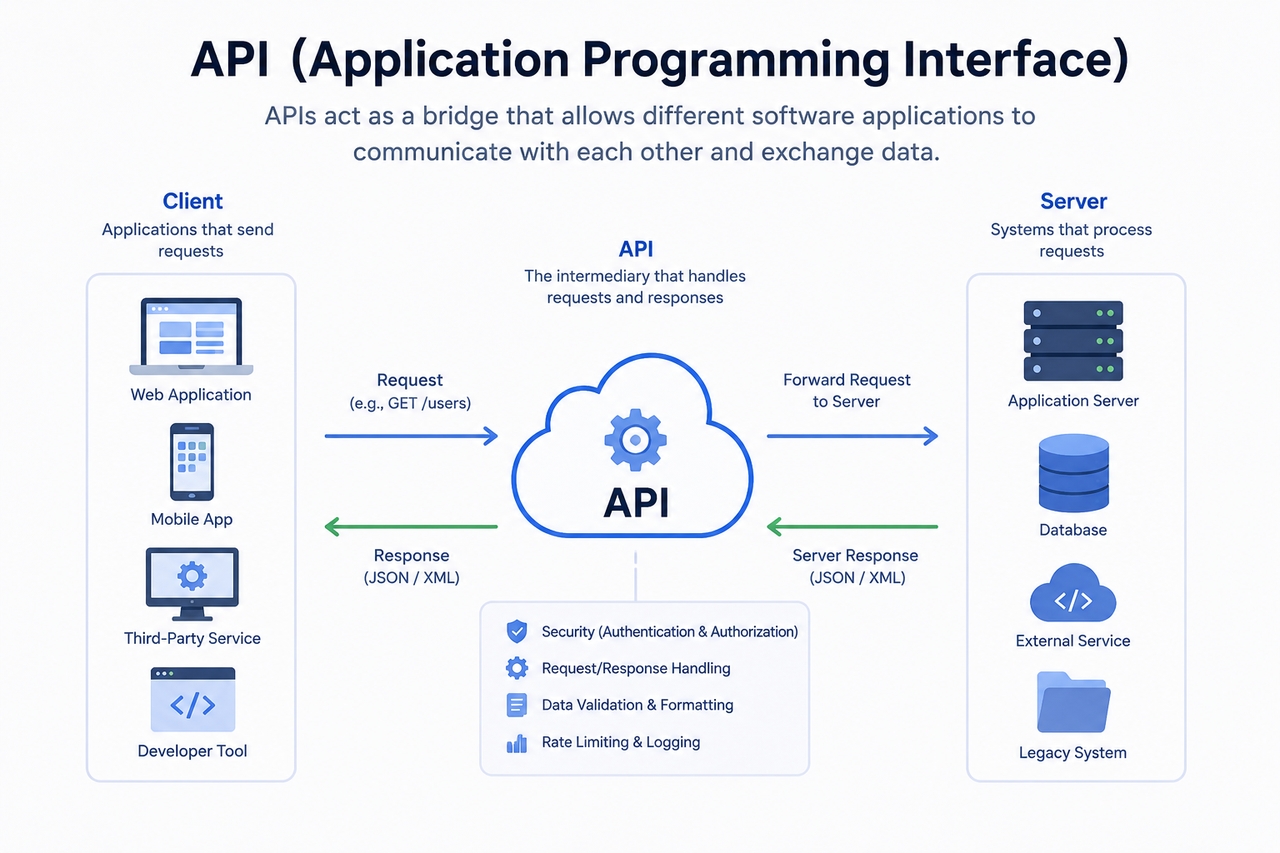
API is short for Application Programming Interface. In the simplest terms, it's a defined set of instructions that allows software development applications to interact and exchange data. Essentially, an API acts as a translator, bridging systems so applications can share data, perform actions, or request services without requiring deep knowledge of the other's internal programming logic. They are the building blocks of modern software, making distinct platforms interoperate seamlessly and resulting in a more unified digital experience
In general, APIs are based on the request-response model. An application sends a request to the API endpoint (an access point for communication). The system that receives the request performs the specified action and then sends a response back to the first application. Commonly, these API requests use HTTP methods such as GET, POST, PUT, and DELETE: GET is typically used to fetch data. POST requests are sent to send/create data on a system. PUT is used to update the record. DELETE can be used to remove data.
Common API examples:
- Weather APIs deliver live forecasts directly to applications, reducing effort.
- Payment gateways use APIs to authorize transactions and confirm payments.
- Social media APIs connect platforms for login, sharing, and analytics.
- Banking and travel APIs enable bookings, account access, and updates.
What is a webhook?
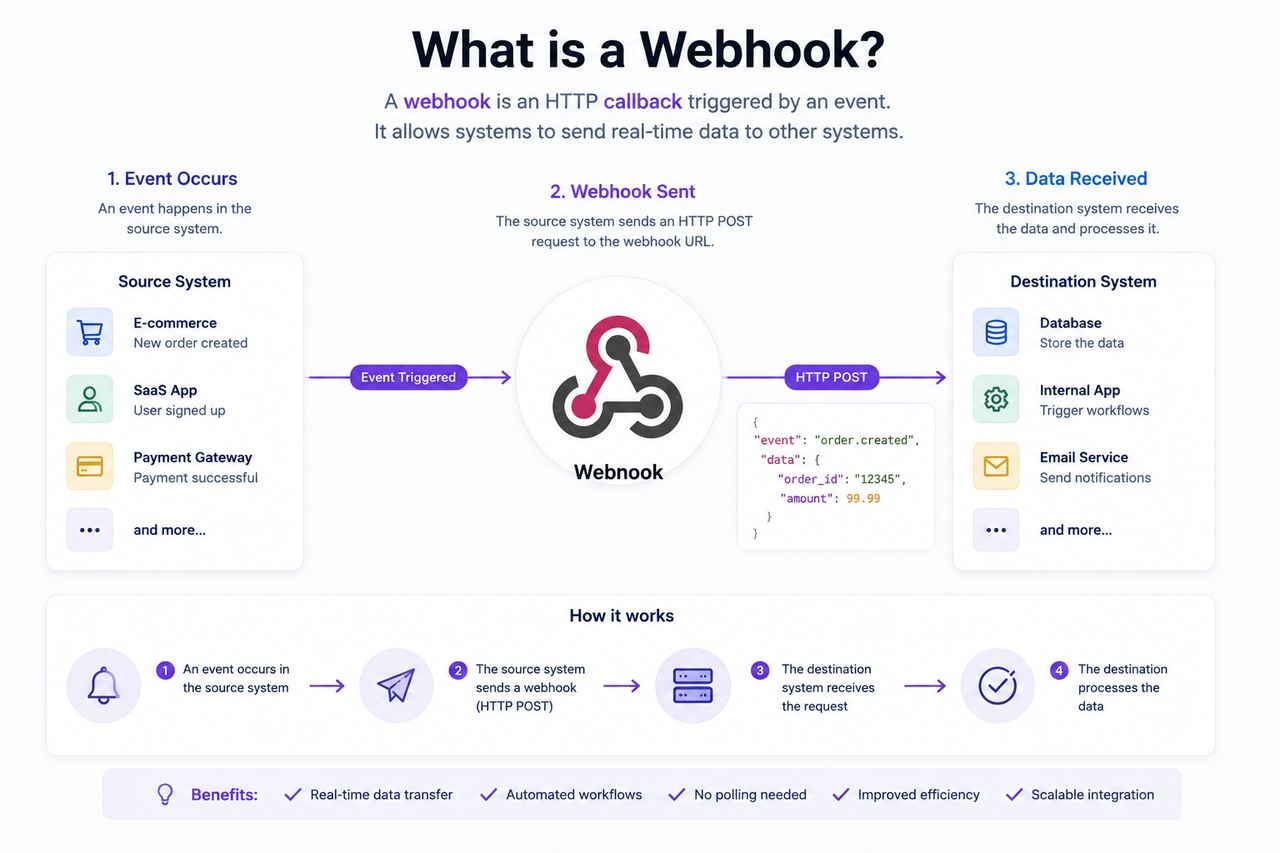
A webhook is a way to enable automatic communication between applications whenever a specified event occurs. While an API generally relies on a request-response communication model, a webhook uses an event-driven, push-based notification model. Typically, an automatic HTTP callback (a webhook) pushes data from one application to another as soon as an event occurs.
A webhook will take this 4-step process: the first step is the event. The event can be anything from a customer purchasing something to a form being filled out in the source system. Then a payload will be created for that event. A payload is simply a block of data associated with that event. Next, that payload is transmitted from the source to the designated destination or receiver URL. Lastly, the receiver system will use the payload data to make a call to an endpoint.
Common webhook examples:
- Payment webhooks instantly notify merchants after a transaction is successfully confirmed and processed.
- GitHub webhooks trigger deployments after coding app pushes or repository updates occur.
- CRM webhooks send lead alerts immediately after online form submissions.
- Order status webhooks update systems when shipping or delivery changes.
Webhook vs API: What is the main difference?
Webhook vs. API can be best explained by contrasting how the two mechanisms interact and transmit data. Despite both facilitating information exchange, APIs and webhooks differ in three main ways: communication style, control, and ease of operation.
- Communication style: API is based on the request/response interaction model, in which the application requests information or performs an action. Webhook is based on event-driven interaction, in which the system sends notifications whenever an event occurs that matches predefined criteria. Thus, there's a fundamental difference in how systems interact.
- Data flow: The main difference between API and Webhook in how systems communicate is that the former operates on a pull-based model. This means that the receiving system pulls the information at the required times, whereas a webhook operates on a push-based model, in which the source system pushes data automatically.
- Trigger: A webhook is event-driven; for instance, a completed payment or a new registration would trigger a webhook. An API is request-driven; it doesn't start until you send a request.
- Response time: Delayed updates are possible when a system polls the API at set intervals or scheduled requests. Webhooks, however, tend to provide near-real-time responses, as the notification is fired as soon as an event occurs.
- Control: The API gives the user more control and is more flexible because the user dictates the requested information and the time. With a webhook, the user has less control of timing, and events trigger communication. Their primary function is automation.
- Complexity: API Integrations may be more complex than webhooks because they involve endpoints, requests, security rules, and the logic that handles your data. Webhooks are usually simpler to use as they are designed for event notification. Endpoint configuration and monitoring are still necessary.
Webhook vs API example: Understanding with real-world scenarios
Real-life examples will help to understand webhook vs API: both mechanisms send data between systems, but they trigger and deliver the updates differently.
Example 1: Payment confirmation
- Using API: In an API-based payment system, the online store repeatedly contacts the payment gateway to check transaction status. The store sends requests asking, "Has payment been completed?" until it receives confirmation. This polling approach works, but it may increase server requests and cause delays.
- Using Webhook: The process becomes more efficient and automatic. Once the payment is completed, the payment provider instantly sends a notification to the store's webhook endpoint. The store receives confirmation immediately and can update the order without repeated checks.
Example 2: Order tracking system
- Using API: An e-commerce platform using APIs may repeatedly request shipping information from the logistics provider. The system checks at scheduled intervals to determine whether an order has shipped, reached transit, or been delivered. This method depends on regular polling.
- Using Webhook: In a webhook-based setup, the logistics provider automatically sends updates whenever shipment status changes. Notifications are triggered for dispatch, transit, or delivery events and pushed directly to the receiving system. This creates faster order tracking and a smoother customer experience.
When should you use an API vs webhook?
The API vs. Webhook decision depends on how you want information to flow between systems and how quickly you need it updated. The reality for most businesses is that they will utilize either or both

Use an API when:
- You need on-demand data: APIs excel at retrieving information precisely when it is required. When information is needed by a user or system, it can be requested at any time, rather than being pushed as soon as it becomes available due to an event. APIs facilitate well-defined and flexible access.
- Users request information: Several applications use API when users actively seek something, search, or navigate around systems. Traveling searches or weather lookups, for example, are user-driven queries; API facilitates them.
- CRUD operations are required: APIs are ideal when two or more systems need to perform CRUD (Create, Read, Update, or Delete) functions. The software is allowed to manipulate the records with these operations. This provides the system with dynamic behavior.
- More control is needed: APIs provide greater control over what information is shared and how. Systems only ask for what it needs and specify exactly what the actions are. This is useful for creating workflows that are specific to the workflow needs and for integrations with more specific functions.
Use a webhook when:
- Real-time alerts matter: Webhooks are valuable when immediate notifications are important for operations. Updates are pushed automatically as soon as events occur. This helps businesses respond faster to critical changes.
- Event automation is needed: Webhooks allow for automated responses based on specific triggers. System immediately respond to payments, registrations or state updates without any user interaction. It increases operating efficiency and consistency.
- You want fewer requests: In contrast to APIs, where you have to check repeatedly (polling), webhooks send data whenever something happens. Therefore, there are fewer queries (no need to poll unnecessarily), and less server load. Communication becomes more efficient.
- Speed and efficiency matter: Webhooks send data immediately after an event. Faster data updates lead to a better user experience and are important for processes that can't tolerate delay. This is why they are ideal for systems that rely heavily on automation.
Use both when:
- Building complex integrations: Most sophisticated systems make use of both APIs and webhooks, to deal with the different communication requirements. The API can be used for data requests, and access, while webhooks are ideal for notification of events.
- Syncing apps and automation tools: While applications and automation platforms need real-time data to work, they still require controlled access to the data. Through APIs and webhooks, applications can maintain a clear sync of all data.
- Managing transactional systems: In transactional environments like payment systems and e-commerce platforms, both are used together. APIs handle requests and log transactions, while webhooks provide near-real-time status updates.
Simplify API and Webhook connections with Enter Pro
As systems, applications, and workflows scale, managing APIs and webhooks can become complex. Enter Pro simplifies communication across business processes and systems, helping to bridge applications, devices, and workflows. Using it, organizations can automate workflows, minimize human interaction, and gain a comprehensive view of integrated systems. Businesses can implement it when dealing with APIs to access data or webhooks to be notified about certain events; regardless of the implementation, Enter Pro helps bridge the gap and offers a streamlined integration environment. The final result: faster, smarter, and more reliable digital operations.
Step-by-step guide:
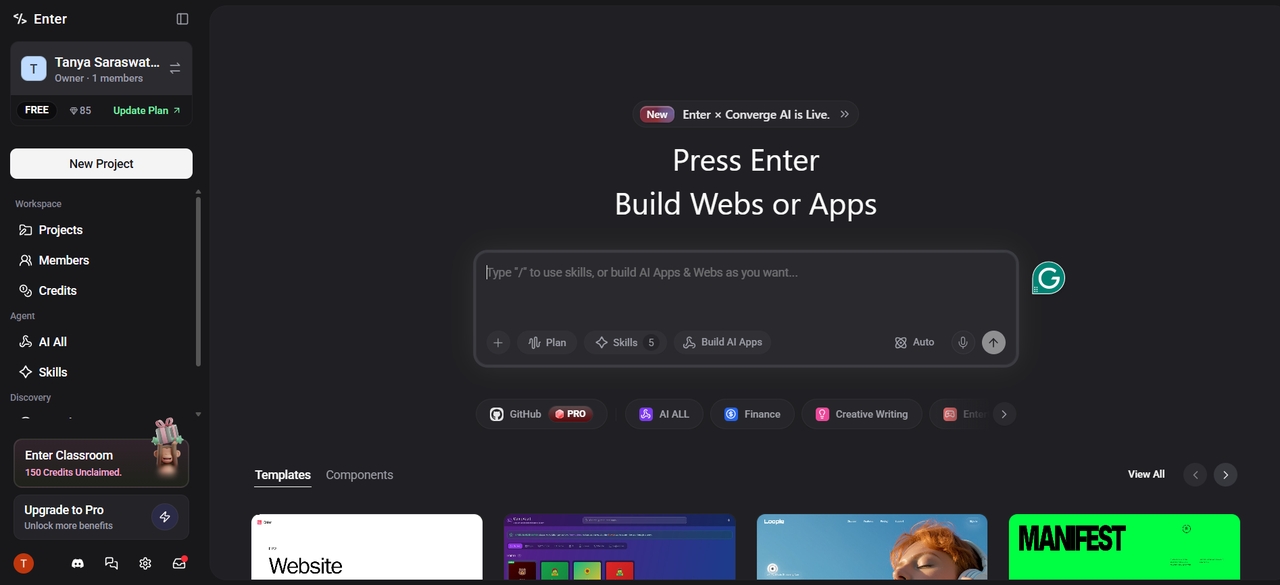
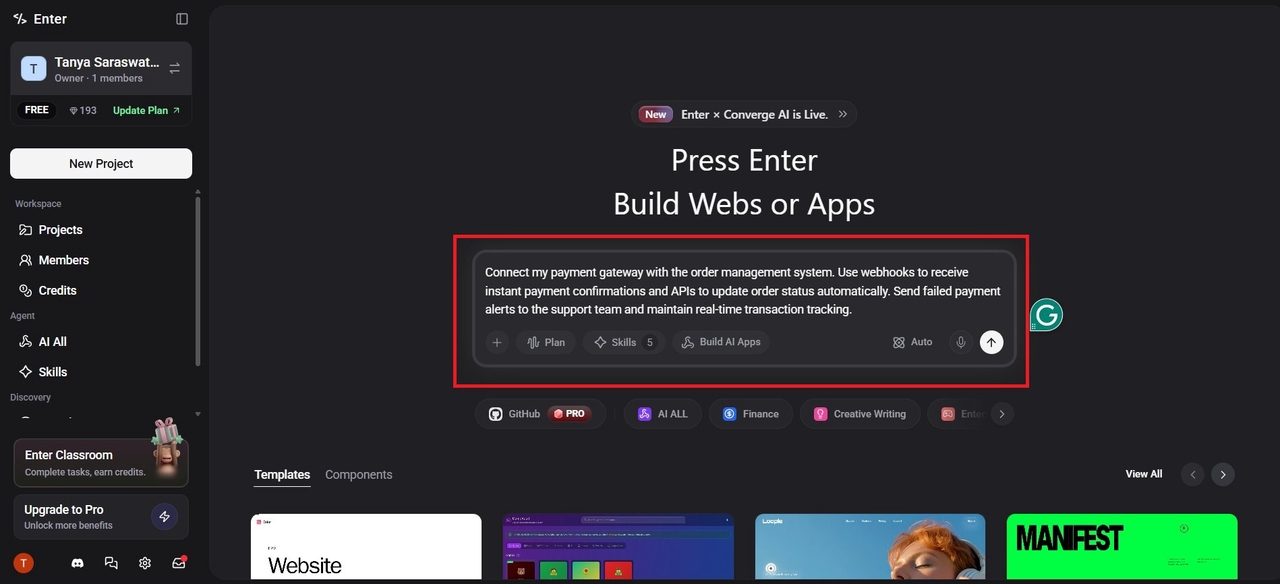
Step 1: Open Enter Pro and write your prompt
Open Enter Pro and describe the integration or workflow you want to create. Mention the applications involved, the type of data exchange needed, and the action you want automated.
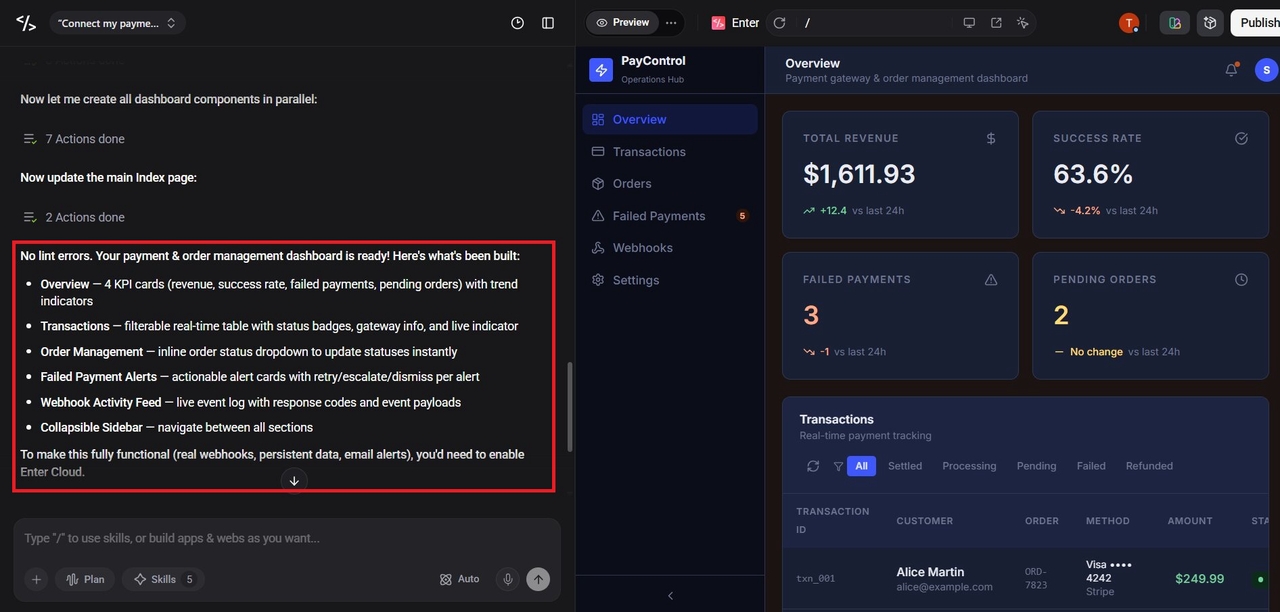
Step 2: Configure APIs and webhook triggers
Select the systems you want to connect and configure the required API endpoints or webhook events. Add authentication details and define how data should move between applications.
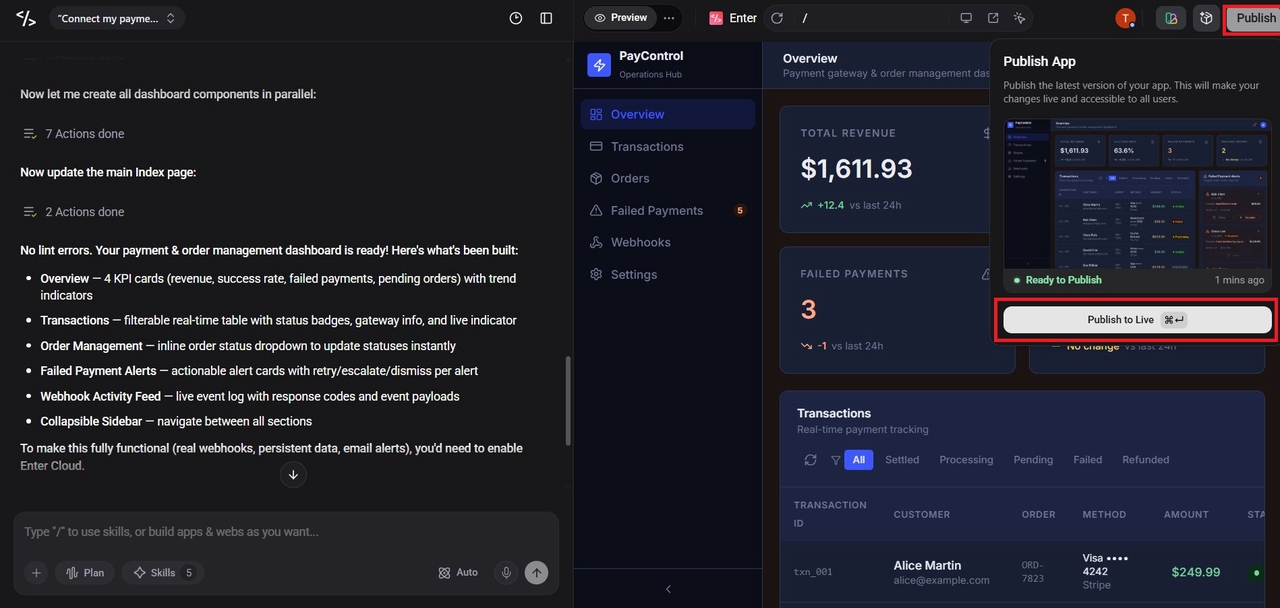
Step 3: Test and launch the workflow
Run test requests or sample webhook triggers to confirm everything works correctly. Once verified, deploy the integration and monitor performance to ensure smooth, reliable automation.
Key benefits:
- Simplifies system integrations: Enter Pro makes it easy to link applications, platforms and business systems without building excessively complicated workflows, thus enabling API and webhook integrations that are easy to maintain, scale and manage.
- Supports faster automation: Integrating API connections and triggered webhook actions into Enter Pro also allows for faster information sharing and process execution, minimizing the workload of individual employees.
- Improves workflow visibility and control: Enter Pro gives better visibility into connected processes and data flow. Teams can track integration, troubleshoot issues more quickly, and maintain increased control over automation workflows.
Conclusion
Developers must integrate software effectively by understanding the difference between a webhook and an API. These technologies provide two applications to talk to each other. When a system requires the requested data at the requested time, requires manually ordered user inputs, or when control over how the data flows must be exercised, the API should be utilized. In contrast, the webhook pushes an update in response to an event and does not require a request beforehand. Webhooks enable real-time notification services and automation capabilities.
The use of webhooks and APIs ultimately depends on the business's integration requirements, business processes, and business operations. The control and flexibility of access is likely more important for API use cases and is more ideal for such purposes. Speed and instant access is more important for webhook use cases.
Realistically, almost all modern applications/digital environments have at least one API and a webhook or two available to facilitate requests/integration of systems and for instantly communicating changes to relevant parties respectively. If a system, such as Enter Pro, incorporates both APIs and webhooks together, it ensures that the workflow is smarter, quicker and more seamlessly connected.
FAQs
Is a webhook an API?
A webhook is not exactly an API, although both support application communication. One of the main webhook vs api differences is that APIs request data while webhooks automatically send updates after events occur. Webhooks are often considered complementary to APIs rather than replacements.
Can APIs and webhooks work together?
Yes, APIs and webhooks are commonly used together in modern software applications. APIs are primarily used for retrieving data and performing actions, while webhooks enable the instant delivery of event notifications to maintain application synchronization. Using these technologies together provides enhanced automation, real-time responsiveness, and workflow efficiency.
Are webhooks more secure than APIs?
The security of the communication channel depends heavily on the configuration rather than on the choice of APIs or webhooks alone. APIs are generally secured with authentication tokens and access permissions. Webhooks are secured through the implementation of secure endpoints, signatures, and validation mechanisms.
Does a webhook always use HTTP?
Webhooks often use the HTTP or HTTPS protocols for delivering event notifications. When we talk about webhook vs. REST API, we have to remember that a webhook sends an HTTP POST request to the listening endpoint. The data should be securely transmitted over HTTPS.
Is webhook polling or push-based?
A webhook uses a push communication model rather than an application requesting data via polling. An external application sends the information to the target system whenever it's generated. This approach helps reduce unnecessary requests and enables rapid event-driven communication.